

 FSX Business Jet Aircraft
Lockheed Jetstar 2 Update
Lockheed Jetstar 2 Update. This is an update for FSX Acceleration of the Lock…
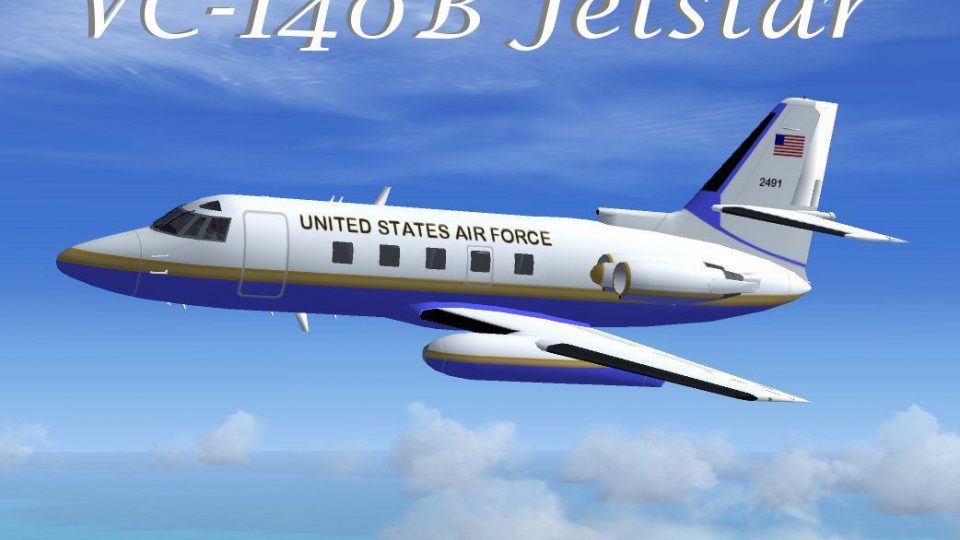
Lockheed VC-140B JetStar brings a classic USAF VIP four-engine business jet to Microsoft Flight Simulator X, capturing the type sometimes tasked with Air Force One support in the 1970s and 1980s. The freeware package pairs Mike Stone’s model with RDG Aircraft textures, a clear canopy, default gauges, and a GPS-equipped panel plus an optional original panel.
 Rate
Rate

The Lockheed VC-140B JetStar is a compact, four-engine business jet that once served as a VIP transport for the United States Air Force. Originally engineered by Lockheed to meet specialized requirements for high-ranking individuals, the design quickly attained recognition for its range and reliability. This freeware package includes Mike Stone’s JetStar model adapted for Microsoft Flight Simulator X, along with textures by Mark Rooks of RDG Aircraft and additional updates. Enthusiasts can fly an aircraft that, in real-world settings, was occasionally assigned as Air Force One and carried distinguished guests during the 1970s and 1980s.
The JetStar series was introduced by Lockheed as one of the pioneering corporate jets equipped with four turbojet engines. In total, sixteen JetStars were produced for the United States Air Force as VC-140Bs, each tailored to meet the needs of VIPs. In actual service, these aircraft transported high-profile passengers, including top government and military officials. The real jet’s robust airframe offered considerable performance over mid-range distances, making it a practical choice for rapid, secure travel.

Lockheed VC-140B JetStar in flight.
This release incorporates several key components to ensure a comprehensive experience:
Developers Tim “Piglet” and Mike Stone have laid the groundwork for this JetStar, while Mark “Fire Ball” Rooks provides textures and Microsoft Flight Simulator X adaptations. Remember to support a Mercy Flight in your local area and help keep important aviation services alive.
C:\Program Files\Microsoft Games\FSX\SimObjects\Airplanes
This add-on is freeware and not intended for sale. All rights related to the original model remain with the respective creators. Use these files at your own risk. Neither the authors nor RSDG can be held liable for any issues arising from the installation or use of this package. By proceeding with installation, you acknowledge these terms. Files were confirmed virus-free at the time of upload.
We appreciate your interest in this Lockheed VC-140B JetStar adaptation. Many thanks go to Mike Stone for the base model, Tim “Piglet” for his contributions, and Mark “Fire Ball” Rooks for the repaints and FSX refinements. Enjoy this historic aircraft, and remember to consider the importance of Mercy Flights in your area. Be sure to connect with Tim “Piglet” for more insights into the JetStar and his other projects.
— Mark Rooks (RDG Aircraft)
Free for all simmers · 11.22 MB · Scanned clean Oct 2026
Download speed: Free tier is capped at 0.5 Mbps (this file takes approximately 3 mins at the cap). PRO members download at full line speed.
SimObjects\Airplanes\, Addon Scenery\, Effects\, or Gauges\.readme.txt or README file. It tells you exactly where files go, what dependencies are needed, and any quirks specific to this add-on.The archive da_vc140bjetstar.zip has 9 files and directories contained within it.
This list displays the first 500 files in the package. If the package has more, you will need to download it to view them.
| Filename/Directory | File Date | File Size |
|---|---|---|
| Lockheed VC-140B.zip | 11.30.09 | 2.75 MB |
| Mike Stone panel.zip | 11.30.09 | 231.43 kB |
| Original readme.txt | 06.25.06 | 266 B |
| Pictures and History.zip | 11.30.09 | 8.15 MB |
| Read Me First.txt | 11.30.09 | 3.17 kB |
| Reg. Text.txt | 11.30.09 | 543 B |
| screen VC140B.jpg | 11.30.09 | 87.10 kB |
| flyawaysimulation.txt | 10.29.13 | 959 B |
| Go to Fly Away Simulation.url | 01.22.16 | 52 B |
Only PRO members can place votes.
More FSX & P3D add-ons hand-picked based on this download.
FSX Business Jet Aircraft
Lockheed Jetstar 2 Update. This is an update for FSX Acceleration of the Lock…
 FSX Business Jet Aircraft
Lockheed Jetstar, the first business jet. A four-engined aircraft, with sever…
 FSX Business Jet Aircraft
An update to Mike Stone's Jetstar II, adding Phillip Wallert's Jetstar panel,…
 FSX Business Jet Aircraft
An update for HJG's Jetstar I, adding Phillip Wallert's Jetstar panel, HJG's …
 FSX Business Jet Aircraft
This freeware package offers a fictional charter variant of the JetStar II wi…
 FSX Business Jet Aircraft
Aryus Cessna 56X FSX/P3D complete with virtual cockpit. Converted by Bigmike.…
 FSX Business Jet Aircraft
FSX/SP2 Cessna Citation 500. The highly popular Cessna 500 Citation and 500 …
 FSX Business Jet Aircraft
A reasonably featured Honda Jet add-on (officially known as Honda HA-420 Hon…
Be the first to leave a comment on this download.
Be the first to share your thoughts on this download.