

 FSX Scenery
NL2000 V4.02 Ameland Airport
Experience a meticulously crafted rendition of EHAL Ameland Airport that inte…
EHAL Ameland comes to life with NL2000 v4.0’s close-up scenery, combining photoreal ground textures, accurate runway and parking markings, custom objects, and coastal terrain that captures dunes, shoreline, and island settlements. Built for Microsoft Flight Simulator X, it integrates cleanly with the wider Netherlands coverage and requires the NL2000 v4 installer.
 Rate
Rate
 Netherlands
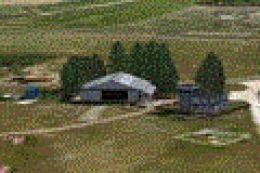
This freeware release introduces a high-fidelity rendition of EHAL Ameland for FSX, meticulously prepared as part of the NL2000 v4 collection. Specifically created by The Netherlands 2000 Scenery Design Team, it offers close-up coverage of the northern island’s airfield while integrating seamlessly with other NL2000 modules. Enthusiasts seeking a faithful depiction of this region’s coastal environment will find comprehensive details that capture the island’s unique landscape, including photoreal components and carefully placed objects.
This package highlights the EHAL airfield on Ameland, an island in the Wadden Sea off the coast of the Netherlands. The developer team, known for bringing immense detail to Dutch flightsim coverage, has optimized this airstrip to reflect real-world structures, runway layouts, and surrounding terrain. Furthermore, this localized scenery preserves high-resolution ground textures, ensuring visual consistency with the broader NL2000 v4 environment.
Ameland’s coastal characteristics stand out thanks to custom landclass data and nuanced scenery elements. Users can explore the small settlement areas, dunes, and varied shoreline that define the island’s geography. In-flight, the transition from mainland textures to island vegetation feels natural, incorporating precise satellite imagery curated by the design team.
In keeping with the NL2000 tradition, this add-on uses a modular installation framework. You will need the NL2000 v4 installer to integrate the Ameland package without complications. This approach also helps you tailor your simulator’s coverage areas—whether you choose to install additional sections of the Netherlands or focus primarily on EHAL. The Netherlands 2000 Scenery Design Team has ensured compatibility with other key airports, letting you maintain a uniform appearance across the entire country.
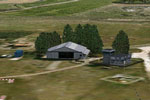
NL2000 V4.0 Ameland Package Scenery.
The use of photoreal textures, precise modeling of airport structures, and inland water visuals contribute to a realistic depiction of the Ameland area. Pilots can appreciate details such as parking layouts, aerodrome markings, and the surrounding farmland patterns typical of the Netherlands. Additionally, the transitions between paved surfaces and grass fields are rendered smoothly for enhanced immersion.
Despite the dense details, the builders have balanced visual fidelity with optimized performance. This means that even on modest setups, you can enjoy a fluid framerate and stable operation within FSX. The developers, The Netherlands 2000 Scenery Design Team, verified that this release aligns with other NL2000 packages, helping to prevent conflicts or duplication of scenery assets.
This free supplement works best when combined with the remaining NL2000 v4 offerings. If you are looking for an immersive take on Dutch island aviation, the NL2000 V4.0 Ameland package stands out as a precise, visually appealing choice courtesy of The Netherlands 2000 Scenery Design Team.
Free for all simmers · 21.46 MB · Scanned clean Oct 2026
Download speed: Free tier is capped at 0.5 Mbps (this file takes approximately 6 mins at the cap). PRO members download at full line speed.
FSX\Addon Scenery\ containing scenery and texture sub-folders.readme.txt or README file. It tells you exactly where files go, what dependencies are needed, and any quirks specific to this add-on.Use these coordinates to fly directly to this location once the mod is installed.
53.44890000,5.67720000
Launch FSX or Prepar3D and use Flights → Load to open the downloaded .pln file. Your aircraft will be positioned at this location.
The archive nl2k_v4_ehal.zip has 8 files and directories contained within it.
This list displays the first 500 files in the package. If the package has more, you will need to download it to view them.
| Filename/Directory | File Date | File Size |
|---|---|---|
| nl2k_v4_ehal.gif | 05.24.10 | 12.78 kB |
| FILE_ID.DIZ | 05.24.10 | 342 B |
| nl2k_v4_ehal.nl2 | 04.16.10 | 21.44 MB |
| nl2k_v4_ehal.txt | 05.22.10 | 335 B |
| copyright.txt | 05.24.10 | 4.43 kB |
| auteursrecht.txt | 05.24.10 | 5.06 kB |
| flyawaysimulation.txt | 10.29.13 | 959 B |
| Go to Fly Away Simulation.url | 01.22.16 | 52 B |
Only PRO members can place votes.
More FSX & P3D add-ons hand-picked based on this download.
FSX Scenery
Experience a meticulously crafted rendition of EHAL Ameland Airport that inte…
 FSX Scenery
Scenery NL2000 V4.0. This is the NL2000 v4.0 Traffic package for the NL2000 s…
 FSX Scenery
This comprehensive libraries collection integrates foundational objects, enha…
 FSX Scenery
This freeware scenery expansion focuses on enhancing FSX with detailed covera…
 FSX Scenery
Scenery NL2000 V4.0. This is the NL2000 v4.0 Education package for the NL2000…
 FSX Scenery
This library add-on brings vital models, effect files, and AI traffic compone…
 FSX Scenery
This freeware package supplies essential libraries and objects across many Du…
 FSX Scenery
Enhance your simulator’s portrayal of one of the Netherlands’ busiest regiona…
Be the first to leave a comment on this download.
Be the first to share your thoughts on this download.