

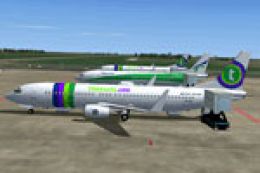
 FSX Scenery
NL2000 V4.0 Traffic Package
Scenery NL2000 V4.0. This is the NL2000 v4.0 Traffic package for the NL2000 s…
NL2000 v4.0 Libraries Package supplies the shared object libraries, tailored effect files, and included AI aircraft that many Netherlands 2000 scenery modules rely on, keeping airports and surrounding areas visually consistent and complete. Designed for Microsoft Flight Simulator X, it requires the NL2000 v4 installer and underpins realistic Dutch architecture, lighting, and traffic.
 Rate
Rate
 Netherlands
This comprehensive libraries collection integrates foundational objects, enhanced effect files, and essential AI aircraft for the NL2000 V4 environment, ensuring a unified experience when flying over detailed Netherlandscapes in Microsoft Flight Simulator X. It consolidates many of the critical resources required to fully utilize the Netherlands 2000 scenery modules, and it allows virtual pilots to immerse themselves in the scenic locales of the Dutch region without missing key visual components. Developed by The Netherlands 2000 Scenery Design Team, this free package includes everything from expanded 3D content to specialized files that bring a sense of authenticity to airports and surrounding areas.
Within this package, you will find libraries that form the backbone of multiple airports throughout the Netherlands. These libraries reference models, terminal structures, environmental details, and other architectural assets. The goal is to provide a uniform framework that each NL2000 airport references for optimal performance. This arrangement eliminates duplication and keeps all necessary resources streamlined. In addition, it helps maintain consistent design standards across each airport that NL2000 supports.
The developers ensure that effect files have been carefully tailored to harmonize with various airport lighting and weather transitions. Users also receive a set of AI airplanes to populate the skies, increasing traffic realism as they taxi, take off, and land in busy hubs around the Netherlands. These additions give simmers a methodical but engaging environment where public and general aviation flights intersect, enhancing immersion throughout the region.
To get started, remember that you must utilize the NL2000 v4 installer. This specialized installer orchestrates the process, making it hassle-free to integrate the libraries into your current scenery setup. By following the installer prompts, you guarantee that all library content is placed correctly. Once installed, these expanded objects and AI traffic elements seamlessly appear across the Netherlands 2000 v4 coverage area.
The Netherlands 2000 v4 Scenery, known for its modular design, offers an intricate re-creation of the entire Dutch nation. With this libraries package in place, virtual pilots can enjoy enhanced realism in urban centers as well as smaller airfields, complete with consistent architecture and runway installations. The library's carefully modeled content ensures that landmarks and general aviation facilities remain faithful to their real-world counterparts, reflecting the unique geography and cultural attributes of the Netherlands.
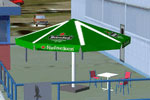
NL2000 V4.0 Libraries Package Scenery.
The Netherlands 2000 Scenery Design Team generously provides this scenery extension free of charge, catering to enthusiasts and seasoned flyers alike. It stays compatible with the entire family of NL2000 v4 products, making it an indispensable component for anyone seeking to ensure full coverage and maximum detail across the Netherlands. All elements have been tested to integrate smoothly with existing modules, plus they continue to receive community feedback for ongoing refinements.
Free for all simmers · 130.32 MB · Scanned clean Oct 2026
Download speed: Free tier is capped at 0.5 Mbps (this file takes approximately 36 mins at the cap). PRO members download at full line speed.
FSX\Addon Scenery\ containing scenery and texture sub-folders.readme.txt or README file. It tells you exactly where files go, what dependencies are needed, and any quirks specific to this add-on.Use these coordinates to fly directly to this location once the mod is installed.
52.36760000,4.90410000
Launch FSX or Prepar3D and use Flights → Load to open the downloaded .pln file. Your aircraft will be positioned at this location.
The archive nl2k_v4_libraries.zip has 8 files and directories contained within it.
This list displays the first 500 files in the package. If the package has more, you will need to download it to view them.
| Filename/Directory | File Date | File Size |
|---|---|---|
| nl2k_v4_libraries.gif | 05.24.10 | 9.43 kB |
| FILE_ID.DIZ | 05.24.10 | 433 B |
| nl2k_v4_libraries.nl2 | 04.28.10 | 131.22 MB |
| nl2k_v4_libraries.txt | 05.22.10 | 424 B |
| copyright.txt | 05.24.10 | 4.43 kB |
| auteursrecht.txt | 05.24.10 | 5.06 kB |
| flyawaysimulation.txt | 10.29.13 | 959 B |
| Go to Fly Away Simulation.url | 01.22.16 | 52 B |
Only PRO members can place votes.
More FSX & P3D add-ons hand-picked based on this download.
FSX Scenery
Scenery NL2000 V4.0. This is the NL2000 v4.0 Traffic package for the NL2000 s…
 FSX Scenery
This freeware release introduces a high-fidelity rendition of EHAL Ameland fo…
 FSX Scenery
This freeware scenery expansion focuses on enhancing FSX with detailed covera…
 FSX Scenery
Scenery NL2000 V4.0. This is the NL2000 v4.0 Education package for the NL2000…
 FSX Scenery
This library add-on brings vital models, effect files, and AI traffic compone…
 FSX Scenery
This freeware package supplies essential libraries and objects across many Du…
 FSX Scenery
Enhance your simulator’s portrayal of one of the Netherlands’ busiest regiona…
 FSX Scenery
This comprehensive scenery package brings an authentic representation of Eind…
Be the first to leave a comment on this download.
Be the first to share your thoughts on this download.