


 United States of America
  FSX Scenery
Greater Rochester International Airport
Scenery Greater Rochester International Airport (KROC), New York (NY). An upd…
Greater Kankakee Airport (KIKK/IKK) brings the busy general aviation field south of Chicago to life with custom airport detailing, improved ground textures, and default-aircraft AI traffic to match real-world operations. Designed for FSX, it requires common scenery object libraries such as Classic Libraries, EZ-Scenery, RWY12, and Loney’s EZ sets.
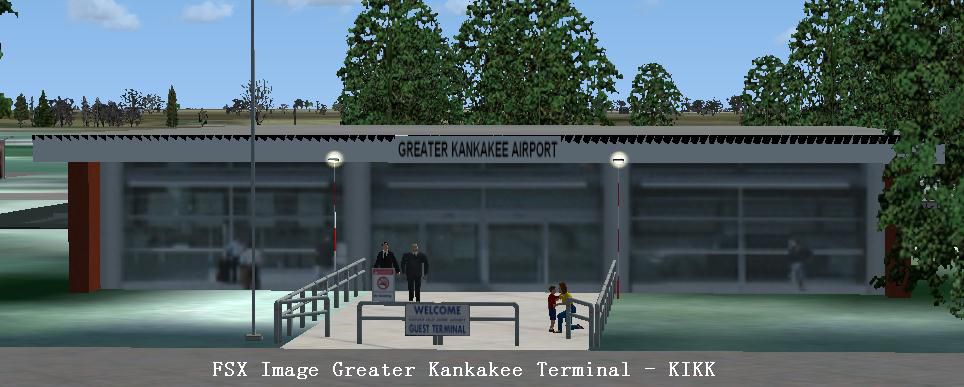
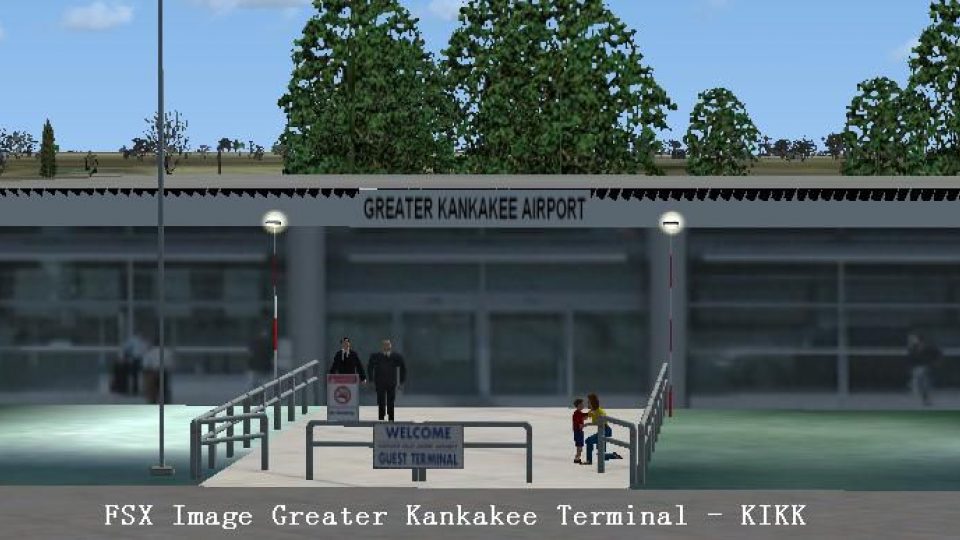
Greater Kankakee Airport (IATA: IKK, ICAO: KIKK, FAA LID: IKK) is a public airport located three miles (5 km) south of the central business district of Kankakee, in Kankakee County, Illinois (IL), United States. The airport was opened in 1962 and continues to operate as a general aviation facility serving the Kankakee area and South Chicago. It is 60 miles (97 km) south of Chicago and 75 miles (121 km) north of Champaign, Illinois. It is the largest airport between the Chicago Midway Airport and the Champaign Airport. Greater Kankakee is a general aviation airport, consisting of mostly private aircraft with a mix of corporate and business aircraft usage. Created by John B. Loney Jr.
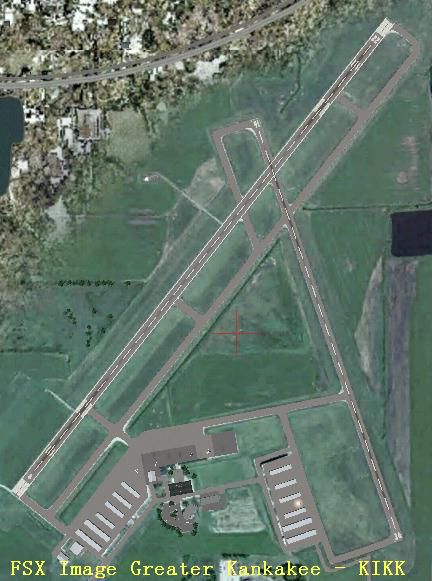
Overview of Greater Kankakee Airport Scenery.
WHAT YOU NEED:
Library Files -
You may be able to save some search and download time by downloading and installing the following files. They are compilations of most of the scenery library objects by the various designers in the FS community. However, if you are still missing objects or textures, then refer to the individual library file list.
classic_libraries.zip by Wolfgang Gersch/
ez_1.zip by David Grindele/
rwy12_1.zip by David Grindele/
loneys_ez_scenery.zip by the author/
Individual Library File List –
parklrgs.zip by Sidney Schwartz
park_ss.zip or parking_ss.zip by Sidney Schwartz
default_terminals_ss.zip or deftrmss.zip by Sidney Schwartz
lens_ez_scenery.zip and lens_ez_scenery_textures.zip by Len Hickman
lts_ss_1.zip by Sidney Schwartz
warehouse_airplanes_*.zip compiled by Sidney Schwartz
Please keep in mind that some of the above library files may have been updated by the authors. You should check for any updates available.
INSTALLATION:
Since you are reading this file you obviously have already unzipped the zip file greater_kankakee_kikk_fsx.zip to a temporary folder. Having done so please find the following files.
FILE_ID.DIZ
Readme.doc
readme.txt
screenshots.zip
greater_kankakee_scenery_fsx.zip
kikk_3_fs.jpg
kikk_5_fs.jpg
Check your file structure in your Windows Explorer. If your FS setup is like the following, all you need to do is unzip the above mentioned zip files to the drive where your FS is located.
:\Programs Files\Microsoft Games\Flight Simulator X.
Using the folder feature in your zip program, the scenery files will be placed in the FS\Addon Scenery folder.
Start FS and navigate to 'Scenery Library' via the 'Settings' menu. Select 'Add Area' and click on Greater Kankakee Airport KIKK. Set your priority then Click OK. You can go fly now.
If your file structure is not like that mentioned above, then unzip the zip files to a temporary folder and manually move each scenery folder to wherever you keep your add-on scenery, and then activate the scenery in FSX as described above.
The scenery has AI traffic flying. All ai aircraft are default aircraft, so there is nothing to download for the flight plans.
Enjoy your flight.
ABOUT THE AIRPORT:
Greater Kankakee Airport (IATA: IKK, ICAO: KIKK, FAA LID: IKK) is a public airport located three miles (5 km) south of the central business district of Kankakee, in Kankakee County, Illinois, United States.
The airport was opened in 1962 and continues to operate as a general aviation facility serving the Kankakee area and South Chicago. It is 60 miles (97 km) south of Chicago and 75 miles (121 km) north of Champaign, Illinois. It is the largest Airport between the Chicago Midway Airport and the Champaign Airport. Greater Kankakee is a general aviation airport, consisting of mostly private aircraft with a mix of corporate and business aircraft usage.
The airport is owned and operated by the Kankakee Valley Airport Authority. The Authority has an appointed board of directors totaling six members. Members are appointed one each from the local communities of Kankakee, Bradley, and Bourbonnais and three members from the Kankakee County Board.
ABOUT THE SCENERY:
I became familiar with Greater Kankakee Airport way back in FS version 4. Back then it was nothing but a runway and a weird colored ground texture. The thought occurred to me to design this airport for FS9, but never got around to it. Well, better late than never, so here it is for FSX. I hope you enjoy it.
Acknowledgements:
I wish to thank all of the designers for both aircraft and scenery objects used in this scenery. I put the scenery together, but it's their hard work that made it possible. Please read the Warehouse text and pdf files to see the contributing authors. Thanks a lot guys.
Also, I’d like to thank Bob Lacy, who is helping me to learn how to make photorealistic ground textures. I appreciate him allowing me to ware his patience thin.
Last, but certainly not least I'd like to thank the FS community who download and use my sceneries. Without them...........what's the point? Thank you all very, very much.
John B. Loney, Jr.
As usual, I welcome any comments. I will try to answer as many as I can.
Have fun and enjoy.
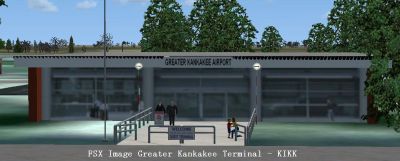
Screenshot of Greater Kankakee Airport Terminal.
Free for all simmers · 4.09 MB · Scanned clean Oct 2026
Download speed: Free tier is capped at 0.5 Mbps (this file takes approximately 1 min at the cap). PRO members download at full line speed.
FSX\Addon Scenery\ containing scenery and texture sub-folders.readme.txt or README file. It tells you exactly where files go, what dependencies are needed, and any quirks specific to this add-on.Use these coordinates to fly directly to this location once the mod is installed.
41.07140000,-87.84630000
Launch FSX or Prepar3D and use Flights → Load to open the downloaded .pln file. Your aircraft will be positioned at this location.
The archive greater_kankakee_kikk_fsx.zip has 9 files and directories contained within it.
This list displays the first 500 files in the package. If the package has more, you will need to download it to view them.
| Filename/Directory | File Date | File Size |
|---|---|---|
| screenshots.zip | 03.11.12 | 498.62 kB |
| FILE_ID.DIZ | 03.11.12 | 707 B |
| greater_kankakee_scenery_fsx.zip | 03.11.12 | 2.93 MB |
| kikk_3_fs.jpg | 03.11.12 | 65.57 kB |
| kikk_5_fs.jpg | 03.11.12 | 71.04 kB |
| Readme.doc | 03.11.12 | 629.00 kB |
| readme.txt | 03.11.12 | 6.97 kB |
| flyawaysimulation.txt | 10.29.13 | 959 B |
| Go to Fly Away Simulation.url | 01.22.16 | 52 B |
Only PRO members can place votes.
More FSX & P3D add-ons hand-picked based on this download.
FSX Scenery
Scenery Greater Rochester International Airport (KROC), New York (NY). An upd…
 FSX Scenery
Greater Rochester International Airport (KROC), New York (NY). A total makeov…
 FSX Scenery
Greater Binghamton Regional Airport (KBGM), New York (NY). Here is an improve…
 FSX Scenery
Princess Juliana International Airport (TNCM) in Saint Marteen, Netherlands A…
 FSX Scenery
Los Angeles Airport Scenery v3, California (CA). This photoreal scenery is a …
 FSX Scenery
Barbados International Airport (TBPB). Grantley Adams International Airport f…
 FSX Scenery
Paris Charles de Gaulle Airport (CDG, LFPG), France. The entire airport has b…
 FSX Scenery
John F. Kennedy Airport (KJFK), New York, NYU. This is a photoreal scenery re…
Be the first to leave a comment on this download.
Be the first to share your thoughts on this download.