

 FSX Historic & Vintage Aircraft
Stinson 108 Update
Stinson 108 Update. for use with STIN108X.ZIP. This update gets rid of the sm…
The Stinson 108 Voyager brings a classic postwar four-seat taildragger to FSX with smooth “usual” control-surface animations, transparent glass, and working navigation and landing lights. It includes two factory-style liveries (red-cream and blue-white) plus a photo-based 2D panel and virtual cockpit, with a practical modern radio stack.
 Rate
Rate
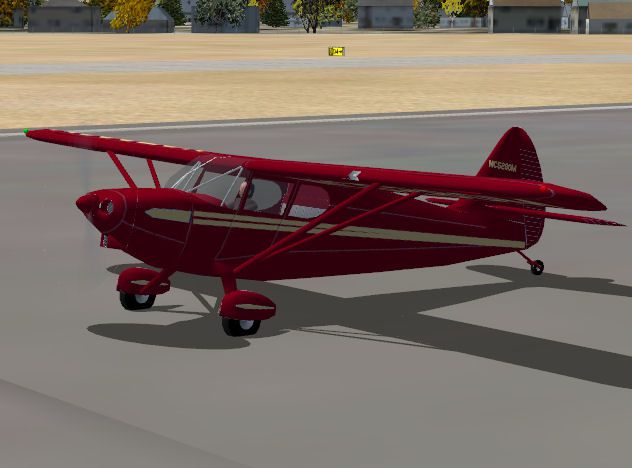


Stinson 108 Voyager. An FSDSv3.5 project compiled with Xtomdl into FSX. It has the usual animations and comes with a red-cream and a blue-white factory style livery. By Paul Clawson. (See also STN108X2.ZIP).

Screenshot of Stinson 108 Voyager in flight.
This is a FSDSv3.5 project which converts my FS2004 Voyager into a format where it is compiled by Xtomdl into the FSX format. The is what FSDSv3.5 was conceived to do and in this case worked flawlessly. This project is not backwards compatible with FS2004.
The Stinson 108 was a 4 place single engine plane produced from right after WW2 into the 1950's. It was quite successful because it had good short field performance and could carry a good load for its size. It was the darling of many flying farmers during those years. I never had the chance to ride in one, but saw many during my teenage flying days in Bozeman Montana. A lot of ranchers would fly their 108's into Gallatin Field for maintenance.
I would like to give special thanks to Mike Mire over at the Sim-Outhouse for providing some detail info and photo's that made this a viable project. This is a FSDSv3.5 project. It has the usual animations, DXT3 textures, transparent glass etc. It has nav and landing lights controlled by the "L" key or the appropriate panel switches. The 2D panel and VC are based on actual photo's. I have given it two factory style liveries; a Blue-White and a Red-cream The VC interior is copied from a Stinson brochure. Note on Radio's: I added the typical "todays" radio stack because I cannot find an appropriate vintage radio that is freeware. We flew the radio range because there wasn't anyting else back in those days. I have seen a couple of receivers that would be realistic but they are commercial products.
INSTALLATION: Unzip Stin108X.zip into a temporary folder. Copy the Stinson Voyager folder into the Airplane folder of FSX. Copy the contents of the gauges folder into the Gauges folder of FSX. Copy them "as is", don't open them. Most of the gauges are default, but I included some just in case one is missing from your folder. Close everything and fire up FSX. This plane will show in the Aircraft Selection list as Stinson Voyager Blue and Stinson Voyager Red.
Enjoy! P. Clawson
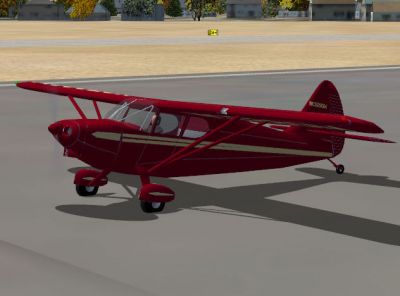
Screenshot of Stinson 108 Voyager on the ground.
Free for all simmers · 961.31 KB · Scanned clean Oct 2026
Download speed: Free tier is capped at 0.5 Mbps. PRO members download at full line speed.
This add-on may require the following files to function properly. If this is a repaint, the dependency below is likely the base aircraft package.
SimObjects\Airplanes\, Addon Scenery\, Effects\, or Gauges\.readme.txt or README file. It tells you exactly where files go, what dependencies are needed, and any quirks specific to this add-on.The archive stin108x.zip has 38 files and directories contained within it.
This list displays the first 500 files in the package. If the package has more, you will need to download it to view them.
| Filename/Directory | File Date | File Size |
|---|---|---|
| File_id.diz | 09.19.07 | 199 B |
| gauges | 09.19.07 | 0 B |
| C130m_BRAKE.gau | 06.21.03 | 109.50 kB |
| Lockheed_Vega.cab | 06.12.03 | 415.28 kB |
| wiskey_compass.gau | 03.30.98 | 44.00 kB |
| Readme.txt | 09.19.07 | 2.49 kB |
| Red 108.jpg | 09.19.07 | 49.58 kB |
| Stinson Voyager | 09.19.07 | 0 B |
| Aircraft.cfg | 09.16.07 | 11.36 kB |
| model | 09.19.07 | 0 B |
| Model.cfg | 09.19.07 | 55 B |
| Stin108.MDL | 09.19.07 | 172.17 kB |
| Stin108_interior.MDL | 09.19.07 | 97.21 kB |
| panel | 09.19.07 | 0 B |
| $108VCpan.bmp | 09.26.06 | 3.00 MB |
| 108pan.bmp | 09.24.06 | 2.25 MB |
| Panel.cfg | 09.19.07 | 2.95 kB |
| Thumbs.db | 04.16.07 | 6.50 kB |
| sound | 09.19.07 | 0 B |
| sound.cfg | 05.21.07 | 28 B |
| Stin108.air | 09.15.07 | 7.08 kB |
| texture | 09.19.07 | 0 B |
| 108fuse.bmp | 10.01.06 | 1.00 MB |
| 108trans.bmp | 09.19.06 | 64.07 kB |
| 108wing.bmp | 09.29.06 | 1.00 MB |
| prop_108.bmp | 07.18.07 | 64.07 kB |
| thumbnail.jpg | 09.16.07 | 14.25 kB |
| Thumbs.db | 09.16.07 | 4.50 kB |
| texture.red | 09.19.07 | 0 B |
| 108fuse.bmp | 09.19.07 | 1.00 MB |
| 108trans.bmp | 09.19.06 | 64.07 kB |
| 108wing.bmp | 09.16.07 | 1.00 MB |
| prop_108.bmp | 07.18.07 | 64.07 kB |
| thumbnail.jpg | 09.16.07 | 14.69 kB |
| Thumbs.db | 09.19.07 | 4.50 kB |
| Stin108X | 09.19.07 | 0 B |
| flyawaysimulation.txt | 10.29.13 | 959 B |
| Go to Fly Away Simulation.url | 01.22.16 | 52 B |
Only PRO members can place votes.
More FSX & P3D add-ons hand-picked based on this download.
FSX Historic & Vintage Aircraft
Stinson 108 Update. for use with STIN108X.ZIP. This update gets rid of the sm…
 FSX Historic & Vintage Aircraft
This is a repaint for the Classics Hangar Messerschmitt BF 108 "Taifun". VVKJ…
 FSX Historic & Vintage Aircraft
"Hungary 1942" Messerschmitt Bf 108. This is a repaint of Classics Hangar (Ma…
 FSX Historic & Vintage Aircraft
Now version 3.14 (V3.1406). This package includes the latest Douglas C-47 Sky…
 FSX Historic & Vintage Aircraft
This is A.F. Scrub's Submarine MK-22 Spitfire Updated For Flight Simulator X.…
 FSX Historic & Vintage Aircraft
Note this aircraft originally was made by Gary Herbert due to the fact that h…
 FSX Historic & Vintage Aircraft
An FSX-native Boeing-Stearman Model 75 freeware aircraft add-on with a range …
 FSX Historic & Vintage Aircraft
Delve into the realm of historic aviation with the Mitsubishi A6M Zero Comple…
Be the first to leave a comment on this download.
Be the first to share your thoughts on this download.