

 FSX AFCAD Files
ADE For AYPY
ADE For AYPY, Papua New Guinea. This FSX ADE file of Jacksons International A…
Jacksons International Airport (AYPY) in Port Moresby gets a sharper default layout with corrected parking and more realistic stand allocation for AI operations. Designed for Microsoft Flight Simulator X, this updated AFCAD includes two BGL options, with or without assigned parking, to suit custom traffic plans or built-in AI behavior.
 Rate
Rate
 Papua New Guinea
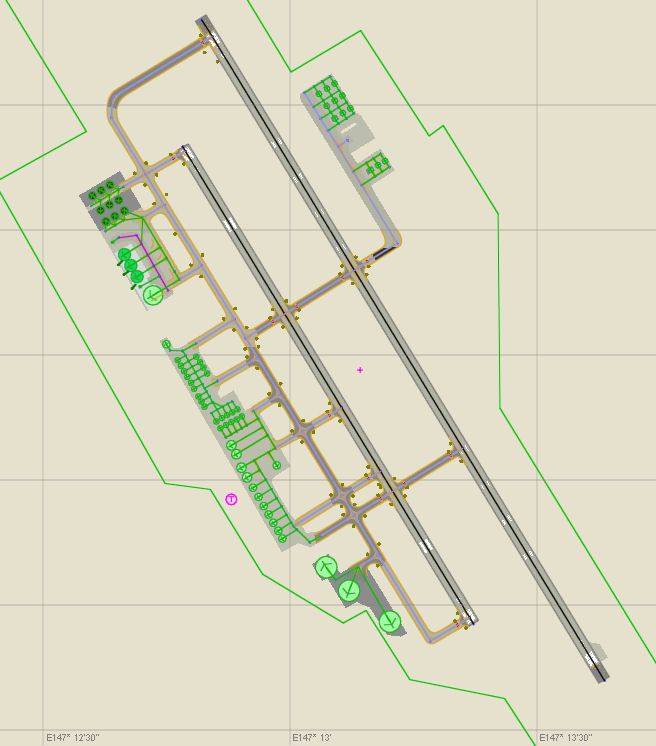
AFX File For AYPY, Jacksons International Airport, Port Moresby, Papua-New Guines. Updates the default scenery with corrected parking. By Ray Mansfield.
Overview of Jacksons International Airport.
This is an updated AFCAD for AYPY (Jacksons International Port Moresby, Papua-New Guinea). Most parking is corrected. It is for the default FSX scenery and is somewhat based on the real thing. There's not much AI traffic for this location however it is a major hub for my VA so I thought it should have it's own AFCAD. Currently it is only served by 4 airlines:
I have included 2 versions of this AFCAD, one with assigned parking (fsx_aypy_default_PA.bgl) and one without (fsx_aypy_default_NPA.bgl). If you have AI setup for this airport you should use fsx_aypy_default_PA.bgl and if you're using the built in FSX AI use the fsx_aypy_default_NPA.bgl one.
To install simply place the file of your choice into your "C:\Program Files\Microsoft Games\Microsoft Flight Simulator X\Addon Scenery\scenery" folder.
To uninstall simply delete it.
Ray Mansfield
Free for all simmers · 91 KB · Scanned clean Oct 2026
Download speed: Free tier is capped at 0.5 Mbps. PRO members download at full line speed.
SimObjects\Airplanes\, Addon Scenery\, Effects\, or Gauges\.readme.txt or README file. It tells you exactly where files go, what dependencies are needed, and any quirks specific to this add-on.Use these coordinates to fly directly to this location once the mod is installed.
-9.44338000,147.22000000
Launch FSX or Prepar3D and use Flights → Load to open the downloaded .pln file. Your aircraft will be positioned at this location.
The archive fsxaypy1.zip has 7 files and directories contained within it.
This list displays the first 500 files in the package. If the package has more, you will need to download it to view them.
| Filename/Directory | File Date | File Size |
|---|---|---|
| fsx_aypy_default_NPA.bgl | 12.10.07 | 29.90 kB |
| fsx_aypy_default_PA.bgl | 12.10.07 | 29.97 kB |
| FullSize.jpg | 12.11.07 | 76.26 kB |
| ReadMe.txt | 12.11.07 | 1.02 kB |
| FILE_ID.DIZ | 12.17.07 | 162 B |
| flyawaysimulation.txt | 10.29.13 | 959 B |
| Go to Fly Away Simulation.url | 01.22.16 | 52 B |
Only PRO members can place votes.
More FSX & P3D add-ons hand-picked based on this download.
FSX AFCAD Files
ADE For AYPY, Papua New Guinea. This FSX ADE file of Jacksons International A…
 FSX AFCAD Files
AFX File For LFBO, Toulouse/Blagnac Airport, France. Includes new parking. By…
FSX AFCAD Files
Very realistic AFCAD file of Unalaska/Dutch Harbor Airport (PADU), Alaska (AK…
 FSX AFCAD Files
AFX File For KEDW, Edwards AFB, California (CA). Adds parking to the default …
FSX AFCAD Files
AFX File For LATI, Rinas, Tirana, Albania. An update for the default airport …
FSX AFCAD Files
AFX File For SBCT, Afonso Pena Airport, Curitiba, Parana, Brazil. By Efraim d…
FSX AFCAD Files
AFX File For FIMP, Mauritius International Airport. Upgrade for the default a…
FSX AFCAD Files
AFX File for FNLU, Luanda, Angola. An update to the default airport with corr…
Be the first to leave a comment on this download.
Be the first to share your thoughts on this download.