

 FSX AFCAD Files
AFX File For AYPY
AFX File For AYPY, Jacksons International Airport, Port Moresby, Papua-New Gu…
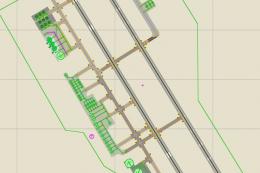
Jacksons International Airport (AYPY) for Port Moresby gets a refreshed airport layout that corrects runway 14R/32L to asphalt and enhances the default scenery with three extra jetways, added buildings, and expanded parking at the defense force terminal. Fire station details and placed vehicles improve the general aviation and military areas in FSX.
 Rate
Rate
 Papua New Guinea
ADE For AYPY, Papua New Guinea. This FSX ADE file of Jacksons International Airport (AYPY), Port Moresby - Papua New Guinea, is a remake of the default airport. Runway 14R/32L in real life is an asphalt runway, not dirt as in the default. Other improvements include additional three jetways set at normal and dense levels. Also added an extra building and parking at the defense force terminal, added fire house and vehicles at various areas of the general aviation and defense terminals. By Graham Michael.
This FSX ADE file of Jacksons International Airport (AYPY), Port Moresby - Papua New Guinea, is a remake of the default airport. Rwy 14R/32L in real life is an asphalt Rwy, not dirt as in the default. Other improvements include additional three jetways set at normal and dense levels. Added an extra building and parking at the defense force terminal, added fire house and vehicles at various areas of the general aviation and defense terminals. This is work in progress, including other PNG airports, so I welcome comments/critics.
Installation:
Free for all simmers · 10.49 KB · Scanned clean Oct 2026
Download speed: Free tier is capped at 0.5 Mbps. PRO members download at full line speed.
SimObjects\Airplanes\, Addon Scenery\, Effects\, or Gauges\.readme.txt or README file. It tells you exactly where files go, what dependencies are needed, and any quirks specific to this add-on.Use these coordinates to fly directly to this location once the mod is installed.
-9.44340000,147.22010000
Launch FSX or Prepar3D and use Flights → Load to open the downloaded .pln file. Your aircraft will be positioned at this location.
The archive aypy2.zip has 5 files and directories contained within it.
This list displays the first 500 files in the package. If the package has more, you will need to download it to view them.
| Filename/Directory | File Date | File Size |
|---|---|---|
| AYPY Readme.txt | 05.06.08 | 743 B |
| AYPY_ADE_GM.BGL | 05.06.08 | 20.98 kB |
| AYPY | 05.06.08 | 0 B |
| flyawaysimulation.txt | 10.29.13 | 959 B |
| Go to Fly Away Simulation.url | 01.22.16 | 52 B |
Only PRO members can place votes.
More FSX & P3D add-ons hand-picked based on this download.
FSX AFCAD Files
AFX File For AYPY, Jacksons International Airport, Port Moresby, Papua-New Gu…
 FSX AFCAD Files
An updated verson of the airport EPKK Balice, Poland, found in Krakow since t…
 FSX AFCAD Files
Experience a refined depiction of Osaka International Airport (commonly calle…
 FSX AFCAD Files
ADE File For LGIR, Nikos Kazantzakis Airport, Iraklion, Greece. An update for…
 FSX AFCAD Files
An updated verson of the airport EPKK Balice, Poland, found in Krakow since t…
 FSX AFCAD Files
ADE File For LIRL, Latina "E.Comani" Airport, Latina, Italy, for the default …
 FSX AFCAD Files
ADE File For LIMW, Aosta Airport, northern Italy. The runway was repositioned…
 FSX AFCAD Files
ADE File For EGLL, London Heathrow Airport, UK. Adds Terminal 5, using defaul…
Be the first to leave a comment on this download.
Be the first to share your thoughts on this download.