

 FSX AFCAD Files
AFX File For LFBO
AFX File For LFBO, Toulouse/Blagnac Airport, France. Includes new parking. By…
Greater Rochester International Airport (KROC) gets a cleaner, more realistic layout with revised gate geometry, airline-coded parking, improved jetway placement, and dedicated cargo ramp stands that support believable taxi flow and AI arrivals. Built for Microsoft Flight Simulator X, it also blends well with Ultimate Terrain X, Ground Environment X, and World of AI traffic.
 Rate
Rate
 United States of America
Maximize your enjoyment within Microsoft Flight Simulator X by incorporating this freeware add-on designed to refine gate layouts, cargo ramp assignments, and jetway positioning at Greater Rochester International Airport (KROC) in New York. Crafted by Jim Cook, this enhancement seeks to recreate the airport’s real-world traffic flow while accommodating accurate airline parking preferences.
KROC, located just southwest of downtown Rochester, New York, serves as a critical hub for regional travel throughout the northeastern United States. This scenery file extensively modifies the default airport within the simulator by introducing additional gates, animating jetways where applicable, and integrating correct airline slots. Due to the dynamic traffic system, you may not observe an immediate crowd at the terminal from the start. However, over time, aircraft will arrive and taxi to their correctly assigned stands.
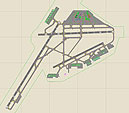
Overview of Greater Rochester International Airport.
This project emerged from Flight1’s AFX program, a specialized utility for adjusting airfield layouts. Each gate was meticulously placed with an airline-specific designation, including regional carriers that commonly operate here. Incorporating matching jetways ensures more realistic interactions between terminal buildings and passenger aircraft, aligning with real-world operations.
Cargo operations received attention through dedicated parking spots accurately assigned to freight carriers. This element grants enhanced realism for users who rely on scripted or AI-generated cargo flights. Whether you leverage third-party traffic solutions or prefer default AI, flights will gradually appear and occupy these ramps based on flight schedules.
To tie in with popular scenery and environment expansions, this freeware mod supports Ultimate Terrain X and Ground Environment X. Integration with World of AI traffic further enriches immersion for those who rely on a robust AI traffic setup. These improvements do not override payware, yet they blend naturally with most existing airport expansions.
By Jim Cook
Free for all simmers · 15.04 KB · Scanned clean Oct 2026
Download speed: Free tier is capped at 0.5 Mbps. PRO members download at full line speed.
SimObjects\Airplanes\, Addon Scenery\, Effects\, or Gauges\.readme.txt or README file. It tells you exactly where files go, what dependencies are needed, and any quirks specific to this add-on.Use these coordinates to fly directly to this location once the mod is installed.
43.11890000,-77.67240000
Launch FSX or Prepar3D and use Flights → Load to open the downloaded .pln file. Your aircraft will be positioned at this location.
The archive afkrocjc.zip has 4 files and directories contained within it.
This list displays the first 500 files in the package. If the package has more, you will need to download it to view them.
| Filename/Directory | File Date | File Size |
|---|---|---|
| AFX_KROC_JC.bgl | 03.23.08 | 32.72 kB |
| AFX_KROC.txt | 03.23.08 | 801 B |
| flyawaysimulation.txt | 10.29.13 | 959 B |
| Go to Fly Away Simulation.url | 01.22.16 | 52 B |
Only PRO members can place votes.
More FSX & P3D add-ons hand-picked based on this download.
FSX AFCAD Files
AFX File For LFBO, Toulouse/Blagnac Airport, France. Includes new parking. By…
 FSX AFCAD Files
Very realistic AFCAD file of Unalaska/Dutch Harbor Airport (PADU), Alaska (AK…
 FSX AFCAD Files
AFX File For KEDW, Edwards AFB, California (CA). Adds parking to the default …
FSX AFCAD Files
AFX File For LATI, Rinas, Tirana, Albania. An update for the default airport …
FSX AFCAD Files
AFX File For SBCT, Afonso Pena Airport, Curitiba, Parana, Brazil. By Efraim d…
FSX AFCAD Files
AFX File For FIMP, Mauritius International Airport. Upgrade for the default a…
FSX AFCAD Files
AFX File for FNLU, Luanda, Angola. An update to the default airport with corr…
 FSX AFCAD Files
AFX File For SPIM, Aeropuerto Internacional Jorge Chavez, Lima Peru. The gate…
Be the first to leave a comment on this download.
Be the first to share your thoughts on this download.