

 FS2004 Civil Jet Aircraft
EAL Boeing 727-200 1970 White Livery V2
This updated release brings an authentic Eastern Air Lines Boeing 727-200 fro…
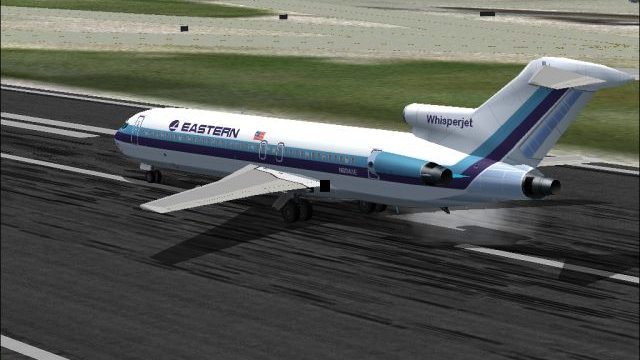
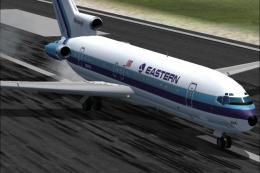
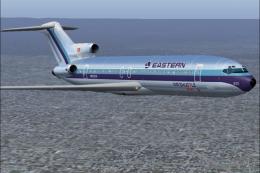
Eastern Air Lines’ classic 1970s white-fuselage look lands on the Boeing 727-200 with a crisp repaint by Sheppard Avery, featuring matching day and night textures for convincing ramp and runway lighting. Built for Microsoft Flight Simulator 2004, it requires the AI Aardvark 727-200 base model from AIA721PK.ZIP.
 Rate
Rate

This freeware repaint set brings a vivid representation of Eastern Air Lines’ 1970s white fuselage aesthetic to the Boeing 727-200 platform, ensuring faithful adaptation for Microsoft Flight Simulator 2004 enthusiasts. The original design, crafted by Sheppard Avery, showcases subtle details with both day and night textures, and it relies on the AI Aardvark 727-200 base model provided in the AIA721PK.ZIP package.
The Boeing 727-200, introduced as an extended version of the initial 727 series, features a recognizable T-tail and triple-engined layout (two engines flanking the fuselage rear and one mounted at the tail’s base). This tri-jet design offered airlines excellent performance on medium-range routes and yielded efficient ground handling at airports with shorter runways. In the 1970s, Eastern Air Lines (often abbreviated as EAL) employed this aircraft extensively on key domestic and Caribbean sectors, solidifying the carrier’s strong route network.
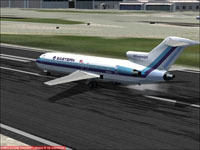
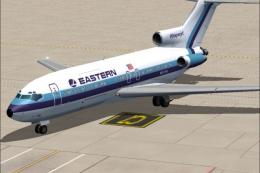
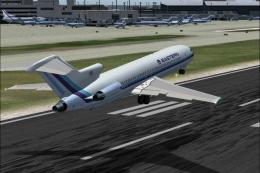
Screenshot of EAL Boeing 727-200 on runway.
Eastern Air Lines, formed in the early 20th century, eventually based significant operations out of Atlanta and Miami. Over time, it became a primary operator along the eastern United States corridor, cultivating hubs in major cities like New York and Kansas City. During the early 1980s, Eastern achieved a notable milestone by carrying more passengers than any other airline worldwide. Unfortunately, the carrier ceased operations in the early 1990s, but its legacy endures through liveries like this 1970s white scheme, which is a hallmark of the airline’s nostalgic appeal.
Once installed, the EAL Boeing 727-200 1970 White Livery revitalizes historic aviation in your simulator and brings back the era when tri-jets dominated major air routes. Model credits go to AI Aardvark, and the expert repaint was produced by Sheppard Avery for Microsoft Flight Simulator 2004. Enjoy this classic piece of aviation heritage at no additional cost, and immerse yourself in Eastern’s golden era of jet travel.
Free for all simmers · 889.97 KB · Scanned clean Oct 2026
Download speed: Free tier is capped at 0.5 Mbps. PRO members download at full line speed.
FS9\Aircraft\, FS9\Addon Scenery\, FS9\Gauges\, or FS9\Effects\.readme.txt or README file. It tells you exactly where files go, what dependencies are needed, and any quirks specific to this add-on.The archive ea7swlv2.zip has 7 files and directories contained within it.
This list displays the first 500 files in the package. If the package has more, you will need to download it to view them.
| Filename/Directory | File Date | File Size |
|---|---|---|
| aia_727_200_l.bmp | 09.09.04 | 341.43 kB |
| aia_727_200_t.bmp | 09.19.04 | 5.33 MB |
| eastern.gif | 01.25.04 | 1.87 kB |
| EASTERN.jpg | 09.25.04 | 222.36 kB |
| READ ME.txt | 09.24.04 | 1.64 kB |
| flyawaysimulation.txt | 10.29.13 | 959 B |
| Go to Fly Away Simulation.url | 01.22.16 | 52 B |
Only PRO members can place votes.
More FS2004 add-ons hand-picked based on this download.
FS2004 Civil Jet Aircraft
This updated release brings an authentic Eastern Air Lines Boeing 727-200 fro…
 FS2004 Civil Jet Aircraft
This freeware release showcases an iconic Eastern Air Lines Boeing 727-100 fi…
 FS2004 Civil Jet Aircraft
This freeware package features a meticulously crafted repaint of an Eastern A…
 FS2004 Civil Jet Aircraft
This repaint package features a distinctive white fuselage scheme for the AI …
 FS2004 Civil Jet Aircraft
This repaint offers a meticulously polished metal finish for the iconic Boein…
 FS2004 Civil Jet Aircraft
This freeware texture pack showcases the last variation bare metal thin cheat…
 FS2004 Civil Jet Aircraft
This freeware add-on features a genuine Eastern Airlines Boeing 727-200 in a …
 FS2004 Civil Jet Aircraft
This freeware add-on provides a carefully rendered Eastern Air Lines Boeing 7…
Be the first to leave a comment on this download.
Be the first to share your thoughts on this download.