

 FS2004 Civil Jet Aircraft
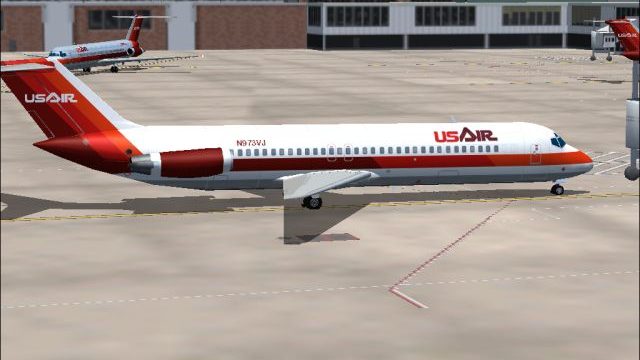
USAir Douglas DC-9-30 N940N
This freeware release provides detailed USAir textures for the classic SGA DC…
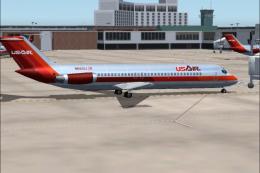
USAir’s early-1980s white-fuselage Douglas DC-9-30 livery brings period-correct titles and striping to AI traffic, with dedicated day and night texture sets tuned for convincing ramp and inflight lighting. Built for Microsoft Flight Simulator 2004, it requires the AI Aardvark DC-9-30 base model (AIAFS9UP.ZIP) for proper display.
 Rate
Rate
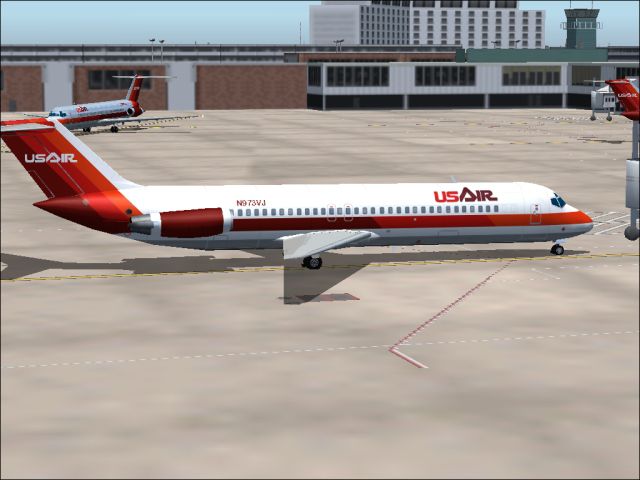
This freeware release features a classic USAir DC-9-30 repaint designed for Microsoft Flight Simulator 2004. It includes specialized day and night texture sets for the AI Aardvark base model, carefully reflecting the airline’s early 1980s white fuselage design. Authored by Sheppard Avery, this package captures the essence of a pivotal era in USAir’s growth, and it requires the original AI Aardvark DC-9-30 model (AIAFS9UP.ZIP) from the Fly Away Simulation mod library.
Screenshot showcasing the USAir Douglas DC-9-30 parked on the apron.
USAir, originally operating under the name All American Aviation during the late 1930s, established roots by serving smaller cities in Pennsylvania and the Ohio Valley. Through a series of strategic mergers, notably with Allegheny Airlines, this carrier broadened its network significantly. By the early 1980s, it flew under the USAir brand and further integrated carriers such as PSA and Piedmont, eventually evolving into what is known today as US Airways. The featured airliner, the DC-9-30, is a short- to medium-range jet that was produced by McDonnell Douglas and became well-regarded for its reliability and versatile performance.
Download and install the AIAFS9UP.ZIP base package from Fly Away Simulation if not already present. Afterwards, place each texture file into the appropriate texture folder found inside the AI Aardvark DC-9-30 directory. In the aircraft.cfg file, add a corresponding entry referencing these new textures. Make sure to select the reflective version of the model to fully appreciate the repaint’s enhanced details.
All repaint work is credited to Sheppard Avery for his meticulous attention to detail. The DC-9-30 model by AI Aardvark provides the foundation, ensuring accurate proportions and flight characteristics for those using AI traffic setups in Microsoft Flight Simulator 2004.
Once properly installed, this USAir DC-9-30 repaint delivers a faithful visual representation of an influential livery from the early days of commercial aviation’s post-deregulation expansion. Whether you are populating your traffic schedule or simply admiring the iconic aircraft at the gate, it offers a period-authentic look at one of the airline’s most recognizable jets.
Free for all simmers · 729.26 KB · Scanned clean Oct 2026
Download speed: Free tier is capped at 0.5 Mbps. PRO members download at full line speed.
This file is a repaint — the package below is the base model it paints onto. Install it first, or the textures will have nothing to load onto.
FS9\Aircraft\, FS9\Addon Scenery\, FS9\Gauges\, or FS9\Effects\.readme.txt or README file. It tells you exactly where files go, what dependencies are needed, and any quirks specific to this add-on.The archive us9swtv2.zip has 7 files and directories contained within it.
This list displays the first 500 files in the package. If the package has more, you will need to download it to view them.
| Filename/Directory | File Date | File Size |
|---|---|---|
| aia_dc_9_30_l.bmp | 08.07.04 | 341.43 kB |
| aia_dc_9_30_t.bmp | 09.25.04 | 5.33 MB |
| READ ME.txt | 09.25.04 | 1.96 kB |
| USAir1.jpg | 09.25.04 | 169.42 kB |
| usair_old.gif | 01.17.04 | 2.29 kB |
| flyawaysimulation.txt | 10.29.13 | 959 B |
| Go to Fly Away Simulation.url | 01.22.16 | 52 B |
Only PRO members can place votes.
More FS2004 add-ons hand-picked based on this download.
FS2004 Civil Jet Aircraft
This freeware release provides detailed USAir textures for the classic SGA DC…
 FS2004 Civil Jet Aircraft
Experience a classic example of USAir’s early 1980s livery in Microsoft Fligh…
 FS2004 Civil Jet Aircraft
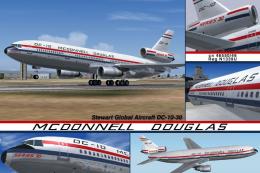
This freeware release brings fresh updates to a classic tri-engine wide-body …
 FS2004 Civil Jet Aircraft
This freeware package offers a meticulously recreated Boeing 737-200 wearing …
 FS2004 Civil Jet Aircraft
A repaint of the FFX B737-300 in the old colors of US Air. This package inclu…
 FS2004 Civil Jet Aircraft
This freeware package features USAir’s classic Boeing 737-200 (registered N24…
 FS2004 Civil Jet Aircraft
A repaint of Vistaliners B727-200 in the colors of USAir. Model by Erick Cant…
 FS2004 Civil Jet Aircraft
This aircraft is made by Project OpenSky. Livery by Daniel Counahan. Screensh…
Be the first to leave a comment on this download.
Be the first to share your thoughts on this download.