

 FS2004 Civil Jet Aircraft
Iberia Douglas DC-90-30 (OC)
This repaint package applies the old-style Iberia livery to the Douglas DC-9-…
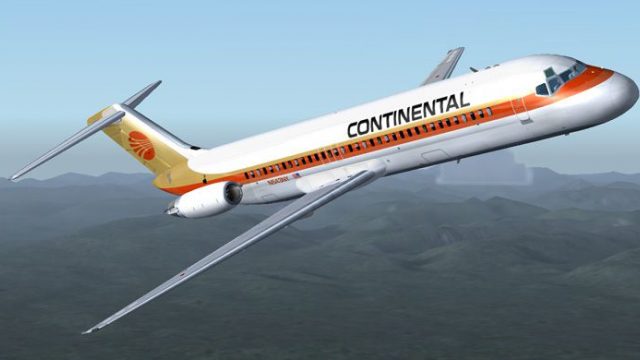
Continental Airlines’ classic “old colors” livery brings a period-correct look to the Douglas DC-9-30, with crisp tail markings, authentic logos, reflective sheen, and carefully aligned windows and engine details. Designed for Microsoft Flight Simulator 2004, it requires the freeware SGA DC-9-30 base package and matches its model specifics.
 Rate
Rate
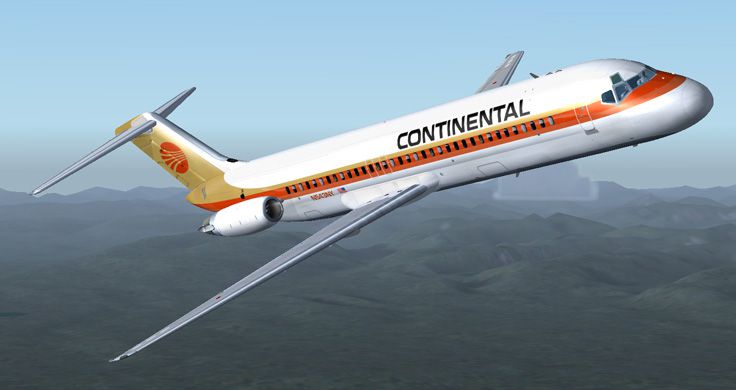
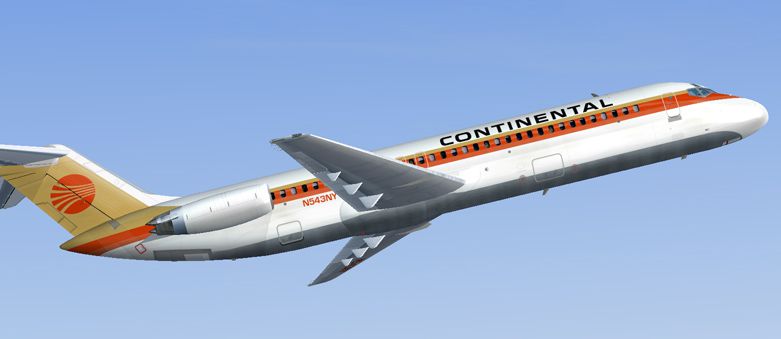
This freeware repaint offers the classic Continental Airlines livery for the Douglas DC-9-30 in Microsoft Flight Simulator 2004. Built on the SGA DC-9-30 series framework, it showcases the older, more traditional color accents once used by Continental. Created by Henry William, this texture set pays homage to a notable era in commercial aviation history, highlighting the DC-9’s role in short-haul routes within North America and beyond.
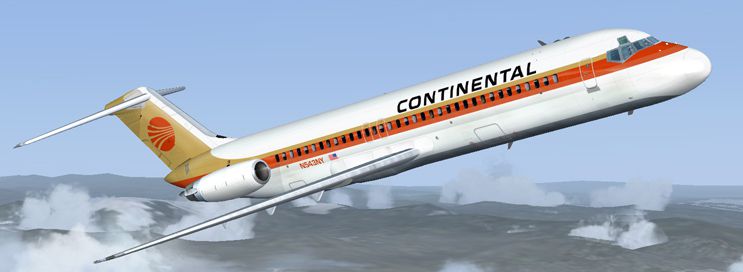
This repaint accurately depicts the iconic tail and fuselage markings that Continental employed in its earlier years. Intensive detail is applied across the entire airframe, ensuring reflective sheen and period-correct logos. The Douglas DC-9-30 itself is a short-range, single-aisle jet developed for efficient and reliable service, offering smooth handling characteristics useful for both new and seasoned virtual aviators. The author, Henry William, has illustrated many subtle features such as engine inlet details and realistic window placements, all while staying consistent with SGA’s distinct 3D model specifics.
-fs9-1.jpg)
Continental’s distinctive livery on the SGA DC-9-30 model.
Before installing, confirm that you have already acquired the necessary SGA930.zip base package developed by Erick Cantu and flight dynamics by Fraser W. Turner. This core model is freeware and is available in the Fly Away Simulation library. Once the base model has been installed, proceed with the following steps for applying the Continental textures:
[fltsim.X] to the next available entry.[fltsim.X]
title=SGA DC-9-30 Continental O.C
sim=SGA DC9_30
model=
panel=
sound=
texture=cont
checklists=
atc_id=N940N
atc_id_color=0xffffffff
atc_airline=continental
atc_flight_number=935
ui_manufacturer=Douglas
ui_type=DC-9-31
ui_variation=Continental Old Colors
description=Model: Erick Cantu\nFlight Dynamics V9.1.0: Fraser W. Turner\n\n
visual_damage=0
atc_heavy=0
atc_id_font=Verdana,-11,1,600,0
atc_parking_codes=
atc_parking_types=
Texture repaint by Henry William. Model and associated flight dynamics by Erick Cantu and Fraser W. Turner under the SGA label. Remember, this add-on solely includes the repainted textures—ensure you have the base DC-9-30 package for complete functionality.
Free for all simmers · 1.98 MB · Scanned clean Oct 2026
Download speed: Free tier is capped at 0.5 Mbps. PRO members download at full line speed.
This file is a repaint — the package below is the base model it paints onto. Install it first, or the textures will have nothing to load onto.
FS9\Aircraft\, FS9\Addon Scenery\, FS9\Gauges\, or FS9\Effects\.readme.txt or README file. It tells you exactly where files go, what dependencies are needed, and any quirks specific to this add-on.The archive coocd9h.zip has 25 files and directories contained within it.
This list displays the first 500 files in the package. If the package has more, you will need to download it to view them.
| Filename/Directory | File Date | File Size |
|---|---|---|
| texture.cont | 12.09.04 | 0 B |
| CONE_L.BMP | 08.08.03 | 5.43 kB |
| CONE_T.BMP | 08.08.03 | 5.43 kB |
| DC9_B_L.BMP | 05.19.04 | 256.07 kB |
| DC9xINTERIOR_L.BMP | 05.19.04 | 256.07 kB |
| DC9xINTERIOR_T.BMP | 01.28.04 | 1.00 MB |
| ENGINES_L.BMP | 05.19.04 | 256.07 kB |
| INTAKE_L.bmp | 08.08.03 | 5.43 kB |
| INTAKE_t.BMP | 08.10.03 | 42.78 kB |
| WING_LEFT_L.BMP | 05.19.04 | 256.07 kB |
| WING_RIGHT_L.BMP | 05.19.04 | 256.07 kB |
| WING_RIGHT_T.BMP | 09.24.03 | 1.00 MB |
| engines_t.bmp | 10.28.04 | 4.00 MB |
| 30FUSE_L.BMP | 10.28.04 | 4.00 MB |
| wing_left_t.bmp | 11.05.04 | 4.00 MB |
| dc9_b_t.bmp | 11.06.04 | 4.00 MB |
| 30fuse_t.bmp | 12.08.04 | 4.00 MB |
| readme.txt | 12.09.04 | 1.57 kB |
| aa.jpg | 12.09.04 | 74.94 kB |
| bb.jpg | 12.09.04 | 87.04 kB |
| cc.jpg | 12.09.04 | 79.20 kB |
| small.gif | 12.09.04 | 3.92 kB |
| ContinentalDC930 o.c | 12.09.04 | 0 B |
| flyawaysimulation.txt | 10.29.13 | 959 B |
| Go to Fly Away Simulation.url | 01.22.16 | 52 B |
Only PRO members can place votes.
More FS2004 add-ons hand-picked based on this download.
FS2004 Civil Jet Aircraft
This repaint package applies the old-style Iberia livery to the Douglas DC-9-…
 FS2004 Civil Jet Aircraft
This repaint package brings the old KLM color scheme onto the Douglas DC-9-30…
 FS2004 Civil Jet Aircraft
This freeware release brings fresh updates to a classic tri-engine wide-body …
 FS2004 Civil Jet Aircraft
This freeware package offers a faithful simulation of the iconic wide-body tr…
 FS2004 Civil Jet Aircraft
Continental Airlines Douglas DC-10-10, circa 1982, registration N68046 in "Me…
 FS2004 Civil Jet Aircraft
Textures only; requires SGA1030.ZIP. Model by SGA. Livery by Evgeni Slepnev. …
 FS2004 Civil Jet Aircraft
Lufthansa livery for the Vistaliners B727. Features 32 bit textures, mostly h…
 FS2004 Civil Jet Aircraft
This comprehensive freeware package showcases Air France’s legacy paint schem…
Be the first to leave a comment on this download.
Be the first to share your thoughts on this download.