

 FS2004 Propeller Aircraft
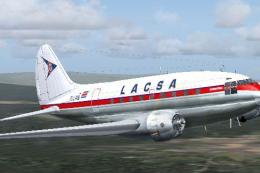
LACSA Curtiss C-46
Two textures from 1950's and 1970's. Some 1950's flight schedules included. T…
LACSA’s 1967–1971 Douglas DC-3 livery brings Costa Rica’s classic flag carrier to the default aircraft in FS2004, depicting TI-1051C, the airline’s last DC-3/C-47 in service. The repaint adds chrome and reflective detailing for a period-authentic exterior finish and requires the stock Douglas DC-3.
 Rate
Rate
A repaint of the default DC3 in 1967-1971 paint scheme. LACSA (Lineas Aereas Costarricenses S. A.) was founded in 1946, and it began operations with a couple of C-47s/DC-3 property of Pan American Airways. This aircraft (TI-1051C) was the last C-47/DC-3 operated by LACSA. Includes chrome and reflection effects. Repaint By Daniel Umana.
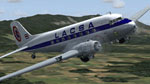
Screenshot of LACSA Douglas DC-3 in flight.
Installation:
[fltsim.XX]

	title=Douglas DC-3 LACSA Pintura 5

	sim=Douglas_DC3

	model=

	panel=

	sound=

	texture=lr5

	kb_checklists=Douglas_DC3_check

	kb_reference=Douglas_DC3_ref

	atc_id=TI-1051C

	atc_id_color=0xffffffff

	ui_manufacturer=Douglas

	ui_type="DC-3"

	ui_variation="LACSA Pintura 1967-1971"

	description=
Warning: Make a backup of your aircraft.cfg file!
Free for all simmers · 1.87 MB · Scanned clean Oct 2026
Download speed: Free tier is capped at 0.5 Mbps. PRO members download at full line speed.
FS9\Aircraft\, FS9\Addon Scenery\, FS9\Gauges\, or FS9\Effects\.readme.txt or README file. It tells you exactly where files go, what dependencies are needed, and any quirks specific to this add-on.The archive dc3lr5.zip has 13 files and directories contained within it.
This list displays the first 500 files in the package. If the package has more, you will need to download it to view them.
| Filename/Directory | File Date | File Size |
|---|---|---|
| Douglas_DC3_1_C.bmp | 04.29.03 | 682.74 kB |
| Douglas_DC3_1_D.bmp | 03.19.03 | 682.74 kB |
| Douglas_DC3_1_T.bmp | 02.14.04 | 1.33 MB |
| Douglas_DC3_2_C.bmp | 04.29.03 | 170.74 kB |
| Douglas_DC3_2_T.bmp | 02.15.04 | 682.75 kB |
| Douglas_DC3_3_C.bmp | 04.29.03 | 42.74 kB |
| Prop_DC3.bmp | 11.27.02 | 341.40 kB |
| Thumbs.db | 02.17.04 | 8.50 kB |
| readme-leame.txt | 02.17.04 | 3.86 kB |
| file_id.diz | 02.17.04 | 416 B |
| DC3LR5.gif | 02.17.04 | 10.89 kB |
| flyawaysimulation.txt | 10.29.13 | 959 B |
| Go to Fly Away Simulation.url | 01.22.16 | 52 B |
Only PRO members can place votes.
More FS2004 add-ons hand-picked based on this download.
FS2004 Propeller Aircraft
Two textures from 1950's and 1970's. Some 1950's flight schedules included. T…
 FS2004 Propeller Aircraft
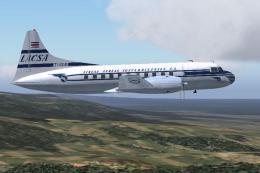
Circa 1957. Textures only for the model by Tom Gibson, Greg Pepper, Alan Jenn…
 FS2004 Propeller Aircraft
These layered PSD files can be used in Paint Shop Pro or Photoshop to allow e…
 FS2004 Propeller Aircraft
DC-3 Airways Douglas DC-3 classic and 1940's liveries. Based on the default D…
 FS2004 Propeller Aircraft
"City of Boston", in bare metal scheme. Original model by Arik Hohmeyer and F…
 FS2004 Propeller Aircraft
DC-3 Airways Douglas DC-2 bare metal livery. A repaint for the virtual airlin…
 FS2004 Propeller Aircraft
This repaint showcases a distinctive Finnish Air Force Douglas DC-2 “DC-1,” a…
 FS2004 Propeller Aircraft
DC-3 Airways Douglas DC-3 N18560, in bare metal livery. A rework of the defau…
Be the first to leave a comment on this download.
Be the first to share your thoughts on this download.