

 FS2004 Propeller Aircraft
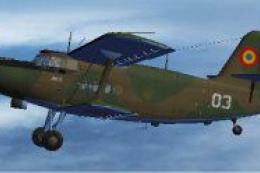
Romanian Air Force An2T 03
This freeware package delivers a unique Romanian Air Force color pattern for …
Romanian Air Force “58” markings bring fresh authenticity to the Antonov An-2T’s rugged biplane silhouette, with crisp exterior textures that highlight struts, wings, and period-correct insignia in Microsoft Flight Simulator 2004. Designed as an exterior repaint, it requires Tim Conrad’s An-2T base package for full use.
 Rate
Rate
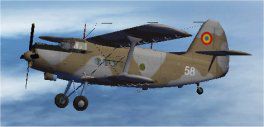
This freeware repaint enriches your copy of Microsoft Flight Simulator 2004 by introducing Romanian Air Force markings on the classic Antonov An-2T. It references the base model initially developed by Tim Conrad, with textures crafted by Steve Baldwin, and is meant purely as an external paint modification. You will need to download the underlying Antonov An-2T package (by Tim Conrad) from the Fly Away Simulation library in order to fully utilize this repaint.
The full-size Antonov An-2T is recognized for its single-engine biplane structure and rugged short-field performance. Originally conceived in the late 1940s, it quickly found favor in various civilian and military applications, including paratroop transport and aerial agriculture. The Romanian Air Force has employed these aircraft to support different operational requirements, taking advantage of the An-2T’s reliable capabilities and low-speed handling. That overall versatility is at the core of what keeps pilots fascinated by this proven workhorse in flight simulation as well as real-world aviation.
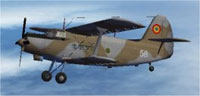
Screenshot showcasing the Romanian Air Force An2T 58 repaint in action.
The core Antonov An-2T design comes from Tim Conrad, whose dedication to accurate flight modeling provided the foundational aircraft files. Steve Baldwin meticulously prepared these custom textures, bringing the Romanian Air Force “58” identity to your virtual hangar with a high degree of authenticity.
An2T directory found in your aircraft collection.aircraft.cfg file. Replace XX with the next available sequential number in your configuration.[fltsim.XX]
title = AN-2T_Romanian 58
sim = AN-2T
model =
panel =
sound =
texture =rom58
panel_alias =
sound_alias =
kb_checklists =
kb_reference =
atc_id =
atc_id_color = 0xffffffff
atc_airline =
atc_flight_number = 1
ui_manufacturer = Antonov
ui_type = AN-2T
ui_variation = Romanian AF 58
description = First appearing in 1947, the AN-2's was first dismissed as obsolete, due to its biplane layout and homely looks. But the “Annushka” would prove the naysayers wrong... and how! The biplane layout proved itself, and there wasn’t much the AN-2 couldn’t do, whether as a passenger, cargo, parachuting, crop spraying, or spec ops plane. Over 20,000 were produced, mostly in Poland. Not bad for an “obsolete” design.
This package includes only the livery files. You must acquire the main An-2T aircraft by Tim Conrad, which is available in the Fly Away Simulation repository. Once installed together, the newly applied textures will let you experience a distinctive Romanian Air Force flight deck perspective as you traverse destinations across your virtual skies. It is a simple yet robust upgrade that stands out for its authentic markings.
Free for all simmers · 1.58 MB · Scanned clean Oct 2026
Download speed: Free tier is capped at 0.5 Mbps. PRO members download at full line speed.
FS9\Aircraft\, FS9\Addon Scenery\, FS9\Gauges\, or FS9\Effects\.readme.txt or README file. It tells you exactly where files go, what dependencies are needed, and any quirks specific to this add-on.The archive an2rom58.zip has 15 files and directories contained within it.
This list displays the first 500 files in the package. If the package has more, you will need to download it to view them.
| Filename/Directory | File Date | File Size |
|---|---|---|
| Readme.txt | 11.15.06 | 1.41 kB |
| texture.rom58 | 11.15.06 | 0 B |
| an2t_00.bmp | 12.13.03 | 256.07 kB |
| an2t_01.bmp | 11.15.06 | 1.00 MB |
| an2t_02.bmp | 12.11.03 | 4.00 MB |
| an2t_03.bmp | 11.12.06 | 512.07 kB |
| an2t_fan.bmp | 12.10.03 | 16.07 kB |
| an2t_glass.bmp | 12.11.03 | 256.07 kB |
| pspbrwse.jbf | 11.15.06 | 13.29 kB |
| thumbnail.jpg | 11.07.06 | 8.15 kB |
| Thumbs.db | 11.15.06 | 16.50 kB |
| thumbnail.jpg | 11.07.06 | 8.15 kB |
| An2T Romanian AF 58 | 11.15.06 | 0 B |
| flyawaysimulation.txt | 10.29.13 | 959 B |
| Go to Fly Away Simulation.url | 01.22.16 | 52 B |
Only PRO members can place votes.
More FS2004 add-ons hand-picked based on this download.
FS2004 Propeller Aircraft
This freeware package delivers a unique Romanian Air Force color pattern for …
 FS2004 Propeller Aircraft
This freeware repaint immerses you in the unique livery of the Nicaraguan Air…
 FS2004 Propeller Aircraft
This freeware add-on delivers a meticulously painted Russian Air Force-inspir…
 FS2004 Propeller Aircraft
A repaint of Tim Conrad's Antonov An-2T in Russian AF 79 textures. Textures o…
 FS2004 Propeller Aircraft
This repaint package represents a North Korean Air Force livery for the Anton…
 FS2004 Propeller Aircraft
This specialized repaint introduces the distinctive Polish Air Ambulance live…
 FS2004 Propeller Aircraft
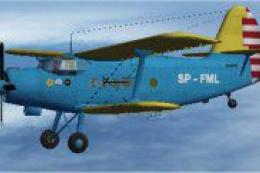
This freeware repaint showcases a specialized Polish Air Ambulance scheme for…
 FS2004 Propeller Aircraft
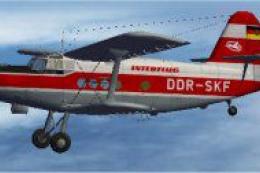
Enthusiasts of Microsoft Flight Simulator 2004 can enhance their virtual hang…
Be the first to leave a comment on this download.
Be the first to share your thoughts on this download.