

 FSX Misc
Flight Plan For OB-9 Bayshore Michigan
Experience a carefully planned IFR high-speed, low-level military training fl…
OB-98 Rapid City delivers a high-speed IFR training circuit across South Dakota, Nebraska, Wyoming, and Montana, mixing mountain valleys with open plains for demanding low-level navigation and mission-style objectives in Microsoft Flight Simulator X. Includes Karol Chlebowski’s TFR and Pave Tack gauges plus a mini panel option to sharpen terrain-following and targeting workflows.
 Rate
Rate
Experience an extensive high-speed IFR training circuit that spans dramatic elevations and open plains across South Dakota, Nebraska, Wyoming, and Montana. This package is designed for pilots seeking both technical complexity and realistic mission objectives, complete with specialized gauges by Karol Chlebowski and a recommended mini panel upgrade. Developed by Bill McClellan, this add-on offers a distinctive challenge for those wanting to push the boundaries of Microsoft Flight Simulator X.
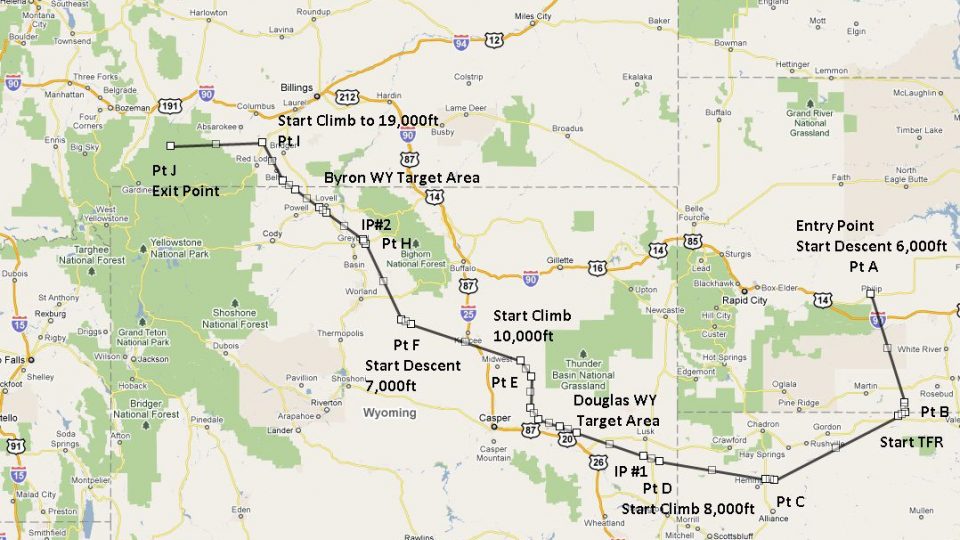
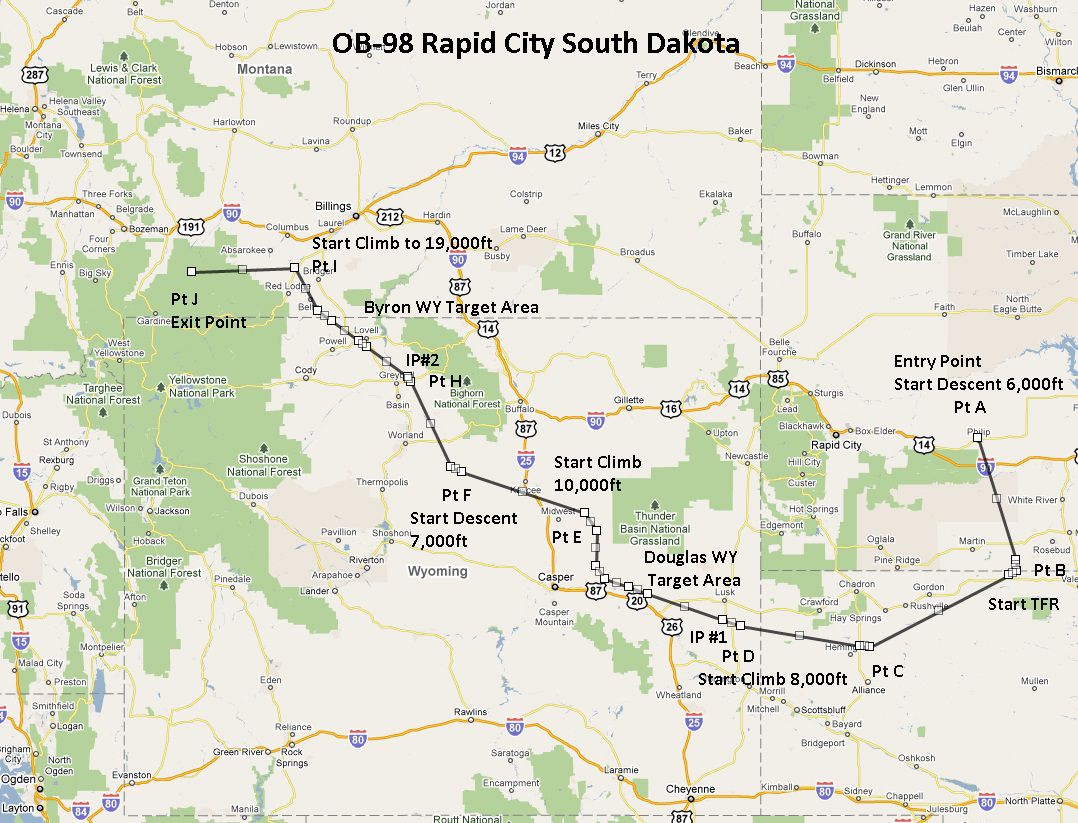
The designated route, known as OB-98 Rapid City, weaves through rugged landscapes and flatter regions from South Dakota into neighboring states. It incorporates sudden elevation changes in mountain valleys, along with wide, rolling fields that create unique navigation demands. Such varied terrain is ideal for practicing low-level flight tactics, especially at high speeds.
Within this flight plan, two distinct sets of target areas are laid out to enhance situational awareness and provide strategic bombing or reconnaissance practice. This setup broadens the scope of operational training, allowing more flexibility when selecting mission goals.
To simulate realistic tactical flying, two integrated gauges by Karol Chlebowski are bundled with the package:
Additionally, pilots may opt for version 2.1 of the mini panel, which incorporates these critical functionalities alongside other enhancements to manage flight data and mission-related tasks.
The OB-98 circuit endorses a variety of military jets and bombers, such as the B-52, F-111, B-1B, B-2, A6, A4, and even the Vulcan. Any supersonic fighter or strategic bomber will find ample opportunity to test agility and speed here. Nevertheless, the route remains fully accessible to other types of aircraft, so general aviation flyers or turboprop enthusiasts can also experiment with this demanding sequence.
Representative layout of this specialized flight plan.
While optimized for high-speed military profiles, this route remains accessible to any skill level, thanks to adaptable navigation points and flexible waypoints. The package, crafted by Bill McClellan, includes detailed guidance to ensure sim pilots benefit from the meticulous planning behind OB-98 Rapid City. Whether honing radar-evading tactics or rehearsing intricate bombing runs, this mission stands out as a robust and immersive option in your flight simulation library.
Free for all simmers · 945.68 KB · Scanned clean Oct 2026
Download speed: Free tier is capped at 0.5 Mbps. PRO members download at full line speed.
FSX\Missions\ as a sub-folder. The folder must contain an XML file describing the mission.readme.txt or README file. It tells you exactly where files go, what dependencies are needed, and any quirks specific to this add-on.The archive ob-98_rapid_city_sd.zip has 18 files and directories contained within it.
This list displays the first 500 files in the package. If the package has more, you will need to download it to view them.
| Filename/Directory | File Date | File Size |
|---|---|---|
| Approaching IP OB-98 Douglas WY.FLT | 07.11.11 | 17.43 kB |
| Approaching IP OB-98 Douglas WY.FSSAVE | 07.11.11 | 85.79 kB |
| Approaching IP OB-98 Douglas WY.WX | 07.11.11 | 288.21 kB |
| Entering OB-98 Rapid City SD.FLT | 07.11.11 | 18.29 kB |
| Entering OB-98 Rapid City SD.FSSAVE | 07.11.11 | 36.77 kB |
| Entering OB-98 Rapid City SD.WX | 07.11.11 | 286.36 kB |
| OB-98 Rapid City SD.jpg | 07.11.11 | 317.05 kB |
| OB-98 Rapid City SD.pln | 07.11.11 | 2.95 kB |
| Pave Tack Notes.doc | 06.16.11 | 327.50 kB |
| Pave Tack.cab | 07.05.11 | 633.89 kB |
| Read Me.txt | 07.11.11 | 13.47 kB |
| TargetsOB-98 Byron WY.bgl | 07.04.11 | 3.70 kB |
| TargetsOB-98 Douglas WY.bgl | 07.04.11 | 6.55 kB |
| Approaching IP OB-98 Byron WY.FLT | 07.11.11 | 16.12 kB |
| Approaching IP OB-98 Byron WY.FSSAVE | 07.11.11 | 83.37 kB |
| Approaching IP OB-98 Byron WY.WX | 07.11.11 | 301.27 kB |
| flyawaysimulation.txt | 10.29.13 | 959 B |
| Go to Fly Away Simulation.url | 01.22.16 | 52 B |
Only PRO members can place votes.
More FSX & P3D add-ons hand-picked based on this download.
FSX Misc
Experience a carefully planned IFR high-speed, low-level military training fl…
 FSX Misc
This freeware release introduces a detailed IFR high-speed, low-level militar…
 FSX Misc
This freeware add-on delivers a meticulously crafted IFR, high-speed, low-lev…
 FSX Misc
This new freeware package provides a carefully crafted IFR (Instrument Flight…
 FSX Misc
This carefully designed flight plan offers an immersive low-level, high-speed…
 FSX Misc
Flight plan for OB-27 Ashland ME and Fort Drum NY IFR high speed low altitude…
 FSX Misc
This comprehensive package offers a meticulously designed IFR high-speed, low…
 FSX Misc
This freeware add-on introduces a demanding IFR route designed for high-speed…
Be the first to leave a comment on this download.
Be the first to share your thoughts on this download.