

 FSX Misc
Flight Plan For OB-11
Experience an immersive low-level training flight plan crafted for high-speed…
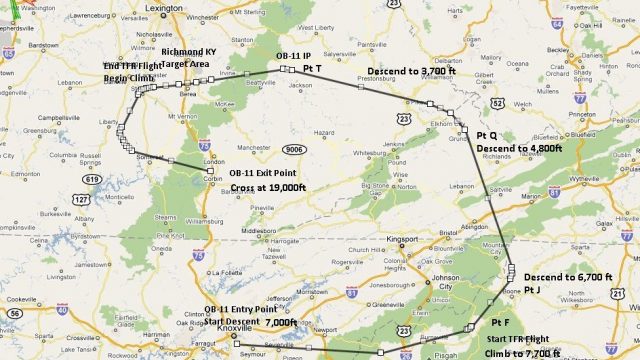
OB-11 Richmond, Kentucky IFR training route delivers a high-speed, low-level military corridor across rugged terrain in Tennessee, North Carolina, Virginia, and Kentucky, tuned for realistic tactical profiles in Microsoft Flight Simulator X. Includes TFR and Pave Tack gauges plus an optional mini panel, supporting precise navigation, reconnaissance, and bombing-style procedures with varied aircraft.
 Rate
Rate

This freeware add-on delivers a meticulously crafted IFR, high-speed, low-level military training flight plan focused on OB-11 Richmond, Kentucky. It crosses mountainous terrain that extends through Tennessee, North Carolina, Virginia, and Kentucky. Developed by Bill McClellan, it marks the thirteenth route in his series of flight plans and offers a challenging environment for military-style operations in Microsoft Flight Simulator X.
Enthusiasts of bomber and fighter aircraft—whether operating a B-52, F-111, B-1B, B-2, A-6, A-4, or Vulcan—will value this route’s realistic profiles. It introduces tight IFR corridors at low altitudes, which simulate real-world training conditions commonly used by tactical squadrons. Moreover, any aircraft of your choice can follow the same track, making this plan versatile for different cockpit setups.
To elevate your experience, the package includes two notable gauges authored by Karol Chlebowski: one for TFR (Terrain Following Radar) flying and another referred to as Pave Tack. These embedded instruments permit advanced navigation, bombing accuracy, and reconnaissance operations, all aligned with realistic in-theater procedures. Together, they significantly expand immersion while you traverse twisting valleys and hilly regions.
For those seeking an alternative interface, the developer suggests installing version 2.1 of the mini panel. It contains an extensive set of features that incorporates TFR flying and Pave Tack functionality, along with additional tools designed to simplify cockpit management on challenging routes in mountainous zones.
Spanning multiple states, including Kentucky, Tennessee, North Carolina, and Virginia, this corridor tests your ability to manage sudden elevation changes, local weather phenomena, and tight turns. These conditions enhance pilot situational awareness, demand more precise throttle control, and cultivate an authentic sense of real-world military training missions.
-fsx-1.jpg)
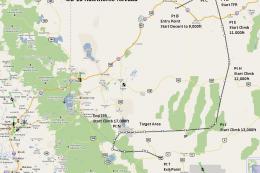
Overview of flight plans.
This creation by Bill McClellan offers a unique combination of technical challenge and regional variety. If you are seeking an authentic environment to practice IFR navigation and low-level maneuvers, this plan provides an immersive scenario that fits seamlessly into your simulator fleet.
Free for all simmers · 973.39 KB · Scanned clean Oct 2026
Download speed: Free tier is capped at 0.5 Mbps. PRO members download at full line speed.
FSX\Missions\ as a sub-folder. The folder must contain an XML file describing the mission.readme.txt or README file. It tells you exactly where files go, what dependencies are needed, and any quirks specific to this add-on.The archive ob-11_richmond_ky_new.zip has 15 files and directories contained within it.
This list displays the first 500 files in the package. If the package has more, you will need to download it to view them.
| Filename/Directory | File Date | File Size |
|---|---|---|
| Approaching IP at OB-11 Richmond KY.WX | 07.12.11 | 286.54 kB |
| Entering OB-11 Richmond KY.FLT | 07.12.11 | 17.64 kB |
| Entering OB-11 Richmond KY.FSSAVE | 07.12.11 | 100.90 kB |
| Entering OB-11 Richmond KY.WX | 07.12.11 | 292.59 kB |
| OB-11 Richmond (New).jpg | 07.12.11 | 313.69 kB |
| OB-11 Richmond KY NEW.PLN | 07.12.11 | 2.40 kB |
| Pave Tack Notes.doc | 06.16.11 | 327.50 kB |
| Pave Tack.cab | 07.05.11 | 633.89 kB |
| Read Me.txt | 07.12.11 | 12.60 kB |
| Targets OB-11 Richmond KY.BGL | 07.02.11 | 2.27 kB |
| TFR.cab | 07.02.11 | 9.88 kB |
| Approaching IP at OB-11 Richmond KY.FLT | 07.12.11 | 17.82 kB |
| Approaching IP at OB-11 Richmond KY.FSSAVE | 07.12.11 | 172.11 kB |
| flyawaysimulation.txt | 10.29.13 | 959 B |
| Go to Fly Away Simulation.url | 01.22.16 | 52 B |
Only PRO members can place votes.
More FSX & P3D add-ons hand-picked based on this download.
FSX Misc
Experience an immersive low-level training flight plan crafted for high-speed…
 FSX Misc
Experience a carefully planned IFR high-speed, low-level military training fl…
 FSX Misc
This freeware release introduces a detailed IFR high-speed, low-level militar…
 FSX Misc
This new freeware package provides a carefully crafted IFR (Instrument Flight…
 FSX Misc
This carefully designed flight plan offers an immersive low-level, high-speed…
 FSX Misc
Flight plan for OB-27 Ashland ME and Fort Drum NY IFR high speed low altitude…
 FSX Misc
This comprehensive package offers a meticulously designed IFR high-speed, low…
 FSX Misc
This freeware add-on introduces a demanding IFR route designed for high-speed…
Be the first to leave a comment on this download.
Be the first to share your thoughts on this download.