

 FS2004 AFCAD Files
EDDF, AFCAD2 File
Frankfurt/Main Airport, Germany, for use with AMEDDF11.ZIP. Should solve most…
Marine Corps Auxiliary Field Bogue (KNJM) gains a refined AFCAD2 layout with accurately assigned military parking and improved ground logic for realistic approach practice and smoother AI traffic flow. Designed for training operations tied to MCAS Cherry Point, it updates the airport database in Microsoft Flight Simulator 2004 and supports optional customization via AFCAD 2.21.
 Rate
Rate
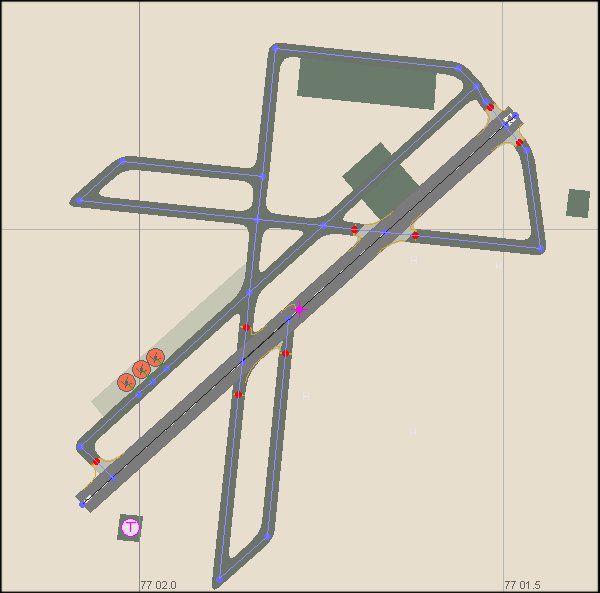
This enhanced AFCAD2 package for Marine Corps Auxiliary Field Bogue (KNJM) in North Carolina enriches training operations for those flying in Microsoft Flight Simulator 2004, allowing realistic practice approaches and traffic flows. Created by developer Keith Guillory, this freeware mod adds carefully assigned parking spots, ensuring accurate placement for various military aircraft operating out of MCAS Cherry Point.
This updated file fine-tunes the existing layout at Marine Corps Auxiliary Field Bogue, located near the state’s Atlantic shoreline. By incorporating more precise parking locations, it offers an environment where Marine Corps virtual squadrons can conduct valuable training sessions. In particular, aircraft tied to the nearby Cherry Point base can stage VFR patterns and refine their approach procedures for better situational awareness.
Marine Corps Auxiliary Field Bogue aerial snapshot.
Within the broader scope of military aviation, Keith Guillory also offers diverse AI flight plan packages for east-coast installations. These include operations at MCAS Cherry Point (KNKT), NAS Oceana (KNTU), Dobbins Joint Reserve Base (KMGE) in Georgia, and Marine Corps Outlying Field Atlantic (12NC). Integrating these plans with this AFCAD2 configuration notably boosts authenticity, as they depict routine training runs and base-to-base deployments.
When you prefer to revert to default conditions, simply remove AF2_KNJM.bgl from the “addon scenery\scenery” folder. Flight Simulator automatically restores the original database upon the next start, reverting KNJM back to its default layout for Marine Corps Auxiliary Field Bogue.
Free for all simmers · 43.74 KB · Scanned clean Oct 2026
Download speed: Free tier is capped at 0.5 Mbps. PRO members download at full line speed.
FS9\Aircraft\, FS9\Addon Scenery\, FS9\Gauges\, or FS9\Effects\.readme.txt or README file. It tells you exactly where files go, what dependencies are needed, and any quirks specific to this add-on.The archive knjmmcal.zip has 8 files and directories contained within it.
This list displays the first 500 files in the package. If the package has more, you will need to download it to view them.
| Filename/Directory | File Date | File Size |
|---|---|---|
| KNJM MCALF BOGUE | 01.05.05 | 0 B |
| AF2_KNJM.bgl | 11.27.04 | 2.88 kB |
| MCALF BOGUE.gif | 01.05.05 | 2.62 kB |
| MCALF BOGUE.jpg | 01.05.05 | 43.53 kB |
| Thumbs.db | 01.05.05 | 6.00 kB |
| KNJM AFCAD 2 README.txt | 01.05.05 | 1.25 kB |
| flyawaysimulation.txt | 10.29.13 | 959 B |
| Go to Fly Away Simulation.url | 01.22.16 | 52 B |
Only PRO members can place votes.
More FS2004 add-ons hand-picked based on this download.
FS2004 AFCAD Files
Frankfurt/Main Airport, Germany, for use with AMEDDF11.ZIP. Should solve most…
 FS2004 AFCAD Files
FS2004 AFCAD2 File For RCKH and RCSS, Taipei Sungshan Airport and Kaohsiung A…
 FS2004 AFCAD Files
Tokyo Narita Airport (RJAA), Japan (not for the default FS2004 airport; detai…
 FS2004 AFCAD Files
Updated gates and taxiways for Amsterdam Schiphol Int'l Airport, The Netherla…
 FS2004 AFCAD Files
WSSS for Samsoft's Singapore Changi scenery (not for the default FS2004 airpo…
 FS2004 AFCAD Files
An AFCAD2 file for Soekarno-Hatta Airport, Jakarta, Indonesia (WIII) for use …
 FS2004 AFCAD Files
An AFCAD2 file for Ngurah Rai Int'l Airport, Denpasar Bali, Indonesia (WRRR),…
FS2004 AFCAD Files
Dubai Int'l Airport, United Arab Emirates. Upgrades the stock airport to prov…
Be the first to leave a comment on this download.
Be the first to share your thoughts on this download.