

 FSX Civil Aircraft
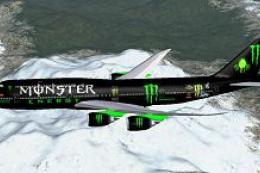
Monster Energy Boeing 747-8i
[fltsim.0] Screenshot of Monster Energy Boeing 747-8i in flight. title=Boeing…
Monster Energy Boeing 777-200ER PH-BQP brings a bold custom livery to long-haul ops in FSX, paired with Project Open Sky’s GE-powered 777-200ER model, tuned flight dynamics, and a detailed virtual cockpit. The package includes matching airline and parking codes for authentic ATC and gate assignment.
 Rate
Rate
Monster Energy Boeing 777-200 GE, registration PH-BQP. Model by Project Open Sky.
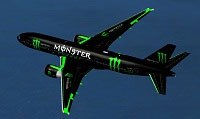
Screenshot of Monster Energy Boeing 777-200 in flight.
[fltsim.0]

title=Boeing 777-200ER Monster energy

sim=Boeing 777-200ER General Electric 90-94B

model=

panel=

sound=

texture=Monster energy

checklists=

atc_airline=Monster

atc_id=PH-BQP

atc_flight_number=5

atc_heavy=1

atc_parking_types=GATE, RAMP,

atc_parking_codes=Monster

ui_manufacturer=juan30005

ui_type=Boeing 777-200

ui_variation=Monster energy"

visual_damage=1

description=Project Opensky Boeing--777-200ER\nVersion 2018.9.1\n\nModel Designers\n Hiroshi Igami\n Yosuke Ube\n\nMaster Textures\n Yosuke Abe\n\nFlight Dynamics\n Brandon Henry\n\n Project Opensky Members\n\nMaximun Range: 7,695 nautical miles (14,260 km) \n\nTypical city pairs: \n London-LA\n LA-Tokyo\n Tokyo-Sydney, \n Repaint By Mathieu Vos (APSS)
Free for all simmers · 5.98 MB · Scanned clean Oct 2026
Download speed: Free tier is capped at 0.5 Mbps (this file takes approximately 2 mins at the cap). PRO members download at full line speed.
FSX\SimObjects\Airplanes\. The folder must contain an aircraft.cfg file. Effects go into FSX\Effects\; gauges go into FSX\Gauges\.readme.txt or README file. It tells you exactly where files go, what dependencies are needed, and any quirks specific to this add-on.The archive boein_777_200_monster_energy-juan30005.zip has 71 files and directories contained within it.
This list displays the first 500 files in the package. If the package has more, you will need to download it to view them.
| Filename/Directory | File Date | File Size |
|---|---|---|
| 777 200 monster energy-juan30005 | 12.25.12 | 0 B |
| Aircraft.cfg | 12.25.12 | 16.12 kB |
| Boeing 777-200ER General Electric 90-94B.air | 09.15.11 | 9.36 kB |
| leer.txt | 12.25.12 | 220 B |
| model | 12.25.12 | 0 B |
| model.cfg | 09.14.11 | 34 B |
| OS772V2_GE90--L.mdl | 09.14.11 | 4.77 MB |
| panel | 12.25.12 | 0 B |
| panel.cfg | 09.15.11 | 5.65 kB |
| sound | 12.25.12 | 0 B |
| Sound.cfg | 02.12.07 | 42 B |
| texture.Monster energy | 12.25.12 | 0 B |
| OS772V2_Glass_T.BMP | 06.07.10 | 4.07 kB |
| os772v2_Parts_T.bmp | 09.14.11 | 1.00 MB |
| os772v2_WINGL_L.bmp | 03.25.07 | 1.07 kB |
| os772v2_WINGL_T.bmp | 12.25.12 | 4.00 MB |
| os772v2_WINGR_L.bmp | 03.25.07 | 1.07 kB |
| os772v2_WINGR_T.bmp | 12.25.12 | 4.00 MB |
| Os772_COCKPIT_L.bmp | 06.07.10 | 256.07 kB |
| Os772_COCKPIT_T.bmp | 06.07.10 | 256.07 kB |
| OS772_LFuse_FRONT_L.bmp | 06.07.10 | 1.00 MB |
| OS772_LFuse_FRONT_T.BMP | 12.25.12 | 4.00 MB |
| OS772_LFuse_MID_L.bmp | 06.07.10 | 1.00 MB |
| OS772_LFuse_MID_T.BMP | 12.25.12 | 4.00 MB |
| OS772_LFuse_REAR_L.bmp | 06.07.10 | 1.00 MB |
| OS772_LFuse_REAR_T.BMP | 12.25.12 | 4.00 MB |
| OS772_RFuse_FRONT_L.bmp | 06.07.10 | 1.00 MB |
| OS772_RFuse_FRONT_T.BMP | 12.25.12 | 4.00 MB |
| OS772_RFuse_MID_L.bmp | 06.07.10 | 1.00 MB |
| OS772_RFuse_MID_T.BMP | 12.25.12 | 4.00 MB |
| OS772_RFuse_REAR_L.bmp | 06.07.10 | 1.00 MB |
| OS772_RFuse_REAR_T.BMP | 12.25.12 | 4.00 MB |
| os773ERv2_Parts_T.bmp | 06.07.10 | 1.00 MB |
| Os777CONTAINER_FRONT_L.BMP | 06.07.10 | 1.07 kB |
| Os777CONTAINER_FRONT_T.BMP | 06.07.10 | 1.00 MB |
| Os777CONTAINER_REAR_L.bmp | 06.07.10 | 1.07 kB |
| Os777CONTAINER_REAR_T.bmp | 06.07.10 | 1.00 MB |
| OS777GSU1_L.BMP | 03.25.07 | 1.07 kB |
| OS777GSU1_T.BMP | 06.22.11 | 1.00 MB |
| OS777GSU2_L.BMP | 03.25.07 | 1.07 kB |
| OS777GSU2_T.BMP | 06.22.11 | 1.00 MB |
| OS777maintire_L.bmp | 06.07.10 | 1.07 kB |
| OS777maintire_T.bmp | 06.07.10 | 64.07 kB |
| OS777nosetire_L.bmp | 06.07.10 | 1.07 kB |
| OS777nosetire_T.bmp | 06.07.10 | 64.07 kB |
| OS777Option.bmp | 09.14.11 | 64.07 kB |
| Os777shaft_L.bmp | 06.07.10 | 1.07 kB |
| Os777shaft_t.bmp | 06.07.10 | 4.07 kB |
| OS777V2_LowerCargo_L.BMP | 06.07.10 | 1.07 kB |
| OS777V2_LowerCargo_T.BMP | 06.07.10 | 256.07 kB |
| os777v2_Parts2_L.bmp | 06.07.10 | 1.07 kB |
| os777v2_Parts2_T.bmp | 06.07.10 | 1.00 MB |
| os777v2_Parts_L.bmp | 06.07.10 | 1.07 kB |
| os777v2_Parts_T.bmp | 06.07.10 | 1.00 MB |
| Os777_GE90_Fan_blurred.bmp | 12.25.12 | 256.05 kB |
| Os777_GE90_Fan_Slow.bmp | 12.25.12 | 256.05 kB |
| Os777_ge90_L.bmp | 03.25.07 | 1.07 kB |
| Os777_GE90_parts_L.BMP | 03.25.07 | 1.07 kB |
| Os777_GE90_parts_T.BMP | 12.25.12 | 4.00 MB |
| Os777_GE90_T.bmp | 12.25.12 | 4.00 MB |
| OS777_PAXDOORSIDE_L.bmp | 06.07.10 | 1.07 kB |
| OS777_PAXDOORSIDE_T.bmp | 06.07.10 | 1.00 MB |
| OS777_SPRING_L.BMP | 06.07.10 | 1.07 kB |
| OS777_SPRING_T.BMP | 06.07.10 | 4.07 kB |
| os777_WHEEL_L.bmp | 06.07.10 | 1.07 kB |
| os777_WHEEL_T.bmp | 06.07.10 | 1.00 MB |
| Os_wt500e_l.bmp | 03.25.07 | 1.07 kB |
| Os_wt500e_t.bmp | 06.22.11 | 256.07 kB |
| thumbnail.jpg | 12.25.12 | 8.88 kB |
| flyawaysimulation.txt | 10.29.13 | 959 B |
| Go to Fly Away Simulation.url | 01.22.16 | 52 B |
Only PRO members can place votes.
More FSX & P3D add-ons hand-picked based on this download.
FSX Civil Aircraft
[fltsim.0] Screenshot of Monster Energy Boeing 747-8i in flight. title=Boeing…
 FSX Civil Aircraft
Monster Travel Boeing 737-800. Fictional airline texture Monster for the defa…
 FSX Civil Aircraft
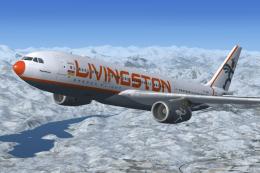
Livingston Energy Flight Airbus A330-243, registration I-LIVM. Livingston Ene…
 FSX Civil Aircraft
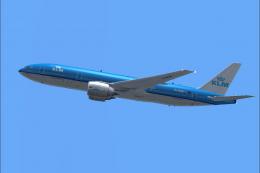
KLM Boeing 777-200, registration PH-BQG, new design. This file contains a rep…
 FSX Civil Aircraft
This fictional repaint package offers a customized Martinair-themed look for …
 FSX Civil Aircraft
This is a fixed version of the previous repaint. Fixed dutchman, logo tail ni…
 FSX Civil Aircraft
This fictional Martinair Cargo repaint brings a customized look to the PMDG 7…
 FSX Civil Aircraft
This repaint, crafted by developer Bonnie Windsor, features the KLM Boeing 77…
Be the first to leave a comment on this download.
Be the first to share your thoughts on this download.