


 FSX Civil Aircraft
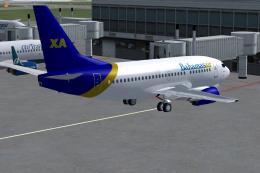
Bahamasair/Xtra Boeing 737-500 C6-BFE
Original model by Eric Cantu/FFX. Repaint by Shawn Penn. Screenshot of Bahama…
Bahamasair’s Boeing 737-500 livery brings the carrier’s classic island branding to the 737 Classic with crisp, accurately placed exterior textures for authentic regional operations in FSX. The repaint focuses on fuselage, tail, and engine markings for a faithful ramp presence and AI traffic use, and requires the freeware Erez Werber 737-500 base model.
 Rate
Rate
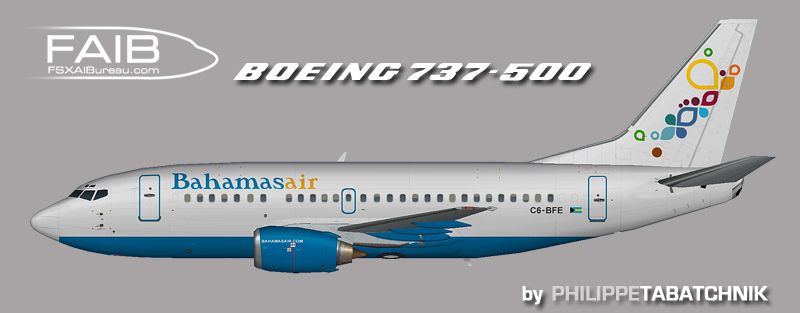
This package features a high-quality repaint of the Bahamasair Boeing 737-500, precisely tailored for flight simulation users seeking the distinctive livery of this airline, which serves routes across the Bahamas and nearby regions. The mod delivers finely crafted external textures reflecting the carrier's colors and branding. It is a freeware add-on, requiring the separate freeware base model from the Fly Away Simulation library. Model and base paint by Erez Werber. Paint by Philippe Tabatchnik.
The Boeing 737-500, part of the 737 Classic series, is renowned for its reliable performance on short- to medium-range routes. Airlines worldwide have operated this variant, noting its efficiency and ease of maintenance. Bahamasair, recognized as the official airline of the Bahamas, has historically operated a variety of jetliners to link Nassau and other key destinations throughout the region. This repaint seeks to capture the airline’s identity and markings as accurately as possible.

Side view of Bahamasair Boeing 737-500.
The repaint set consists of exterior texture files only (no virtual cockpit or panel updates). These replacement files reflect the Bahamasair livery in detail, from the fuselage color scheme to the fin and engine logos. Ensure that the base Boeing 737-500 package by Erez Werber is installed before applying these files.
[fltsim.x] section provided in this download into the aircraft.cfg. Adjust the numbering sequence accordingly, beginning with [fltsim.0] and continuing in ascending order ([fltsim.1], [fltsim.2], etc.) without skipping or repeating any numbers.This still requires the freeware base model from Erez Werber, which must be acquired separately from the Fly Away Simulation library. The textures included here were created by Philippe Tabatchnik and are released as freeware. For those seeking an authentic Bahamasair experience, this repaint accurately represents the airline’s classic branding while ensuring smooth integration with your existing setup.
Free for all simmers · 914.09 KB · Scanned clean Oct 2026
Download speed: Free tier is capped at 0.5 Mbps. PRO members download at full line speed.
texture.{airline}) inside FSX\SimObjects\Airplanes\{base-aircraft}\.aircraft.cfg in Notepad. Add a new [fltsim.X] section per the readme.readme.txt or README file. It tells you exactly where files go, what dependencies are needed, and any quirks specific to this add-on.The archive faib_735bhs_fsx.zip has 8 files and directories contained within it.
This list displays the first 500 files in the package. If the package has more, you will need to download it to view them.
| Filename/Directory | File Date | File Size |
|---|---|---|
| ReadMe.txt | 09.12.12 | 3.30 kB |
| FAIB_737_500_L.bmp | 07.28.12 | 4.00 MB |
| FAIB_737_500_T.bmp | 09.12.12 | 4.00 MB |
| faib_735_bhs.gif | 09.12.12 | 4.65 kB |
| faib_735_bhs.jpg | 09.12.12 | 91.17 kB |
| fltsim.txt | 09.12.12 | 392 B |
| flyawaysimulation.txt | 10.29.13 | 959 B |
| Go to Fly Away Simulation.url | 01.22.16 | 52 B |
Only PRO members can place votes.
More FSX & P3D add-ons hand-picked based on this download.
FSX Civil Aircraft
Original model by Eric Cantu/FFX. Repaint by Shawn Penn. Screenshot of Bahama…
 FSX Civil Aircraft
A B737-200 series in Bahamasair colors. Model by Erick Cantu, and painted by …
 FSX Civil Aircraft
This repaint offers an authentic depiction of Bahamasair’s Boeing 737-800 for…
 FSX Civil Aircraft
Bahamasair Boeing 737-400. This is a converted FS2004 plane for FSX (only for…
 FSX Civil Aircraft
This freeware repaint showcases two specific Bahamasair registrations—C6-BFW …
 FSX Civil Aircraft
This is a Bahamasair B727 in new fictional black livery. Model by Vistaliners…
 FSX Civil Aircraft
A Project Airbus A320 in red 1993 Bahamasair livery also in current paint sch…
 FSX Civil Aircraft
Model by Erick Cantu (FFX). Repaint by Felipe A. Cascales. Screenshot of Rio-…
Be the first to leave a comment on this download.
Be the first to share your thoughts on this download.