

 FSX Civil Aircraft
CamSim AI Aircraft Boeing 787-9 Base Model
This freeware package delivers a dedicated Boeing 787-9 model optimized speci…
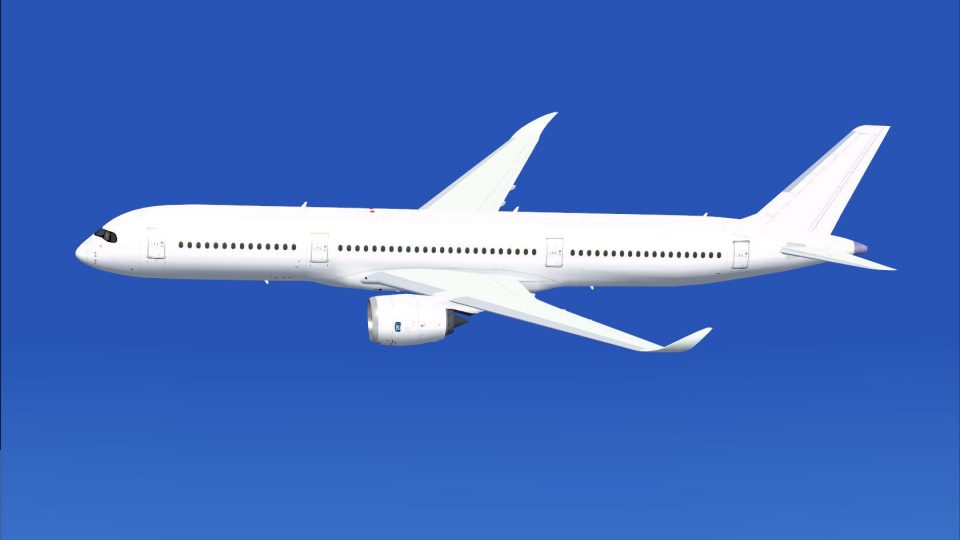
CamSim’s Airbus A350-900 AI base model brings efficient, frame-friendly airliner traffic to Microsoft Flight Simulator X with a simplified layout tailored for automated ATC use. It includes a layered paint kit and supports existing CamSim A350-900 repaint sets, making it easy to build consistent airline fleets with clean night lighting effects.
 Rate
Rate

This freeware package provides a streamlined AI version of the CamSim Airbus A350-900, suitable for Microsoft Flight Simulator X traffic integration. It features original paint kit textures, minimized elements for efficient performance, and high compatibility with any previously released CamSim A350-900 repaint sets from developer Camil Valiquette.
The A350-900 in this release is optimized for automated air traffic control (abbreviated ATC) scenarios and omits elements such as advanced ground services (AGS) and static items. This refined structure helps maintain fluid performance in busy virtual skies. The real A350-900 model, known for integrating advanced composite materials and a modern aerodynamic profile, has been carefully adapted into AI form for minimal impact on frame rates.
Included with this package is a detailed paint kit that incorporates layered textures. It enables repainters to craft unique liveries without struggling to align intricate fuselage sections. All textures originally created for current or older CamSim Airbus A350-900 releases will work smoothly with this specific model, ensuring broad compatibility for personalized fleets.

Screenshot showcasing the clean white A350-900 in flight.
On systems running Windows 7, certain dawn or dusk elements might appear missing when Preview DirectX 10 is enabled. To rectify this, open the Options > Settings > Display menu and ensure that DirectX 10 Preview is unticked, restoring the aircraft visuals to their intended state.
This complete freeware base model gives virtual aviators a way to populate their simulated airspaces with a visually faithful Airbus A350-900, all developed by Camil Valiquette and compatible across various CamSim paint sets.
Free for all simmers · 5.44 MB · Scanned clean Oct 2026
Download speed: Free tier is capped at 0.5 Mbps (this file takes approximately 2 mins at the cap). PRO members download at full line speed.
This add-on may require the following files to function properly. If this is a repaint, the dependency below is likely the base aircraft package.
FSX\SimObjects\Airplanes\. Traffic BGL files go into FSX\Scenery\World\scenery\.readme.txt or README file. It tells you exactly where files go, what dependencies are needed, and any quirks specific to this add-on.The archive camsim359ai_x.zip has 51 files and directories contained within it.
This list displays the first 500 files in the package. If the package has more, you will need to download it to view them.
| Filename/Directory | File Date | File Size |
|---|---|---|
| CamSim Airbus 350-900_V4 AI | 11.14.14 | 0 B |
| 350-900.air | 02.27.12 | 12.75 kB |
| aircraft.cfg | 11.14.14 | 15.22 kB |
| Effects.zip | 03.25.06 | 1.80 kB |
| file_id.diz | 11.14.14 | 408 B |
| model.350-900 ai v4 | 11.14.14 | 0 B |
| 350-900 ai v4.mdl | 11.12.14 | 1.08 MB |
| Model.cfg | 11.12.14 | 32 B |
| paint359v4 blanc_.jpg | 10.09.13 | 66.14 kB |
| PANEL | 11.14.14 | 0 B |
| 787_350_panel_background.bmp | 02.25.10 | 2.25 MB |
| 787_350_panel_background_night.bmp | 02.25.10 | 2.25 MB |
| Airbus_A321.cab | 09.04.06 | 2.72 MB |
| panel.cfg | 02.25.10 | 5.48 kB |
| Read Me_FSX.txt | 11.14.14 | 1.41 kB |
| SOUND | 11.14.14 | 0 B |
| Sound.cfg | 11.04.09 | 35 B |
| texture.base | 11.14.14 | 0 B |
| 359fuse_t.bmp | 10.28.13 | 1.00 MB |
| 35eng_t.bmp | 10.09.13 | 1.00 MB |
| 35int_t.bmp | 08.14.13 | 1.00 MB |
| 35tail_t.bmp | 10.28.13 | 1.00 MB |
| 35wings_t.bmp | 08.14.13 | 1.00 MB |
| gris_t.bmp | 12.09.09 | 16.07 kB |
| tail.bmp | 12.02.12 | 1.00 MB |
| thumbnail.jpg | 11.12.14 | 8.43 kB |
| w_t.bmp | 10.22.13 | 16.07 kB |
| texture.paint kit | 11.14.14 | 0 B |
| 359fuse_t.bmp | 10.28.13 | 1.00 MB |
| 359fuse_t_900V4_1.bmp | 10.07.13 | 3.00 MB |
| 359fuse_t_900V4_2.bmp | 10.07.13 | 3.00 MB |
| 359fuse_t_900V4_3.bmp | 10.07.13 | 3.00 MB |
| 359fuse_t_900V4_4.bmp | 10.07.13 | 3.00 MB |
| 35eng_t.bmp | 10.09.13 | 1.00 MB |
| 35eng_t_v4_RR.bmp | 10.09.13 | 3.00 MB |
| 35eng_t_v4_RR_LOGO Bleu.bmp | 10.09.13 | 3.00 MB |
| 35eng_t_v4_RR_Noir.bmp | 10.09.13 | 3.00 MB |
| 35int_L.bmp | 11.25.13 | 4.00 MB |
| 35int_t.bmp | 11.28.13 | 1.00 MB |
| 35int_t_24_350 V4_ab.bmp | 08.14.13 | 3.00 MB |
| 35tail_t.bmp | 10.03.13 | 1.00 MB |
| 35tail_t_NEW 350_1a.bmp | 10.03.13 | 3.00 MB |
| 35wings_t.bmp | 08.14.13 | 1.00 MB |
| 35wings_t_24 new 350_Mas_3.bmp | 07.19.09 | 3.00 MB |
| 35wings_t_24 new 350_Mas_3a.bmp | 08.14.13 | 3.00 MB |
| gris_t.bmp | 12.09.09 | 16.07 kB |
| tail.bmp | 12.02.12 | 1.00 MB |
| thumbnail.jpg | 12.05.13 | 6.51 kB |
| w_t.bmp | 10.22.13 | 16.07 kB |
| flyawaysimulation.txt | 10.29.13 | 959 B |
| Go to Fly Away Simulation.url | 01.22.16 | 52 B |
Only PRO members can place votes.
More FSX & P3D add-ons hand-picked based on this download.
FSX Civil Aircraft
This freeware package delivers a dedicated Boeing 787-9 model optimized speci…
 FSX Civil Aircraft
This comprehensive freeware package offers a fully modeled Airbus A350-900, c…
 FSX Civil Aircraft
This repaint for the Airbus A350-900 replicates Qatar Airways’ sleek livery w…
 FSX Civil Aircraft
Airbus A318 / A319 / A320 Base Model from Project Airbus. By Andy Warden, Der…
 FSX Civil Aircraft
FS2004/FSX/P3D Delta Airlines Skyteam Airbus A350-900, registration F-WZTW. M…
 FSX Civil Aircraft
Based on the CamSim model, but almost wholely change. Includes new realistic …
 FSX Civil Aircraft
This CamSim version 4 features more Animated Ground Servicing (AGS), featurin…
 FSX Civil Aircraft
This freeware package delivers a long-haul twin-aisle experience complete wit…
Read what other simmers think, or add your own.

Hi, thanks for your work are you going to convert as an AI model the camsim A350 1000 too? If not can you please tell me how to convert it?