

 FSX Military Aircraft
Republic F-105D Bare Metal Textures
This file contains three bare metal textures for the Alphasim/Virtavia F-105 …
Republic’s F-105D Thunderchief arrives in FSX with Alphasim’s model refined for modern sim use, capturing the supersonic strike fighter’s distinctive lines and period-correct presence. The package includes updated panel work, custom effects, and refreshed textures, delivering an immersive virtual cockpit experience for all-weather attack and training-style missions.
 Rate
Rate
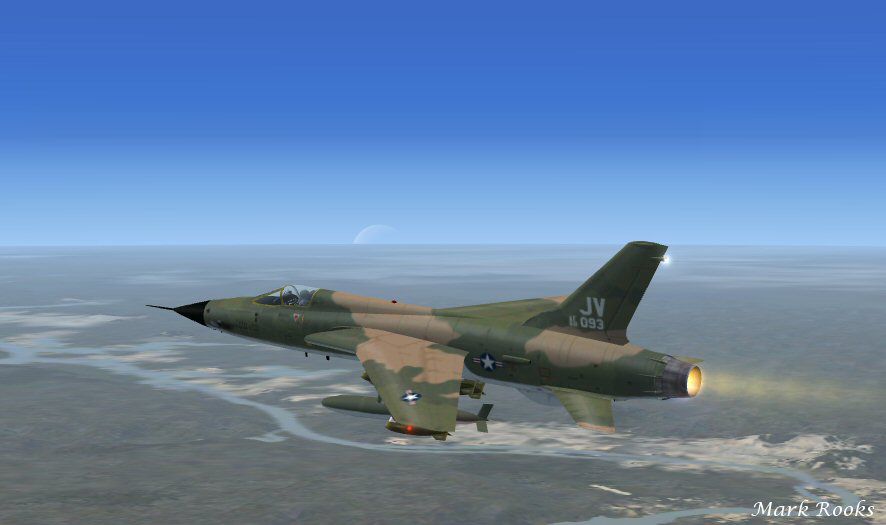
This is Alphasim's F-105D modified for Flight Simulator X. The F-105 evolved from a project that began in 1951 by Republic Aviation to develop a supersonic tactical fighter-bomber to replace the F-84Fs. The prototype first flew on October 22, 1955, but the first production aircraft, the F-105B, was not delivered to the USAF until 1958. The F-105D all-weather strike fighter and the two-place F-105F dual-purpose trainer-fighter also were built before the F105 production (833 aircraft) ended in 1964. Package includes effects and a updated panel. Textures and FSX updates by Mark Rooks of RSDG Aircraft.
Screenshot of Republic F-105D Thunderchief in flight.
Installation:
Free for all simmers · 2.21 MB · Scanned clean Oct 2026
Download speed: Free tier is capped at 0.5 Mbps. PRO members download at full line speed.
texture.{airline}) inside FSX\SimObjects\Airplanes\{base-aircraft}\.aircraft.cfg in Notepad. Add a new [fltsim.X] section per the readme.readme.txt or README file. It tells you exactly where files go, what dependencies are needed, and any quirks specific to this add-on.The archive f105d.zip has 7 files and directories contained within it.
This list displays the first 500 files in the package. If the package has more, you will need to download it to view them.
| Filename/Directory | File Date | File Size |
|---|---|---|
| Effects.zip | 02.23.14 | 5.41 kB |
| F-105D Thunderchief.zip | 02.23.14 | 2.16 MB |
| Read Me First.txt | 02.23.14 | 3.66 kB |
| screenF105D.jpg | 02.23.14 | 45.49 kB |
| Text.txt | 02.23.14 | 608 B |
| flyawaysimulation.txt | 10.29.13 | 959 B |
| Go to Fly Away Simulation.url | 01.22.16 | 52 B |
Only PRO members can place votes.
More FSX & P3D add-ons hand-picked based on this download.
FSX Military Aircraft
This file contains three bare metal textures for the Alphasim/Virtavia F-105 …
 FSX Military Aircraft
There were still two gauges missing in the last gauges upgrade; here they are…
 FSX Military Aircraft
This is an FSX Acceleration update for the Alphasim Republic F105 Thunderchie…
 FSX Military Aircraft
This is Kazunori Ito's A-10 Thunderbolt II, modified for Flight Simulator X. …
 FSX Military Aircraft
Five paint jobs included: An F-84G of the USAF, Korea 1953, and F-84G's of th…
 FSX Military Aircraft
German Democratic Republic MiG-21 demo version. The Mikoyan-Gurevich MiG-21 (…
 FSX Military Aircraft
This is Alpha Sim's Free-ware release of there Republic F-105 Thunderchief. T…
 FSX Military Aircraft
FSX Islamic Republic Of Iran Air Force Northrop RF-5A Freedom Fighter. Model …
Be the first to leave a comment on this download.
Be the first to share your thoughts on this download.