

 FSX Military Aircraft
US Marine Corps F-35C VMFA-225 Repaints
These four specialized US Marine Corps repaints bring the VMFA-225 “Vikings” …
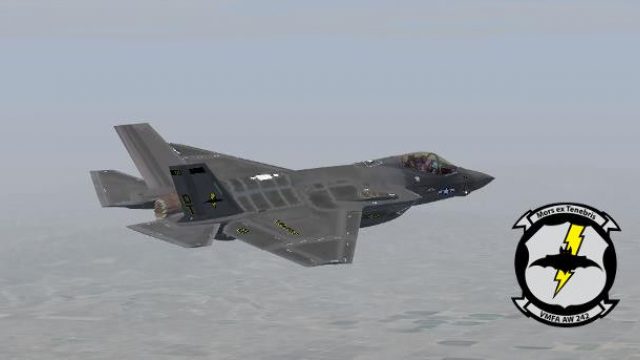
Four fictional US Marine Corps VMFA-242 “Bats” liveries bring the carrier-capable F-35C to life with crisp bat-themed tail art and subtle variation across squadron numbers 01–04. Built for Microsoft Flight Simulator X, the repaint set requires Dino Cattaneo’s freeware F-35C base package and displays cleanly in the virtual cockpit.
 Rate
Rate
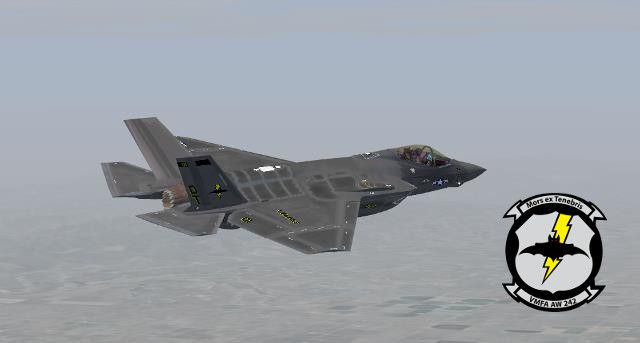
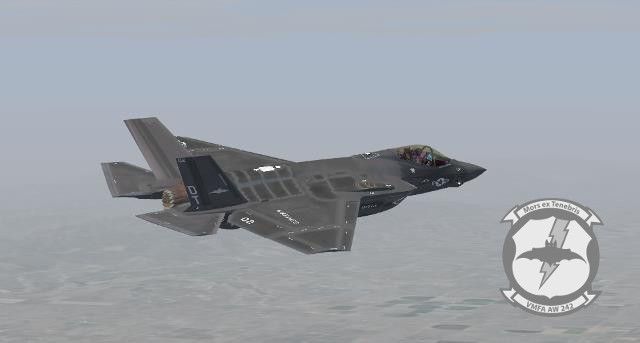
Immerse yourself in these four custom US Marine Corps textures, which envision VMFA-242 Bats transitioning from their legacy F/A-18D Hornets to the carrier-based F-35C. Created by S. Peterson, these fictional markings are designed for Microsoft Flight Simulator X and integrate seamlessly with the Dino Cattaneo F-35C freeware package. The result is a next-generation strike fighter that features the distinctive flair of the Bats insignia across a quartet of detailed liveries.
This repaint series depicts how the “Bats” might appear operating Lockheed Martin’s F-35C Lightning II if they transitioned from their F/A-18Ds. VMFA(AW)-242 is known as an all-weather Marine Fighter Attack Squadron, and these new textures capture their signature bat-themed tail art. Each variant uses the unique stealth lines of the C-model, which incorporates reinforced landing gear and enlarged wings for catapult launches aboard carriers.
The F-35C is a single-engine, fifth-generation multirole stealth aircraft designed for carrier operations. It features foldable wingtips for storage, advanced radar-absorbent materials, and a modern cockpit interface. Pilots benefit from cutting-edge sensor fusion, enabling close air support, deep-strike bombing, and air-to-air missions. Lockheed Martin’s focus on reduced radar signature and integrated avionics makes the aircraft an advanced addition to the USMC arsenal in this fictional repaint scenario.
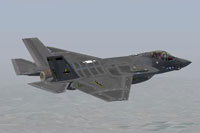
Screenshot showcasing the Bats-inspired motif on an F-35C during simulated carrier ops.
This package highlights the crew’s concept of integrating stealth jets into a Marine Corps squadron previously flying dual-role Hornets. Each repaint illustrates thoughtful paint layout, balanced color tones, and an homage to the squadron’s heritage. From canopy frame details to subtle tail artwork, every piece has been adjusted for a cohesive appearance. The single-engine design and V/STOL lineage (though this variant is the carrier-based type) remain consistent with Lockheed Martin’s overall F-35 concept, making these fictional schemes both precise and visually appealing.
Free for all simmers · 10.49 MB · Scanned clean Oct 2026
Download speed: Free tier is capped at 0.5 Mbps (this file takes approximately 3 mins at the cap). PRO members download at full line speed.
This file is a repaint — the package below is the base model it paints onto. Install it first, or the textures will have nothing to load onto.
texture.{airline}) inside FSX\SimObjects\Airplanes\{base-aircraft}\.aircraft.cfg in Notepad. Add a new [fltsim.X] section per the readme.readme.txt or README file. It tells you exactly where files go, what dependencies are needed, and any quirks specific to this add-on.The archive vmfa242.zip has 26 files and directories contained within it.
This list displays the first 500 files in the package. If the package has more, you will need to download it to view them.
| Filename/Directory | File Date | File Size |
|---|---|---|
| VMFA-242 | 01.12.16 | 0 B |
| FILE_ID.DIZ | 01.12.16 | 208 B |
| Readme.txt | 01.12.16 | 5.62 kB |
| Texture.VMFA242-01 | 01.12.16 | 0 B |
| F35C_T.dds | 01.12.16 | 16.00 MB |
| texture.cfg | 04.25.14 | 137 B |
| thumbnail.jpg | 01.12.16 | 23.01 kB |
| Thumbs.db | 04.25.14 | 8.50 kB |
| Texture.VMFA242-02 | 01.12.16 | 0 B |
| F35C_T.dds | 01.12.16 | 16.00 MB |
| texture.cfg | 04.25.14 | 137 B |
| thumbnail.jpg | 01.12.16 | 20.48 kB |
| Thumbs.db | 04.25.14 | 8.50 kB |
| Texture.VMFA242-03 | 01.12.16 | 0 B |
| F35C_T.dds | 01.12.16 | 16.00 MB |
| texture.cfg | 04.25.14 | 137 B |
| thumbnail.jpg | 01.12.16 | 20.48 kB |
| Thumbs.db | 04.25.14 | 8.50 kB |
| Texture.VMFA242-04 | 01.12.16 | 0 B |
| F35C_T.dds | 01.12.16 | 16.00 MB |
| texture.cfg | 04.25.14 | 137 B |
| thumbnail.jpg | 01.12.16 | 20.48 kB |
| Thumbs.db | 04.25.14 | 8.50 kB |
| VMFA-242.jpg | 01.12.16 | 23.01 kB |
| flyawaysimulation.txt | 10.29.13 | 959 B |
| Go to Fly Away Simulation.url | 01.22.16 | 52 B |
Only PRO members can place votes.
More FSX & P3D add-ons hand-picked based on this download.
FSX Military Aircraft
These four specialized US Marine Corps repaints bring the VMFA-225 “Vikings” …
 FSX Military Aircraft
Experience a new level of realism by adding these four fictional United State…
 FSX Military Aircraft
This package features four fictional liveries for VMFA-314 (Black Knights) in…
 FSX Military Aircraft
This package offers a set of fictional Red Devils repaints depicting how VMFA…
 FSX Military Aircraft
VMFA-242 BATS Texture Fix. This is a correct texture fix for CS VMFA-242 BATS…
 FSX Military Aircraft
This comprehensive update delivers revised fictional textures for VFA-115 Eag…
 FSX Military Aircraft
This update provides revised fictional repaints for the United States Navy’s …
 FSX Military Aircraft
Experience an updated set of fictional repaints designed for the VFA-211 Figh…
Be the first to leave a comment on this download.
Be the first to share your thoughts on this download.