

 FS98-FS2000
FS2000 Boeing 737-400
Immerse yourself in a refreshed airline appearance with this freeware add-on …
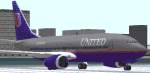
United Airlines colors bring the default Boeing 737-400 to life with a clean, period-accurate repaint for Flight Simulator 2000, enhancing runway presence and screenshots. The package updates exterior textures for a believable fleet look while keeping the original flight model and virtual cockpit behavior intact; requires the stock 737-400.
 Rate
Rate
FS2000 United Boeing 737, new colors. Repaint of the default.
737-400 United Colors.
Installation:
There are 2 methods of installation:
1.Overwrite (after backing up) the old 737-400_T1.BMP with the one supplied in this zip file. You are ready to go.
2. a.Make a new folder under 737-400 named Texture.United
b. Insert the following lines on text into the aircraft.cfg file under the other one that looks like this.
[fltsim.1]

title=United 737-400

sim=Boeing737-400

model=

panel=

sound=

texture=United

kb_checklists=Boeing737-400_check

kb_reference=Boeing737-400_ref

atc_type=Boeing

atc_id_enable=1

atc_id=N783UA

atc_id_color=0xffffffff

editable=1
Start Flight Simulator and you are ready to go.
NOTE: If you want to fly the default 737 use method 2. Also if you use method 2 and you want to go to another 737-400 (same flight model), younwill need to exit Flight Simulator and restart it. Otherwise it will still have the United textures. This didn't happen in FS98, maybe it's just a bug with FS2000.
Copyright 1999 Jeff Topp
Free for all simmers · 60.29 KB · Scanned clean Oct 2026
Download speed: Free tier is capped at 0.5 Mbps. PRO members download at full line speed.
readme.txt or README file. It tells you exactly where files go, what dependencies are needed, and any quirks specific to this add-on.The archive unitd737.zip has 7 files and directories contained within it.
This list displays the first 500 files in the package. If the package has more, you will need to download it to view them.
| Filename/Directory | File Date | File Size |
|---|---|---|
| Readme.txt | 11.12.99 | 1.01 kB |
| FILE_ID.DIZ | 11.12.99 | 358 B |
| 737-400_T1.BMP | 11.12.99 | 65.05 kB |
| United 737-400 tmnl.bmp | 11.12.99 | 15.70 kB |
| United 737-400 Pic.bmp | 11.12.99 | 228.06 kB |
| flyawaysimulation.txt | 10.29.13 | 959 B |
| Go to Fly Away Simulation.url | 01.22.16 | 52 B |
Only PRO members can place votes.
Hand-picked add-ons similar to this download.
FS98-FS2000
Immerse yourself in a refreshed airline appearance with this freeware add-on …
 FS98-FS2000
"Empress of Regina". Re-Designed by Frank Di Candia, paint by Frank Di Candia…
 FS98-FS2000
Pacific Wave Tribute no.2 to mark the end of the era of the 200 series with A…
 FS98-FS2000
48-sided based Variable-Sided Fuelage (POSKY Original Technique). Moving flap…
 FS98-FS2000
(ProMax2000) This aircraft is modify to be compatible for both FS2000 and FS9…
 FS98-FS2000
FS2000 Continental Boeing 777-200 Features maximum moving parts, maximum 3D p…
 FS98-FS2000
This model of a Boeing 777-200 was created for Microsoft Flight Simulator 200…
 FS98-FS2000
Repaint of the default 777-300 in the old twin globe TWA Airlines colors
Be the first to leave a comment on this download.
Be the first to share your thoughts on this download.