


 Myanmar
  FSX Scenery
Mawlamyine Int'l Airport
Mawlamyine Int'l Airport (VYMM), v2.0 with Traffic-Pack 2. Mawlamyine Interna…
Thanlwin Bridge scenery brings Mawlamyine’s landmark crossing near VYMM to life with accurate placement and proportions derived from satellite imagery, enhancing low-level VFR sightseeing and departures toward the Mottama side. Designed for Microsoft Flight Simulator X, it blends cleanly into the surrounding terrain and waterways for a convincing Myanmar (Burma) river scene.
Thanlwin Bridge Mawlamyine VYMM (Moulmein-Martaban) v2.0. The Thanlwin Bridge of Mawlamyine, linking Mawlamyine, the capital of Mon State, and Mottama side, is the longest and largest of its kind in Myanmar (Burma). It is 11575 feet long and has a 28-foot-wide two-lane motorway with the length of two miles, a 14-foot-wide railroad with the length of four miles, and two six-foot-wide walkways on it. The opening ceremony was on February 5, 2005 on Mawlamyine bank. This scenery was produced based on satellite pictures. Many thanks go to the teams of FSX Planner, SceneGenX, Open Ports Scanner, AFXBgDownloader, FSUIPC and Google Earth. By HOUSE-RP.
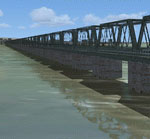
Thanlwin Bridge Mawlamyine Scenery.
Thanksgiving go to the teams of:
Planner,
SceneGenX,
Open Ports Scanner,
AFXBgDownloader,
FSUIPC and
Google Earth
INSTALLATION:
Just copy and paste the file "Thanlwin Bridge Mawlamyine.BGL" in to FSX\Addon Scenery\Scenery. Activate Addon Scenery in the Scenery Library.
That's it.
Take off at VYMM Rwy 4, turn HDG 330 and you find the bridge.
DE-INSTALLATION:
Delete the file "Thanlwin Bridge Mawlamyine.BGL" in your scenery folder.
Further-application this work as total or in dividing needs the consent of the author.
Free for all simmers · 17.25 KB · Scanned clean Oct 2026
Download speed: Free tier is capped at 0.5 Mbps. PRO members download at full line speed.
FSX\Addon Scenery\ containing scenery and texture sub-folders.readme.txt or README file. It tells you exactly where files go, what dependencies are needed, and any quirks specific to this add-on.Use these coordinates to fly directly to this location once the mod is installed.
16.44540000,97.65990000
Launch FSX or Prepar3D and use Flights → Load to open the downloaded .pln file. Your aircraft will be positioned at this location.
The archive tbvymmv2.zip has 6 files and directories contained within it.
This list displays the first 500 files in the package. If the package has more, you will need to download it to view them.
| Filename/Directory | File Date | File Size |
|---|---|---|
| thumbnail.GIF | 01.08.08 | 14.24 kB |
| FILE_ID.diz | 01.08.08 | 884 B |
| Install.txt | 01.08.08 | 1.71 kB |
| Thanlwin Bridge Mawlamyine.BGL | 01.07.08 | 3.53 kB |
| flyawaysimulation.txt | 10.29.13 | 959 B |
| Go to Fly Away Simulation.url | 01.22.16 | 52 B |
Only PRO members can place votes.
More FSX & P3D add-ons hand-picked based on this download.
FSX Scenery
Mawlamyine Int'l Airport (VYMM), v2.0 with Traffic-Pack 2. Mawlamyine Interna…
 FSX Scenery
Highlevel Barton bridge. The high level bridge over the Manchester ship canal…
 FSX Scenery
Laviolette Bridge, Trois-Rivieres, Quebec, Canada. By Gilles Boily. Laviolett…
 FSX Scenery
Golden Gate Bridge Airport (KGGB), California (CA). Adds a fictional airport …
FSX Scenery
The New River Gorge Bridge - FSX Some time ago, I ran across a post in a foru…
 FSX Scenery
Old Bridge Airport (3B6), Old Bridge, New Jersey (NJ). An improved version of…
FSX Scenery
Orwell Bridge. over the river Orwell, Ipswich, Suffolk, UK. For default scene…
FSX Scenery
Old Bridge Airport (3N6), New Jersey (NJ). Located 5 miles south of Old Bridg…
Be the first to leave a comment on this download.
Be the first to share your thoughts on this download.