


 Syrian Arab Republic
  FSX Scenery
Damascus International Fix
Damascus International Airport (OSDI), Syria, fix for use with FSX_DMSC.ZIP. …
Damascus International Airport (OSDI) brings Syria’s main gateway to life in FSX with a detailed gMax-built terminal area tuned for smooth performance, an updated AFCAD, and authentic apron layout. Animated jetways and hangar doors add activity, with optional NAV2-controlled door triggers for extra immersion during ground operations.
Damascus International Airport (OSDI), Syria. AFCAD by Salim Unuver. By Vedat Sencan. (See also FSX_DMFX.ZIP, OSDI_FIX.ZIP).
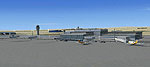
Damascus International Airport Scenery.
Installation:
1. Unzip the zip file in your main FSx ADDON SCENERY folder
2. After this,run your FSx and go in the sceneries library to add and check the new scenery:"OSDI_Damascus_Airport". Don't forgot to restart FS for it take the change, if you want see your new scenery. After restart FS search "OSDI_Damascus_Airport" in your flights library and choose on of the situations at OSDI.
3. This scenery is very detailled and created by gMax for maximum frame rate, to see alls littles details use: EXTREMLY COMPLEXE option in FS ,but I recommand to you don't use the FS scenery shadow option when you flying on this airport to have better performances, for the non power computer users I recommand to you decrease the FS scenery complexity in their: FS OPTION menu.
4. Scenery has default maving gates. For starting gates move, use crtl+j key combination. That's it, Enjoy flying to: "OSDI".
5. Scenery also has moving hangar doors. For open hangar doors which located runway 05R side set NAV2 frequance to 114.50 Mhz and for other blue hangars set NAV2 112.00 Mhz.
This archive file is provided as FREEWARE and can be used in any non-profit making package. The archive can be freely distributed but must remain complete and unaltered. Use all files at your own risk. The author of this package is not liable for any problems caused by these files.
Free for all simmers · 7.16 MB · Scanned clean Oct 2026
Download speed: Free tier is capped at 0.5 Mbps (this file takes approximately 2 mins at the cap). PRO members download at full line speed.
This add-on may require the following files to function properly. If this is a repaint, the dependency below is likely the base aircraft package.
FSX\Addon Scenery\ containing scenery and texture sub-folders.readme.txt or README file. It tells you exactly where files go, what dependencies are needed, and any quirks specific to this add-on.Use these coordinates to fly directly to this location once the mod is installed.
33.41200000,36.51500000
Launch FSX or Prepar3D and use Flights → Load to open the downloaded .pln file. Your aircraft will be positioned at this location.
The archive fsx_dmsc.zip has 162 files and directories contained within it.
This list displays the first 500 files in the package. If the package has more, you will need to download it to view them.
| Filename/Directory | File Date | File Size |
|---|---|---|
| Readme.txt | 09.22.08 | 1.92 kB |
| Scenery | 09.22.08 | 0 B |
| AFX_OSDI.bgl | 09.22.08 | 57.98 kB |
| arac.bgl | 09.22.08 | 3.51 kB |
| beetle.BGL | 09.19.08 | 22.25 kB |
| fuel.BGL | 09.21.08 | 637.50 kB |
| hangar.bgl | 09.12.08 | 444 B |
| hangar1.BGL | 09.21.08 | 15.92 kB |
| hangar2.BGL | 09.21.08 | 15.92 kB |
| hangar22.BGL | 09.21.08 | 13.65 kB |
| hangarcargo.BGL | 09.21.08 | 17.38 kB |
| hangars.BGL | 02.13.05 | 401.52 kB |
| lamba.BGL | 09.12.08 | 25.40 kB |
| lamp.bgl | 09.22.08 | 5.50 kB |
| Light.bgl | 01.11.05 | 30.63 kB |
| mer.BGL | 09.06.08 | 22.97 kB |
| mini.BGL | 09.04.08 | 21.17 kB |
| OSDIFSX.bgl | 09.22.08 | 67.26 kB |
| OSDIFSX_exc1.bgl | 09.22.08 | 148 B |
| OSDIFSX_exc10.bgl | 09.22.08 | 148 B |
| OSDIFSX_exc2.bgl | 09.22.08 | 148 B |
| OSDIFSX_exc3.bgl | 09.22.08 | 148 B |
| OSDIFSX_exc4.bgl | 09.22.08 | 148 B |
| OSDIFSX_exc5.bgl | 09.22.08 | 148 B |
| OSDIFSX_exc6.bgl | 09.22.08 | 148 B |
| OSDIFSX_exc7.bgl | 09.22.08 | 148 B |
| OSDIFSX_exc8.bgl | 09.22.08 | 148 B |
| OSDIFSX_exc9.bgl | 09.22.08 | 148 B |
| OSDI_exc7.bgl | 09.12.08 | 148 B |
| oto.bgl | 10.17.07 | 396.72 kB |
| park.bgl | 09.01.08 | 1.50 kB |
| parkin.bgl | 02.18.08 | 302.83 kB |
| sam.bgl | 09.13.08 | 1.46 kB |
| static.bgl | 07.30.06 | 641.90 kB |
| tabela.BGL | 09.21.08 | 323.05 kB |
| terminal.BGL | 09.22.08 | 506.52 kB |
| tower.BGL | 09.21.08 | 468.41 kB |
| Tower2.BGL | 08.25.08 | 6.79 kB |
| trab.BGL | 09.19.08 | 341.18 kB |
| vos.BGL | 09.19.08 | 23.84 kB |
| windsock.BGL | 08.23.08 | 15.24 kB |
| windsock1.BGL | 08.23.08 | 18.80 kB |
| windsock2.BGL | 08.23.08 | 18.53 kB |
| Texture | 09.22.08 | 0 B |
| 21.bmp | 09.20.08 | 42.74 kB |
| 21_LM.bmp | 09.20.08 | 42.74 kB |
| alim.bmp | 09.17.08 | 42.74 kB |
| apu.bmp | 05.18.08 | 42.74 kB |
| apu_lm.bmp | 07.06.06 | 42.74 kB |
| Asphalt31.bmp | 08.23.08 | 42.74 kB |
| beacon_tower.bmp | 09.22.08 | 170.74 kB |
| beacon_tower_lm.bmp | 09.22.08 | 170.74 kB |
| Beetle.bmp | 09.17.08 | 170.74 kB |
| besar.bmp | 09.16.08 | 42.73 kB |
| besar2.bmp | 09.19.08 | 170.74 kB |
| besar2_LM.bmp | 09.19.08 | 170.74 kB |
| besar_LM.bmp | 09.16.08 | 42.73 kB |
| Blister.bmp | 09.17.08 | 42.74 kB |
| bluehanger1.bmp | 09.08.08 | 128.07 kB |
| bluehanger1_lm.bmp | 02.13.05 | 170.75 kB |
| bluehanger2.bmp | 09.08.08 | 128.07 kB |
| bluehanger2_lm.bmp | 02.13.05 | 170.75 kB |
| brownhanger1.bmp | 02.13.05 | 170.75 kB |
| brownhanger1_lm.bmp | 02.13.05 | 170.75 kB |
| brownhanger2.bmp | 02.13.05 | 170.75 kB |
| brownhanger2_lm.bmp | 02.13.05 | 170.75 kB |
| BS_1061.bmp | 08.21.07 | 170.75 kB |
| BS_1061_n.bmp | 06.28.07 | 170.75 kB |
| carpark.bmp | 09.21.08 | 42.74 kB |
| carpark_LM.bmp | 09.21.08 | 42.74 kB |
| cati1.bmp | 09.18.08 | 170.74 kB |
| cati1_LM.bmp | 09.18.08 | 170.74 kB |
| cim.bmp | 08.29.08 | 42.74 kB |
| depar.bmp | 09.20.08 | 42.73 kB |
| deparb.bmp | 09.17.08 | 42.73 kB |
| deparb_LM.bmp | 09.16.08 | 42.73 kB |
| depart.bmp | 08.21.08 | 16.07 kB |
| depar_LM.bmp | 09.20.08 | 42.73 kB |
| duvar.bmp | 09.17.08 | 42.74 kB |
| Eq.bmp | 09.17.08 | 42.74 kB |
| Eq_LM.bmp | 05.12.07 | 42.74 kB |
| ESDG_ramp.BMP | 09.17.08 | 42.74 kB |
| ESDG_ramp_lm.BMP | 09.17.08 | 42.74 kB |
| fencewnograss.bmp | 07.07.05 | 85.42 kB |
| fuel.bmp | 09.21.08 | 170.74 kB |
| fuelus.bmp | 09.21.08 | 170.74 kB |
| fuelus_lm.bmp | 09.21.08 | 170.74 kB |
| fuel_LM.bmp | 09.22.08 | 170.74 kB |
| hangar_1.bmp | 09.17.08 | 341.40 kB |
| hangar_11.bmp | 09.21.08 | 170.74 kB |
| hangar_11_LM.bmp | 09.21.08 | 170.74 kB |
| hangar_1_lm.bmp | 09.17.08 | 341.40 kB |
| hanroof.bmp | 09.17.08 | 170.74 kB |
| hanroof_LM.bmp | 09.17.08 | 170.74 kB |
| han_31.bmp | 09.21.08 | 170.74 kB |
| han_31_LM.bmp | 09.21.08 | 170.74 kB |
| kaldirim.bmp | 09.17.08 | 85.38 kB |
| kaldirimtop.bmp | 09.17.08 | 85.40 kB |
| kapi.bmp | 09.15.08 | 21.40 kB |
| kapi_LM.bmp | 09.15.08 | 21.40 kB |
| klima.bmp | 09.09.08 | 42.74 kB |
| kuleyan.bmp | 08.27.08 | 64.07 kB |
| kuleyan_LM.bmp | 08.27.08 | 64.07 kB |
| L677.bmp | 06.28.07 | 170.75 kB |
| L677_n.bmp | 06.28.07 | 170.75 kB |
| laguna_green_t.bmp | 10.19.07 | 341.40 kB |
| laguna_green_t_LM.bmp | 10.19.07 | 170.74 kB |
| lfrock.bmp | 01.30.05 | 42.74 kB |
| light_poles.bmp | 09.02.08 | 32.07 kB |
| light_poles_LM.bmp | 09.02.08 | 32.07 kB |
| LIPVGolf.bmp | 06.11.07 | 42.74 kB |
| LIPVGolf_LM.bmp | 10.19.07 | 42.74 kB |
| mac_stair.bmp | 09.09.08 | 170.74 kB |
| mac_stairs1.bmp | 09.09.08 | 42.74 kB |
| Mini.bmp | 09.17.08 | 170.74 kB |
| oncep.bmp | 09.17.08 | 85.40 kB |
| oncep_LM.bmp | 09.17.08 | 85.40 kB |
| packagecar.bmp | 07.12.06 | 85.40 kB |
| packagecar_LM.bmp | 05.18.08 | 85.40 kB |
| papi.bmp | 09.17.08 | 2.74 kB |
| parking concrete.bmp | 02.17.08 | 170.78 kB |
| parking dirt.bmp | 02.17.08 | 170.78 kB |
| PAZ3102.bmp | 08.21.07 | 170.75 kB |
| PAZ3102_n.bmp | 06.04.07 | 170.75 kB |
| redhangerconcrete.bmp | 02.13.05 | 42.75 kB |
| rekab.bmp | 09.17.08 | 42.74 kB |
| tabar.bmp | 09.22.08 | 85.38 kB |
| tabar_LM.bmp | 09.22.08 | 85.38 kB |
| tabela.bmp | 09.11.08 | 85.40 kB |
| tabela1.bmp | 09.22.08 | 85.38 kB |
| tabela1_LM.bmp | 09.22.08 | 85.38 kB |
| tabela3.bmp | 09.20.08 | 170.78 kB |
| tabela3_LM.bmp | 09.20.08 | 170.78 kB |
| tabela_LM.bmp | 09.11.08 | 85.40 kB |
| term1.bmp | 09.17.08 | 170.74 kB |
| term1_LM.bmp | 09.17.08 | 170.74 kB |
| termdir.bmp | 09.17.08 | 5.38 kB |
| termdir_LM.bmp | 09.17.08 | 5.38 kB |
| terminal.bmp | 09.16.08 | 85.40 kB |
| terminal_LM.bmp | 09.16.08 | 85.40 kB |
| termort1.bmp | 09.19.08 | 170.74 kB |
| termort1_LM.bmp | 09.19.08 | 170.74 kB |
| termust.bmp | 09.16.08 | 42.73 kB |
| termust_LM.bmp | 09.16.08 | 42.73 kB |
| termyan.bmp | 09.17.08 | 170.73 kB |
| termyan_LM.bmp | 09.17.08 | 170.73 kB |
| Thumbs.db | 09.22.08 | 658.00 kB |
| tower.bmp | 09.17.08 | 85.40 kB |
| towerbin.bmp | 09.18.08 | 170.74 kB |
| towerbin_LM.bmp | 09.18.08 | 170.74 kB |
| towerpen.bmp | 09.17.08 | 42.74 kB |
| towerpen_LM.bmp | 09.17.08 | 42.74 kB |
| towertap.bmp | 09.19.08 | 85.40 kB |
| towertap_LM.bmp | 09.19.08 | 85.40 kB |
| tower_LM.bmp | 09.17.08 | 85.40 kB |
| trolly.bmp | 05.18.08 | 42.74 kB |
| VW-Bus_Feuerwehr.bmp | 09.17.08 | 170.74 kB |
| windsock.bmp | 10.12.06 | 42.75 kB |
| zemin.bmp | 09.17.08 | 170.74 kB |
| zemin_LM.bmp | 09.17.08 | 170.74 kB |
| flyawaysimulation.txt | 10.29.13 | 959 B |
| Go to Fly Away Simulation.url | 01.22.16 | 52 B |
Only PRO members can place votes.
More FSX & P3D add-ons hand-picked based on this download.
FSX Scenery
Damascus International Airport (OSDI), Syria, fix for use with FSX_DMSC.ZIP. …
 FSX Scenery
Damascus Fix, for use with FSX_DMSC.ZIP. Corrects the AFCAD and stops scenery…
 FSX Scenery
Princess Juliana International Airport (TNCM) in Saint Marteen, Netherlands A…
 FSX Scenery
Barbados International Airport (TBPB). Grantley Adams International Airport f…
 FSX Scenery
Dubai International Airport (OMDB), Dubai. Includes a new passenger terminal …
 FSX Scenery
Soekarno-Hatta International Airport (WIII), Jakarta, Indonesia. An update to…
 FSX Scenery
San Diego International Airport, California (CA), USA. This photoreal scenery…
 FSX Scenery
Suvarnabhumi International Airport (VTBS), Bangkok, Thailand, v1.1. Includes …
Read what other simmers think, or add your own.

Hi,
I have just installed the fsx_dmsc.zip file as instructed, ran my fsx, but there was no scenery named OSDI_Damascus_Airport to check!!!
I tried to add it manually, also no results.
Can you help?
Im running on Windows 8.1 OS.
Thanks,
Wael