

 FS2002
Yak-130 jet trainer
An FSDS aircraft with 512x512 textures and full moving parts including moving…
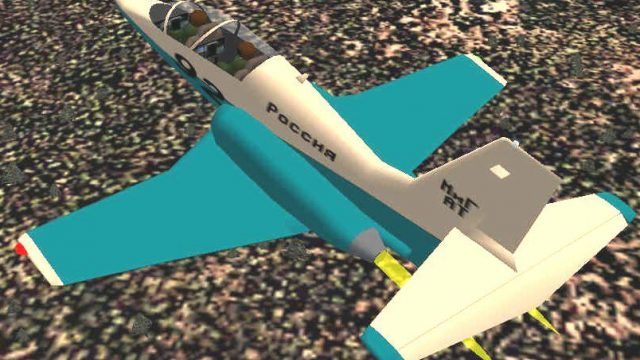
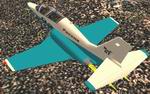
MiG Advanced Trainer brings a Soviet-inspired supersonic jet into Microsoft Flight Simulator 2002 with crisp 512×512 textures, animated crew and rolling gear, plus working nav, strobe, landing lights and a dramatic exhaust effect. A transparent canopy, interactive virtual cockpit, custom panel and gauges, and tuned flight dynamics support realistic high-speed training.
 Rate
Rate
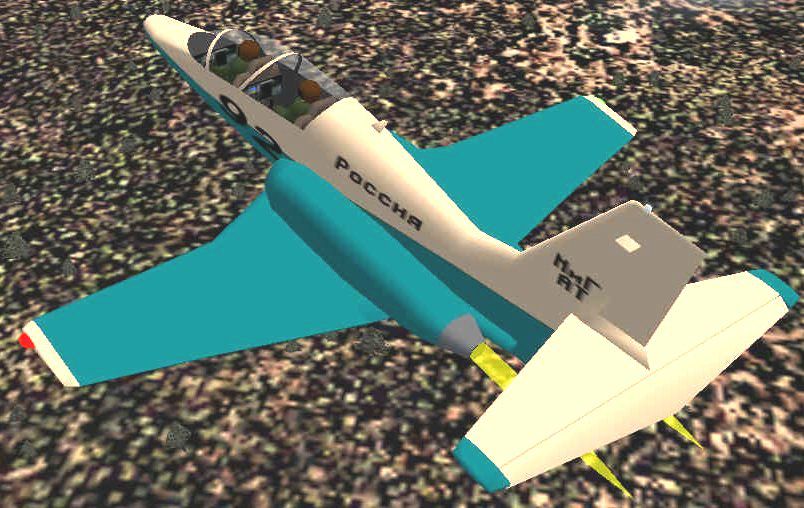
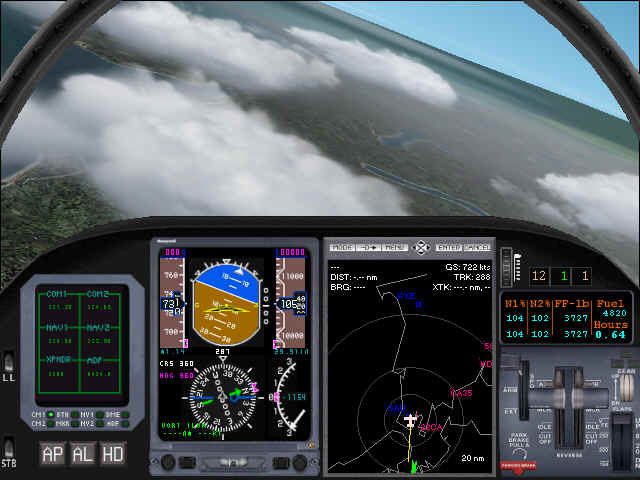
This freeware add-on brings a refined MiG Advanced Trainer model into Microsoft Flight Simulator 2002. It combines supersonic performance, vivid detail, and precise flight characteristics to deliver an immersive training environment. Created by Chuck Dome, this package includes a fully customized platform that pilots can explore without extra downloads.
This aircraft was developed using Flight Simulator Design Studio (FSDS), ensuring a streamlined and efficient structure. The outer fuselage and control surfaces are accompanied by 512×512 resolution textures, which offer crisp visual clarity. Additionally, the external model showcases dynamic features such as rolling wheels and lifelike animations for the onboard crew. Integrated navigation and strobe lights add situational awareness for night operations, while the flaming exhaust emphasizes its supersonic prowess.
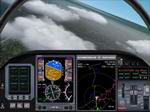
The transparent cockpit canopy allows unobstructed observation of the flight deck. Meanwhile, a fully realized virtual cockpit opens up an interactive viewpoint, enabling operators to check instruments, switches, and displays. A series of custom gauges—designed specifically for this trainer—work in conjunction with a custom panel to recreate the authentic layout seen in advanced MiG training aircraft. These implementations help convey realistic data readings, from engine performance to flight navigation indicators.
The bespoke flight model was meticulously constructed to replicate supersonic handling attributes. When rotating at takeoff or conducting maneuvering drills, the flight envelope remains stable. High-speed runs and agility maneuvers highlight the airframe’s aerodynamic refinement, reflecting the real-world trainer’s capacity for advanced pilot instruction. Landing lights are also included for safe touchdown visibility in darker conditions or adverse weather scenarios.
This MiG Advanced Trainer is the work of Chuck Dome, who invested considerable effort into balancing functionality and visual fidelity. The combination of a transparent cockpit, well-optimized textures, and rolling animations helps ensure an engaging environment for flight simulation enthusiasts seeking an authentic experience in a Soviet-inspired supersonic trainer.
Free for all simmers · 620.77 KB · Scanned clean Oct 2026
Download speed: Free tier is capped at 0.5 Mbps. PRO members download at full line speed.
readme.txt or README file. It tells you exactly where files go, what dependencies are needed, and any quirks specific to this add-on.The archive migat02.zip has 41 files and directories contained within it.
This list displays the first 500 files in the package. If the package has more, you will need to download it to view them.
| Filename/Directory | File Date | File Size |
|---|---|---|
| aircraft | 10.28.01 | 0 B |
| migat | 10.28.01 | 0 B |
| migat_notes.txt | 07.08.01 | 0 B |
| migat02.jpg | 10.29.01 | 99.65 kB |
| migat02p.jpg | 10.28.01 | 39.31 kB |
| migat.air | 10.29.01 | 9.83 kB |
| Aircraft.cfg | 10.29.01 | 5.22 kB |
| model | 10.28.01 | 0 B |
| Model.cfg | 05.31.01 | 24 B |
| migat.mdl | 10.28.01 | 1.00 MB |
| sound | 10.28.01 | 0 B |
| Sound.cfg | 05.31.01 | 30 B |
| panel | 10.28.01 | 0 B |
| MIGAT.BMP | 10.27.01 | 469.80 kB |
| panel.cfg | 10.29.01 | 560 B |
| texture | 10.28.01 | 0 B |
| MIGRD2.BMP | 10.28.01 | 5.05 kB |
| MIGGRA.BMP | 05.31.01 | 5.05 kB |
| MIGCHR.BMP | 05.31.01 | 5.05 kB |
| MIGENG.BMP | 10.28.01 | 17.05 kB |
| migfan.bmp | 04.22.01 | 257.05 kB |
| MIGTAN.BMP | 06.02.01 | 5.05 kB |
| MIGRED.BMP | 10.28.01 | 5.05 kB |
| MIGFUR.BMP | 10.28.01 | 257.05 kB |
| MIGFUL.BMP | 10.28.01 | 257.05 kB |
| mpn.bmp | 10.28.01 | 257.05 kB |
| mpn_lm.bmp | 10.28.01 | 257.05 kB |
| migwhl.bmp | 04.22.01 | 17.05 kB |
| FILE_ID.DIZ | 10.28.01 | 348 B |
| migat02.txt | 10.28.01 | 675 B |
| gauges | 10.28.01 | 0 B |
| migap.gau | 10.28.01 | 49.50 kB |
| miggps.gau | 10.23.01 | 320.07 kB |
| cdquad.gau | 12.18.00 | 194.50 kB |
| chaeng.gau | 04.25.01 | 105.00 kB |
| czr6.gau | 10.21.01 | 39.00 kB |
| migll.gau | 10.28.01 | 28.00 kB |
| castr.gau | 04.10.01 | 31.00 kB |
| atrm.gau | 05.02.01 | 35.50 kB |
| flyawaysimulation.txt | 10.29.13 | 959 B |
| Go to Fly Away Simulation.url | 01.22.16 | 52 B |
Only PRO members can place votes.
Hand-picked add-ons similar to this download.
FS2002
An FSDS aircraft with 512x512 textures and full moving parts including moving…
 FS2002
will not work in prior MSFS versions!! A pair of classic Fleet Canuck 80, Can…
 FS2002
As a Cessna Caravan Amphibian pilot in British Columbia, fly tourists and res…
 FS2002
As a Cessna Caravan Amphibian pilot in Yukon, fly tourists and residents from…
 FS2002
Based on FS2K Concorde, this Concorde package from Mario Coelho is a complete…
 FS2002
The FDE was reworked for FS02 The new FS02 panel features a Visor, Heads up T…
 FS2002
Victory 00. Accurate Gmax model with full moving parts and photoreal textures…
 FS2002
powered by RR engines. The A340-500 is 222 feet in overall length with a maxi…
Be the first to leave a comment on this download.
Be the first to share your thoughts on this download.