


 Canada
  FSX Scenery
Abbotsford International (CYXX)
Abbotsford International (CYXX), British Columbia, Canada. The airport has be…
Abbotsford International Airport (CYXX) in British Columbia gets a detailed rebuild for FSX, aligning layout to satellite imagery with corrected thresholds, updated VASI, and extended runways 01/19 and 07/25. Enhanced aprons add roads, buildings, static traffic, vegetation, fuel truck, animated jetways, plus ramp floodlighting and red obstruction lights at dusk-to-dawn.
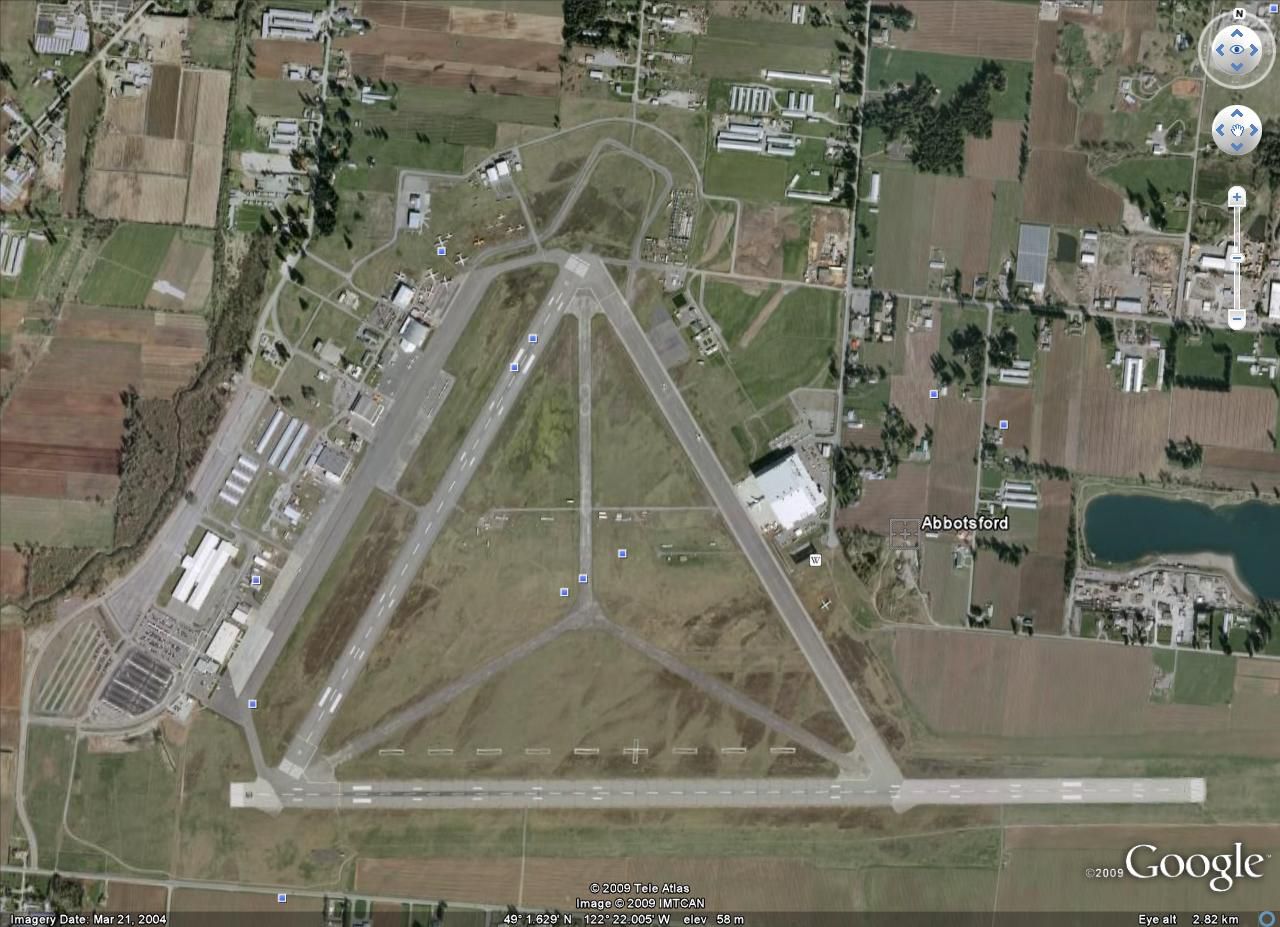
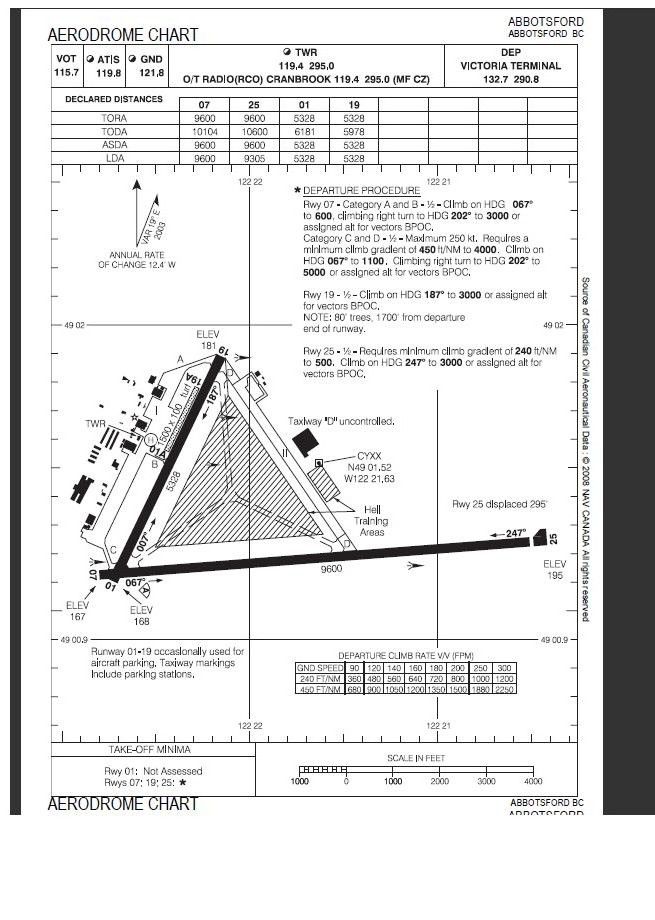
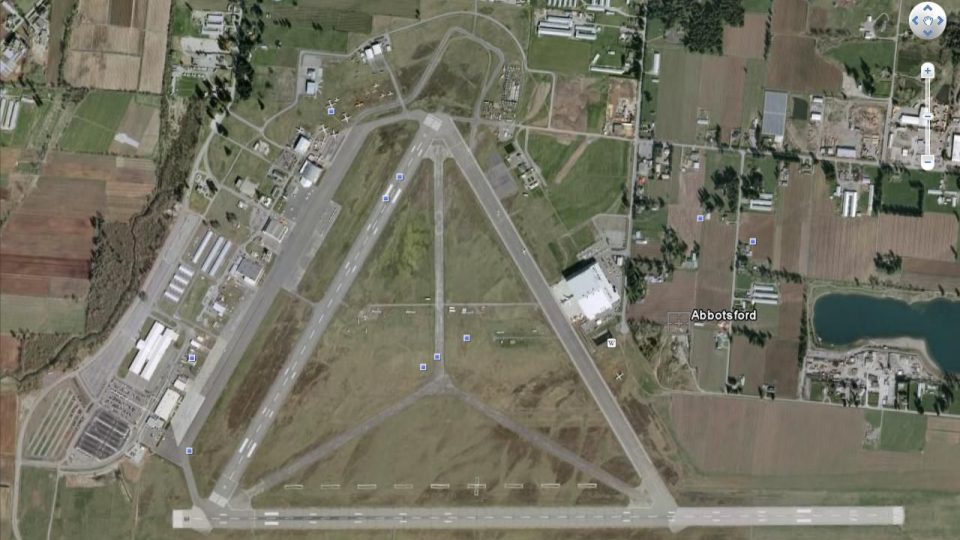
Abbotsford International Airport (CYXX), BC, Canada. This airport has been completely reworked using ADE v1.39 and satellite images from Google Earth and Microsoft Virtual Earth. Both runways have been extended to correct length: 01/19 from 5260 feet to 5328 feet and 07/25 from 7988 feet to 9600 feet. Thesholds have been corrected. VASI updated on both runways. Crosswind runways activated. Roads, buildings and apron areas updated. Static aircraft, vehicles, vegetation, fuel truck and automated jetways added. Flood lights added to cover ramp and parking areas, also red obstruction lights have been added to some taller buildings. These lights are visibled between the hours of dusk and dawn. By Robert Catherall.
There are 3 BGL files: CYXX_ADE_RWC.BGL, CYXX_ADE_RWC_CW.BGL and CYXX_ADE_RWC.CVX.BGL
The CYXX_ADE_RWC_CW.BGL version is with Xwind runways activated and in full operation. The other version CYXX_ADE_RWC.BGL is without.
NOTE: When using ATIS with CYXX_ADE_RWC_CW.BGL file you will hear the fake runways. This is the method used in activating Xwind runways created by Jim Vile and should be ignored or if preferred use the version CYXX_ADE_RWC.BGL.
To Install:
1. Simply take the BGL file of your choice and place it together with CYXX_ADE_RWC_CVX.BGL in your 'FSX->Addon Scenery->Scenery' Folder.
2. Place the included FSX_LTS folder in your FSX->Addon Scenery Folder and activate it there.
3. Start FSX and the changes will be present.
To Uninstall:
1. Delete the two BGL files from your Scenery Folder and the default FSX airport will be reactivated.
2. The FSX_LTS folder can be left in place or deactivated by going into 'FSX Settings-Scenery Library' Hi-Light the area and then Click Delete Area. You can then if you wish remove the FSX_LTS folder.
Acknowledgements
ADE Utility (freeware) by Jon Masterson.
Jim Vile for his Technique that activates crosswind runways.
Jim Dhaenens for providing the library of objects contained in FSX_LTS folder. You may use them without further permission as long as you ensure proper credit is given. No commercial use is authorized without specific permission.
Last but not least many thanks to Ray Smith who provided me with many tips/tricks regarding the use of ADE and for trouble shooting my file.
Free for all simmers · 715.44 KB · Scanned clean Oct 2026
Download speed: Free tier is capped at 0.5 Mbps. PRO members download at full line speed.
FSX\Addon Scenery\ containing scenery and texture sub-folders.readme.txt or README file. It tells you exactly where files go, what dependencies are needed, and any quirks specific to this add-on.Use these coordinates to fly directly to this location once the mod is installed.
49.02527800,-122.36138900
Launch FSX or Prepar3D and use Flights → Load to open the downloaded .pln file. Your aircraft will be positioned at this location.
The archive cyxx-1.zip has 14 files and directories contained within it.
This list displays the first 500 files in the package. If the package has more, you will need to download it to view them.
| Filename/Directory | File Date | File Size |
|---|---|---|
| CYXX Airport Chart.jpg | 04.05.09 | 140.08 kB |
| CYXX Satellite.jpg | 04.05.09 | 171.17 kB |
| Scenery | 04.07.09 | 0 B |
| lightobj.bgl | 04.07.09 | 643.63 kB |
| lightobj.txt | 04.07.09 | 547 B |
| Texture | 04.07.09 | 0 B |
| almwht.dds | 04.07.09 | 64.12 kB |
| lights1.dds | 04.07.09 | 32.12 kB |
| ReadMe.txt | 04.09.09 | 2.73 kB |
| CYXX_ADE_RWC_CW.BGL | 04.09.09 | 87.65 kB |
| CYXX_ADE_RWC.BGL | 04.09.09 | 87.30 kB |
| CYXX_ADE_RWC_CVX.bgl | 04.09.09 | 421 B |
| flyawaysimulation.txt | 10.29.13 | 959 B |
| Go to Fly Away Simulation.url | 01.22.16 | 52 B |
Only PRO members can place votes.
More FSX & P3D add-ons hand-picked based on this download.
FSX Scenery
Abbotsford International (CYXX), British Columbia, Canada. The airport has be…
 FSX Scenery
Princess Juliana International Airport (TNCM) in Saint Marteen, Netherlands A…
 FSX Scenery
Barbados International Airport (TBPB). Grantley Adams International Airport f…
 FSX Scenery
Dubai International Airport (OMDB), Dubai. Includes a new passenger terminal …
 FSX Scenery
Soekarno-Hatta International Airport (WIII), Jakarta, Indonesia. An update to…
 FSX Scenery
San Diego International Airport, California (CA), USA. This photoreal scenery…
 FSX Scenery
Suvarnabhumi International Airport (VTBS), Bangkok, Thailand, v1.1. Includes …
 FSX Scenery
Scenery Miami International Airport (KMIA), Florida (FL). Includes updated ta…
Be the first to leave a comment on this download.
Be the first to share your thoughts on this download.