


 Australia
  FSX Scenery
Bathurst Airport
Bathurst Airport (CZBF). Bathurst Airport is located in beautifull New Brunsw…
Bathurst - Mount Panorama scenery brings central New South Wales to life with crisp photoreal ground textures, detailed town areas, a modeled local airport, and the iconic Mount Panorama racing circuit known for the Bathurst 1000. Built for Microsoft Flight Simulator X, it also includes drivable car SimObjects for track-level sightseeing.
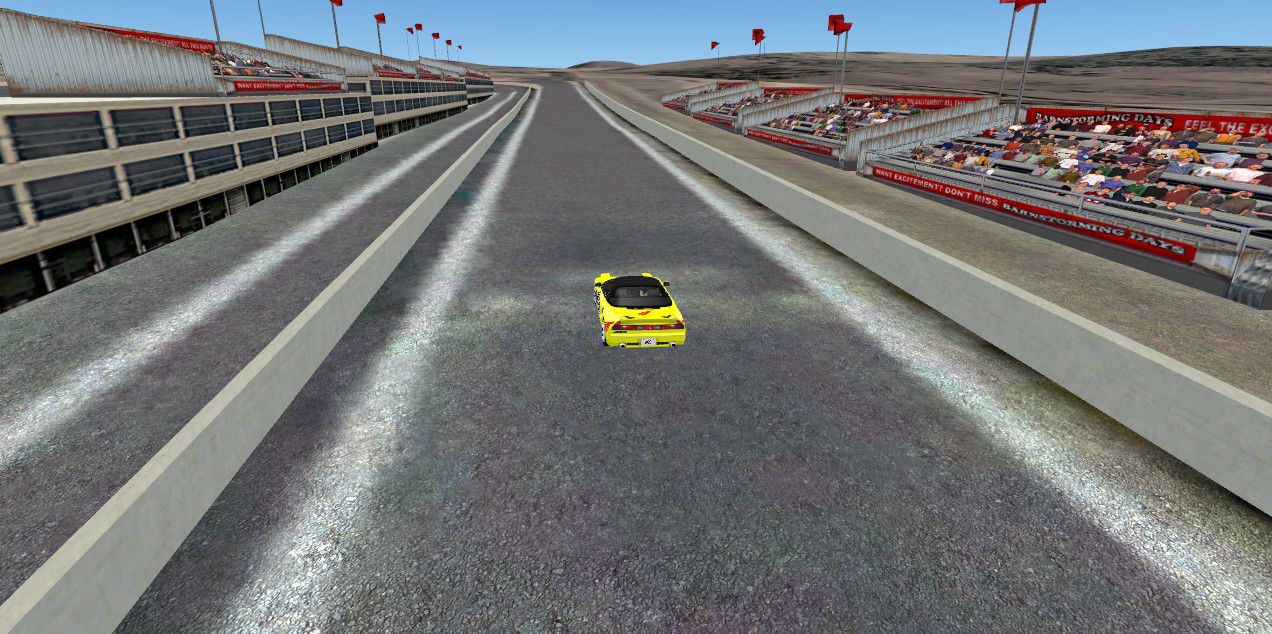



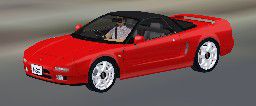
Bathurst - Mount Panorama, Australia, photoreal. Bathhurst/Mount Panorama is well known for the "Bathurst 1000" car race every year. Car races are held here all year around and this scenery adds the airport, town/city areas as well as the Mount Panorama Race Track. By David Sheridan.
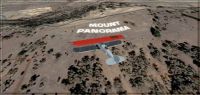
Bathurst - Mount Panorama Scenery.
Bathurst - Mount Panorama (Australia) Photoreal - FSX
Bathhurst/Mount Panorama is well know for the "Bathurst 1000" Car Race every year. Car Races are held here all year around and this scenery adds the Airport, Town/City areas as well as the Mount Panorama Race Track.
The High Resolution of this Scenery is that good you are able to use one of the Cars included in this Package to test youe skills are Car Racing :-)
1.Copy and Paste the "bathurst" folder into your "addon scenery" folder
2.Copy and Paste the "AFX_YMP1_ALT" BGL file into your "Scenery/World/Scenery" folder
3.Copy and Paste the "Honda & bmw" folder into your "SimObjects/Airplanes" folder
4.Copy and Paste the files inside the "flights" folder into your saved flights folder (My Documents/Flight Simulator X Files/)
Once you have done the above 4 things you can then start FSX and Activate the Bathurst Scenery.
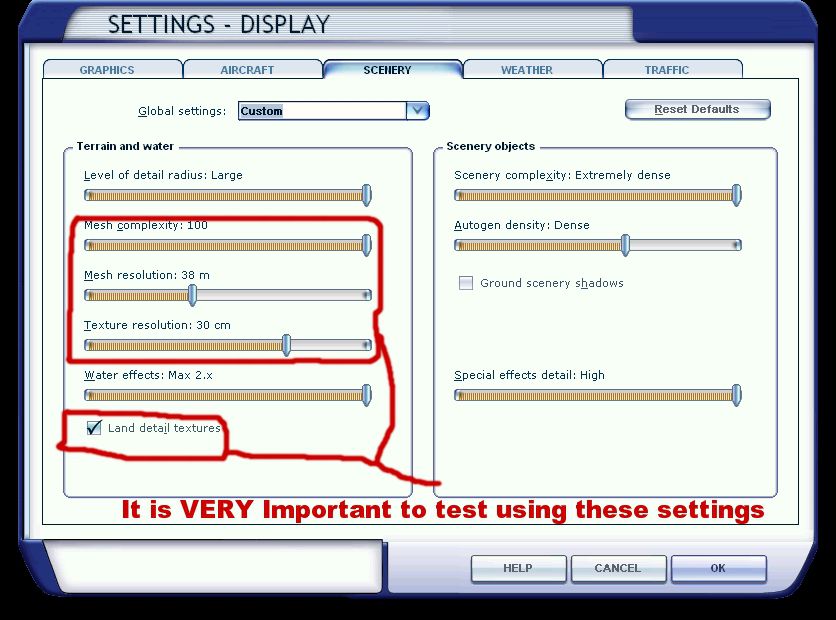
PLEASE MAKE SURE YOU LOOK AT THE "settings.jpg" I have enclosed and if possible try using those settings or as close as you can to them. These setting will have little or no effect on your Framerates.
Regards
Dave
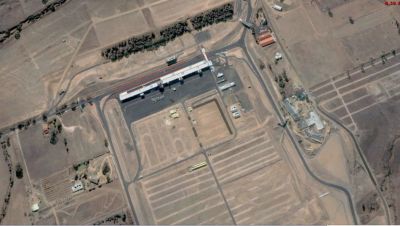
Bathurst - Mount Panorama Scenery.
Free for all simmers · 294.08 MB · Scanned clean Sep 2026
Download speed: Free tier is capped at 0.5 Mbps (this file takes approximately 1h 22m at the cap). PRO members download at full line speed.
FSX\Addon Scenery\ containing scenery and texture sub-folders.readme.txt or README file. It tells you exactly where files go, what dependencies are needed, and any quirks specific to this add-on.Use these coordinates to fly directly to this location once the mod is installed.
-33.41670000,149.57780000
Launch FSX or Prepar3D and use Flights → Load to open the downloaded .pln file. Your aircraft will be positioned at this location.
The archive bathhurst.zip has 245 files and directories contained within it.
This list displays the first 500 files in the package. If the package has more, you will need to download it to view them.
| Filename/Directory | File Date | File Size |
|---|---|---|
| scenery | 11.30.09 | 0 B |
| bath1.bgl | 11.25.09 | 3.32 MB |
| bath10.bgl | 11.25.09 | 1.16 MB |
| bath11.bgl | 11.25.09 | 761.41 kB |
| bath12.bgl | 11.25.09 | 872.55 kB |
| bath13.bgl | 11.27.09 | 986.49 kB |
| bath14.bgl | 11.27.09 | 2.87 MB |
| bath15.bgl | 11.27.09 | 3.30 MB |
| bath16.bgl | 11.27.09 | 2.87 MB |
| bath17.bgl | 11.27.09 | 1.72 MB |
| bath18.bgl | 11.27.09 | 1.30 MB |
| bath19.bgl | 11.27.09 | 1.51 MB |
| bath2.bgl | 11.25.09 | 3.44 MB |
| bath20.bgl | 11.27.09 | 1.55 MB |
| bath21.bgl | 11.27.09 | 1.55 MB |
| bath24.bgl | 11.27.09 | 1.88 MB |
| bath25.bgl | 11.27.09 | 1001.19 kB |
| bath26.bgl | 11.27.09 | 1.27 MB |
| bath27.bgl | 11.27.09 | 1.43 MB |
| bath28.bgl | 11.27.09 | 1.24 MB |
| bath29.bgl | 11.27.09 | 1.10 MB |
| bath3.bgl | 11.25.09 | 2.23 MB |
| bath30.bgl | 11.27.09 | 3.60 MB |
| bath31.bgl | 11.27.09 | 4.44 MB |
| bath32.bgl | 11.27.09 | 2.55 MB |
| bath33.bgl | 11.27.09 | 3.32 MB |
| bath34.bgl | 11.27.09 | 2.79 MB |
| bath35.bgl | 11.27.09 | 4.11 MB |
| bath36.bgl | 11.27.09 | 4.32 MB |
| bath37.bgl | 11.27.09 | 3.39 MB |
| bath38.bgl | 11.27.09 | 3.49 MB |
| bath39.bgl | 11.27.09 | 4.04 MB |
| bath4.bgl | 11.25.09 | 2.43 MB |
| bath40.bgl | 11.27.09 | 4.47 MB |
| bath41.bgl | 11.27.09 | 1.78 MB |
| bath42.bgl | 11.27.09 | 8.38 MB |
| bath43.bgl | 11.27.09 | 3.92 MB |
| bath44.bgl | 11.27.09 | 3.04 MB |
| bath45.bgl | 11.27.09 | 2.82 MB |
| bath46.bgl | 11.27.09 | 3.69 MB |
| bath47.bgl | 11.27.09 | 2.92 MB |
| bath48.bgl | 11.27.09 | 2.61 MB |
| bath49.bgl | 11.27.09 | 2.81 MB |
| bath5.bgl | 11.25.09 | 1.91 MB |
| bath50.bgl | 11.27.09 | 5.07 MB |
| bath51.bgl | 11.27.09 | 5.46 MB |
| bath52.bgl | 11.27.09 | 3.64 MB |
| bath53.bgl | 11.27.09 | 2.73 MB |
| bath54.bgl | 11.27.09 | 3.15 MB |
| bath55.bgl | 11.27.09 | 2.78 MB |
| bath56.bgl | 11.27.09 | 3.13 MB |
| bath57.bgl | 11.27.09 | 2.76 MB |
| bath58.bgl | 11.27.09 | 3.96 MB |
| bath59.bgl | 11.27.09 | 3.47 MB |
| bath6.bgl | 11.25.09 | 249.52 kB |
| bath60.bgl | 11.27.09 | 4.00 MB |
| bath61.bgl | 11.27.09 | 2.57 MB |
| bath62.bgl | 11.27.09 | 3.36 MB |
| bath63.bgl | 11.27.09 | 3.84 MB |
| bath64.bgl | 11.27.09 | 4.21 MB |
| bath65.bgl | 11.27.09 | 3.20 MB |
| bath66.bgl | 11.27.09 | 3.20 MB |
| bath69.bgl | 11.27.09 | 1.70 MB |
| bath7.bgl | 11.25.09 | 847.94 kB |
| bath70.bgl | 11.27.09 | 2.67 MB |
| bath71.bgl | 11.27.09 | 3.45 MB |
| bath72.bgl | 11.27.09 | 2.87 MB |
| bath73.bgl | 11.27.09 | 3.18 MB |
| bath74.bgl | 11.27.09 | 2.44 MB |
| bath75.bgl | 11.27.09 | 3.24 MB |
| bath76.bgl | 11.27.09 | 3.09 MB |
| bath77.bgl | 11.27.09 | 2.64 MB |
| bath78.bgl | 11.27.09 | 2.55 MB |
| bath79.bgl | 11.27.09 | 2.49 MB |
| bath8.bgl | 11.25.09 | 1.28 MB |
| bath80.bgl | 11.27.09 | 1.80 MB |
| bath81.bgl | 11.27.09 | 2.55 MB |
| bath82.bgl | 11.27.09 | 3.36 MB |
| bath83.bgl | 11.27.09 | 3.52 MB |
| bath84.bgl | 11.27.09 | 4.36 MB |
| bath85.bgl | 11.27.09 | 545.75 kB |
| bath86.bgl | 11.27.09 | 578.91 kB |
| bath87.bgl | 11.27.09 | 4.49 MB |
| bath88.bgl | 11.27.09 | 3.90 MB |
| bath89.bgl | 11.27.09 | 3.53 MB |
| bath9.bgl | 11.25.09 | 1.23 MB |
| bathterm.mdl | 11.29.09 | 3.67 kB |
| bathterm_pl.xml | 11.29.09 | 499 B |
| bathwalls2.bgl | 11.29.09 | 3.94 kB |
| bathwalls2.txt | 11.29.09 | 75 B |
| bwalls2.bgl | 11.30.09 | 1.17 kB |
| BWALLS3.mdl | 11.29.09 | 3.83 kB |
| BWALLS3_pl.xml | 11.29.09 | 499 B |
| BWALLSX.bgl | 11.29.09 | 3.94 kB |
| BWALLSX.txt | 11.29.09 | 76 B |
| mpfence1_FSX.bgl | 11.30.09 | 14.07 kB |
| newmpfence_FSX.bgl | 11.30.09 | 28.03 kB |
| Photo01.bgl | 11.29.09 | 329.18 kB |
| Photo02.bgl | 11.27.09 | 2.65 MB |
| Photo02bb.bgl | 11.28.09 | 625.54 kB |
| Photo03.bgl | 11.27.09 | 3.03 MB |
| Photo03bb.bgl | 11.28.09 | 1.23 MB |
| Photo03BXX.bgl | 11.29.09 | 2.48 MB |
| Photo03x.bgl | 11.27.09 | 5.07 MB |
| Photo04.bgl | 11.27.09 | 4.49 MB |
| Photo04bb.bgl | 11.28.09 | 1.21 MB |
| Photo04BXX.bgl | 11.29.09 | 4.06 MB |
| Photo05.bgl | 11.27.09 | 5.12 MB |
| Photo05bb.bgl | 11.28.09 | 1.07 MB |
| Photo06.bgl | 11.27.09 | 5.83 MB |
| Photo06bb.bgl | 11.28.09 | 1.75 MB |
| Photo07.bgl | 11.27.09 | 6.38 MB |
| Photo07bb.bgl | 11.28.09 | 1.41 MB |
| Photo08.bgl | 11.27.09 | 5.74 MB |
| Photo08bb.bgl | 11.28.09 | 1.95 MB |
| Photo09.bgl | 11.27.09 | 1.14 MB |
| Photo09bb.bgl | 11.28.09 | 1.59 MB |
| Photo09x.bgl | 11.27.09 | 734.82 kB |
| Photo10.bgl | 11.27.09 | 1.29 MB |
| Photo10bb.bgl | 11.28.09 | 1017.13 kB |
| Photo10x.bgl | 11.27.09 | 1.19 MB |
| Photo11.bgl | 11.27.09 | 717.27 kB |
| term.bgl | 11.29.09 | 3.78 kB |
| term.txt | 11.29.09 | 77 B |
| term2.bgl | 11.29.09 | 332 B |
| TmfViewer.exe | 05.10.07 | 323.90 kB |
| walls3.mdl | 11.29.09 | 3.83 kB |
| walls3_pl.xml | 11.29.09 | 499 B |
| texture | 11.30.09 | 0 B |
| concrete.bmp | 11.30.09 | 42.75 kB |
| LargeAirport_32.bmp | 05.12.06 | 170.74 kB |
| LargeAirport_32_Bump.dds | 05.12.06 | 256.12 kB |
| LargeAirport_32_lm.bmp | 05.12.06 | 170.74 kB |
| aircraft.cfg | 11.28.09 | 8.77 kB |
| BMWmods.air | 03.18.07 | 6.28 kB |
| BMWmods.txt | 03.26.07 | 5.73 kB |
| model.bmw | 11.30.09 | 0 B |
| bmw760.mdl | 04.03.07 | 2.74 MB |
| bmw760_interior.MDL | 04.04.07 | 1.66 MB |
| model.cfg | 04.02.07 | 49 B |
| panel | 11.30.09 | 0 B |
| background.bmp | 05.10.06 | 769.05 kB |
| FSX_BMW.cab | 04.08.07 | 50.86 kB |
| panel.cfg | 04.04.07 | 1.16 kB |
| Thumbs.db | 04.08.07 | 4.50 kB |
| sound | 11.30.09 | 0 B |
| nsx_rpm2.wav | 10.15.07 | 97.42 kB |
| nsx_rpm4.wav | 10.15.07 | 61.85 kB |
| nsx_shutdown.wav | 10.15.07 | 62.48 kB |
| nsx_starter.wav | 10.15.07 | 215.38 kB |
| sound.cfg | 10.15.07 | 2.91 kB |
| texture.bmw7 | 11.30.09 | 0 B |
| bmw_l.bmp | 04.02.07 | 1.33 MB |
| bmw_t.bmp | 11.29.09 | 1.33 MB |
| interior_l.bmp | 04.03.07 | 1.33 MB |
| interior_t.bmp | 05.10.06 | 1.00 MB |
| interior2_t.bmp | 05.10.06 | 1.00 MB |
| kyouko.bmp | 05.08.06 | 64.07 kB |
| menori.bmp | 05.06.06 | 64.07 kB |
| thumbnail.jpg | 04.05.07 | 8.75 kB |
| Thumbs.db | 11.29.09 | 4.50 kB |
| AFX_YMP1_ALT.bgl | 11.28.09 | 568 B |
| aircraft.cfg | 11.28.09 | 8.97 kB |
| BMWmods.air | 09.19.07 | 6.28 kB |
| model.nsx | 11.30.09 | 0 B |
| model.cfg | 10.10.07 | 24 B |
| nsx.mdl | 10.18.07 | 1.32 MB |
| model.nsx_pc | 11.30.09 | 0 B |
| model.cfg | 10.17.07 | 25 B |
| nsx_pc.mdl | 10.18.07 | 1.67 MB |
| panel.nsx | 11.30.09 | 0 B |
| background.bmp | 10.13.07 | 2.25 MB |
| craft_nsx.cab | 10.18.07 | 15.29 kB |
| panel.cfg | 10.16.07 | 1.80 kB |
| Thumbs.db | 11.14.07 | 7.00 kB |
| sound.nsx | 11.30.09 | 0 B |
| nsx_rpm2.wav | 10.15.07 | 97.42 kB |
| nsx_rpm4.wav | 10.15.07 | 61.85 kB |
| nsx_shutdown.wav | 10.15.07 | 62.48 kB |
| nsx_starter.wav | 10.15.07 | 215.38 kB |
| sound.cfg | 10.15.07 | 2.91 kB |
| texture.nsx_pc | 11.30.09 | 0 B |
| ashimo.bmp | 10.18.07 | 128.07 kB |
| dp_l.bmp | 09.17.07 | 16.07 kB |
| logo.bmp | 11.28.09 | 42.77 kB |
| nsx_D.bmp | 10.18.07 | 32.07 kB |
| nsx_Mirror.bmp | 10.10.07 | 65.05 kB |
| nsx_panel_l.bmp | 10.12.07 | 1.00 MB |
| nsx_panel_t.bmp | 10.12.07 | 1.00 MB |
| nxs_interior_l.bmp | 10.11.07 | 1.00 MB |
| nxs_interior_t.bmp | 10.10.07 | 1.00 MB |
| nxs_l.bmp | 10.09.07 | 1.00 MB |
| nxs_t.bmp | 10.13.07 | 1.00 MB |
| pc_menori.bmp | 10.18.07 | 32.07 kB |
| Thumbs.db | 11.28.09 | 35.50 kB |
| texture.nsx_r | 11.30.09 | 0 B |
| dp_l.bmp | 09.17.07 | 16.07 kB |
| logo.bmp | 10.09.07 | 32.07 kB |
| nsx_Mirror.bmp | 10.11.07 | 65.05 kB |
| nsx_panel_l.bmp | 10.14.07 | 1.00 MB |
| nsx_panel_t.bmp | 10.12.07 | 1.00 MB |
| nxs_interior_l.bmp | 10.11.07 | 1.00 MB |
| nxs_interior_t.bmp | 10.10.07 | 1.00 MB |
| nxs_l.bmp | 10.09.07 | 1.00 MB |
| nxs_t.bmp | 10.13.07 | 1.00 MB |
| thumbnail.jpg | 11.28.09 | 8.30 kB |
| Thumbs.db | 11.14.07 | 12.00 kB |
| VESPACAR_D.bmp | 05.18.07 | 32.07 kB |
| texture.nsx_s | 11.30.09 | 0 B |
| dp_l.bmp | 09.17.07 | 16.07 kB |
| logo.bmp | 10.09.07 | 32.07 kB |
| nsx_Mirror.bmp | 10.10.07 | 65.05 kB |
| nsx_panel_l.bmp | 10.14.07 | 1.00 MB |
| nsx_panel_t.bmp | 10.12.07 | 1.00 MB |
| nxs_interior_l.bmp | 10.11.07 | 1.00 MB |
| nxs_interior_t.bmp | 10.10.07 | 1.00 MB |
| nxs_l.bmp | 10.09.07 | 1.00 MB |
| nxs_t.bmp | 10.13.07 | 1.00 MB |
| Thumbs.db | 11.14.07 | 12.00 kB |
| VESPACAR_D.bmp | 05.18.07 | 32.07 kB |
| texture.nsx_y | 11.30.09 | 0 B |
| dp_l.bmp | 09.17.07 | 16.07 kB |
| logo.bmp | 10.09.07 | 32.07 kB |
| nsx_Mirror.bmp | 10.11.07 | 65.05 kB |
| nsx_panel_l.bmp | 10.14.07 | 1.00 MB |
| nsx_panel_t.bmp | 10.12.07 | 1.00 MB |
| nxs_interior_l.bmp | 10.11.07 | 1.00 MB |
| nxs_interior_t.bmp | 10.10.07 | 1.00 MB |
| nxs_l.bmp | 10.09.07 | 1.00 MB |
| nxs_t.bmp | 11.30.09 | 1.00 MB |
| Thumbs.db | 11.30.09 | 12.00 kB |
| VESPACAR_D.bmp | 05.18.07 | 32.07 kB |
| Mount Panorama - Start Position.FLT | 11.28.09 | 16.85 kB |
| Mount Panorama - Start Position.FSSAVE | 11.28.09 | 108.44 kB |
| Mount Panorama - Start Position.WX | 11.28.09 | 87.64 kB |
| settings.jpg | 11.28.09 | 256.29 kB |
| bath3.jpg | 11.29.09 | 122.55 kB |
| bath2.jpg | 11.30.09 | 225.54 kB |
| bath4.jpg | 11.30.09 | 282.16 kB |
| bath1.jpg | 11.28.09 | 123.40 kB |
| README.txt | 11.30.09 | 1.62 kB |
| Hondamods.txt | 11.30.09 | 5.72 kB |
| readme1st.txt | 11.30.09 | 1.20 kB |
| flyawaysimulation.txt | 10.29.13 | 959 B |
| Go to Fly Away Simulation.url | 01.22.16 | 52 B |
Only PRO members can place votes.
More FSX & P3D add-ons hand-picked based on this download.
FSX Scenery
Bathurst Airport (CZBF). Bathurst Airport is located in beautifull New Brunsw…
 FSX Scenery
CZBF - Bathurst Update, New Brunswick, Canada. The fuel truck path is now lin…
 FSX Scenery
RAF Mount Pleasant (EGYP) in the Falkland Islands. It includes aircraft hanga…
 FSX Scenery
Experience the dramatic terrain of Nepal’s Mount Everest region with crisp el…
 FSX Scenery
Mount Rainier, Washington (WA). Scenery for a fictional airport carved into t…
 FSX Scenery
Mount-Rule Update for Neil's Microlights UK. Update for Neil's Microlight use…
FSX Scenery
Skara Scenery Bonaire X. Flamingo International Airport or Bonaire Internatio…
 FSX Scenery
Iwo Jima Scenery 1945 Update. This is a complete scenery with added effects a…
Read what other simmers think, or add your own.

great scenery, but im hoping for some AI traffic on the racetrack for me to race with. one more thing is that is there a reverse gear for your car? i have to press Ctrl + P every time to call a push back truck for planes -.- anyway, well done. u successfully turned a flight simulator into a car simulator