


 Greece
  FSX Scenery
Princess Juliana International Airport
Princess Juliana International Airport (TNCM) in Saint Marteen, Netherlands A…
Milos Airport (LGML) scenery brings the compact Cyclades airfield to life with updated turning bays, a larger apron, and custom terminal buildings that match local island architecture. Built for Microsoft Flight Simulator X SP2/Acceleration, it sharpens short-runway operations and enriches approaches over the Aegean with smooth, performance-aware detailing.
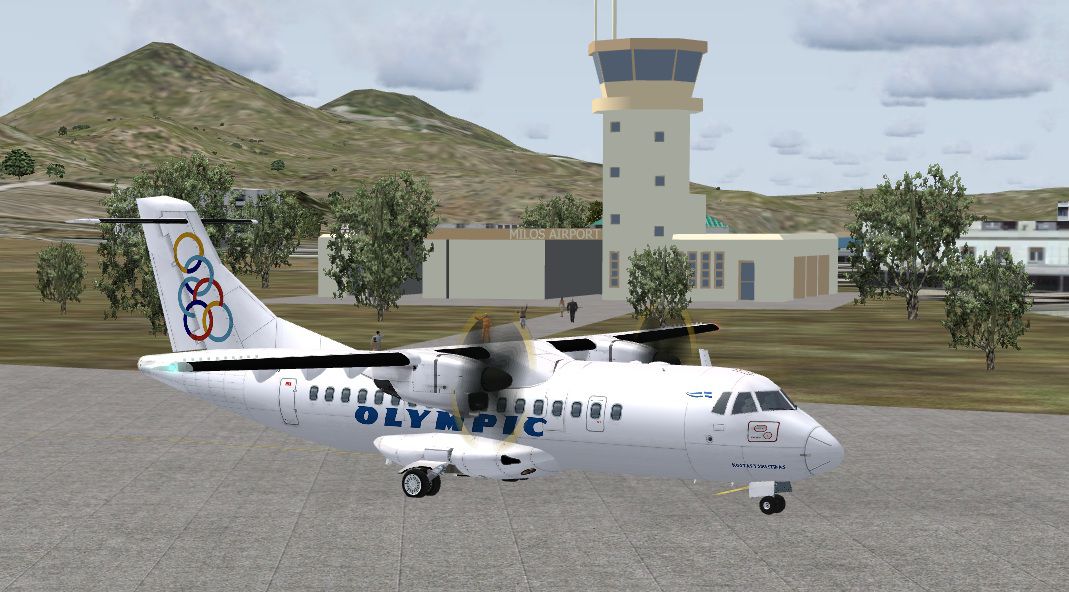
This add-on delivers a refined representation of Milos Airport (LGML), nestled within the southwestern Cyclades in Greece. It introduces updated turning bays, an expanded apron, and carefully crafted terminal structures to enhance realism for Microsoft Flight Simulator X SP2/Acceleration. The developer, Manuel Seiwald, has meticulously designed its layout to capture the airport’s distinctive features and the intricacies of operating on a short runway in a region surrounded by the Aegean Sea. Pilots can expect a more immersive approach, especially when tackling the unique weather patterns often found in these island territories.
Milos Airport is well-regarded for its compact runway, which requires precise maneuvering and careful care when landing or departing. This scenery modification incorporates:
Milos Airport Scenery.
This package is labeled Version 1.0 and functions seamlessly with Microsoft Flight Simulator X SP2/Acceleration. It has been optimized to ensure smooth rendering of the updated airfield, preserving frame rates while delivering enhanced visual fidelity. Simplistic geometry has been merged with detailed texturing to balance performance and aesthetics.
This scenery archive is released under freeware terms. Redistribution of this archive or any of its individual files within another collection is prohibited without prior authorization from Manuel Seiwald. It must remain free of charge, and users assume responsibility for any potential issues arising from installation or usage.
Author:
Manuel Seiwald
Free for all simmers · 285.08 KB · Scanned clean Oct 2026
Download speed: Free tier is capped at 0.5 Mbps. PRO members download at full line speed.
FSX\Addon Scenery\ containing scenery and texture sub-folders.readme.txt or README file. It tells you exactly where files go, what dependencies are needed, and any quirks specific to this add-on.Use these coordinates to fly directly to this location once the mod is installed.
36.69620000,24.47780000
Launch FSX or Prepar3D and use Flights → Load to open the downloaded .pln file. Your aircraft will be positioned at this location.
The archive milosairport.zip has 10 files and directories contained within it.
This list displays the first 500 files in the package. If the package has more, you will need to download it to view them.
| Filename/Directory | File Date | File Size |
|---|---|---|
| Milos | 03.16.10 | 0 B |
| Scenery | 03.16.10 | 0 B |
| LGML_ADEX_MS.BGL | 03.16.10 | 3.44 kB |
| milos3.bgl | 03.16.10 | 303.17 kB |
| readme.txt | 03.16.10 | 1007 B |
| screenshot1.jpg | 03.16.10 | 214.46 kB |
| thumbnail.gif | 03.16.10 | 6.58 kB |
| MilosAirport | 03.16.10 | 0 B |
| flyawaysimulation.txt | 10.29.13 | 959 B |
| Go to Fly Away Simulation.url | 01.22.16 | 52 B |
Only PRO members can place votes.
More FSX & P3D add-ons hand-picked based on this download.
FSX Scenery
Princess Juliana International Airport (TNCM) in Saint Marteen, Netherlands A…
 FSX Scenery
Los Angeles Airport Scenery v3, California (CA). This photoreal scenery is a …
 FSX Scenery
Barbados International Airport (TBPB). Grantley Adams International Airport f…
 FSX Scenery
Paris Charles de Gaulle Airport (CDG, LFPG), France. The entire airport has b…
 FSX Scenery
John F. Kennedy Airport (KJFK), New York, NYU. This is a photoreal scenery re…
 FSX Scenery
Dubai International Airport (OMDB), Dubai. Includes a new passenger terminal …
 FSX Scenery
Soekarno-Hatta International Airport (WIII), Jakarta, Indonesia. An update to…
 FSX Scenery
San Diego International Airport, California (CA), USA. This photoreal scenery…
Be the first to leave a comment on this download.
Be the first to share your thoughts on this download.