

 FSX Scenery
NL2000 V4.03 Zeeland Airport
This is the NL2000 v4.03 EHMZ Zeeland Airport package for the NL2000 scenery …
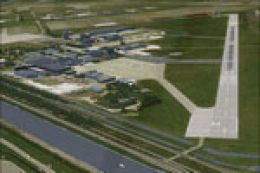
Zeeland Airport (EHMZ) for FSX brings this coastal Dutch GA and training field to life with accurate ground imagery, runway and taxiway markings, custom buildings, and well-placed static detail. It blends cleanly into the NL2000 v4.0 national scenery and requires the NL2000 v4 installer for activation.
 Rate
Rate
 Netherlands
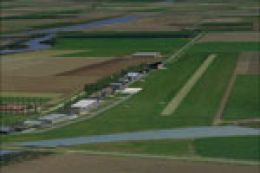
Zeeland Airport (EHMZ) lies in the southwestern corner of the Netherlands and serves primarily as a center for general aviation and flight training. This add-on recreates the airfield with precise details and accurate ground imagery, offering a more immersive flight experience. It integrates seamlessly with the broader NL2000 v4.0 scenery collection, which is a free, modular package covering the entire country for FSX. Developed by The Netherlands 2000 Scenery Design Team, this package highlights the distinctive features of this coastal airport, showcasing realistic textures, custom structures, and carefully designed static objects. When installing, ensure you have the NL2000 v4 installer available so you can activate this Zeeland Airport module.
This rendition places you in a serene environment surrounded by the natural beauty of Zeeland Province, where coastal plains and water inlets shape the horizon. Flight simulator pilots will appreciate the attention to runway markings, taxiway layouts, and the airfield’s immediately recognizable control points. With crisp textures that represent the west coast terrain, you can better appreciate this location’s strong maritime influence.
Integration: The most important step is placing this Zeeland Airport plugin into your existing NL2000 v4 ecosystem. The modular structure means that each area of the Netherlands is downloadable as a separate piece, simplifying customization.
Performance: In order to maintain smooth operation, everything is optimized with minimal impact on frame rates. You can still enjoy photoreal textures and three-dimensional structures without sacrificing stability.
Reliability: Crafted by The Netherlands 2000 Scenery Design Team, this release upholds high-quality standards and stays consistent with the broader NL2000 series. The creators have ensured that all ground elements and airport facilities integrate without conflicting with other packages.
This airfield has become a valued spot for local aviation enthusiasts, offering a runway suited for lightweight aircraft and small charters. The add-on accurately depicts hangars, apron space, and service structures, which allows engaging preflight and post-flight operations. Each gate and parking area is positioned to mirror real-world configurations, delivering a remarkably faithful environment.
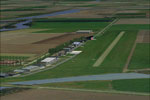
NL2000 V4.0 Zeeland Airport Scenery.
The Netherlands 2000 Scenery Design Team has once again exemplified their commitment to realism and accuracy. Through meticulous modeling and photographic references, they have captured the distinctive charm of Zeeland Airport. Their dedication ensures a flight simulation experience that matches real-world topography and infrastructure.
Free for all simmers · 17.87 MB · Scanned clean Oct 2026
Download speed: Free tier is capped at 0.5 Mbps (this file takes approximately 5 mins at the cap). PRO members download at full line speed.
FSX\Addon Scenery\ containing scenery and texture sub-folders.readme.txt or README file. It tells you exactly where files go, what dependencies are needed, and any quirks specific to this add-on.Use these coordinates to fly directly to this location once the mod is installed.
51.51220000,3.73110000
Launch FSX or Prepar3D and use Flights → Load to open the downloaded .pln file. Your aircraft will be positioned at this location.
The archive nl2k_v4_ehmz.zip has 8 files and directories contained within it.
This list displays the first 500 files in the package. If the package has more, you will need to download it to view them.
| Filename/Directory | File Date | File Size |
|---|---|---|
| nl2k_v4_ehmz.gif | 05.24.10 | 10.43 kB |
| FILE_ID.DIZ | 05.24.10 | 351 B |
| nl2k_v4_ehmz.nl2 | 04.24.10 | 18.04 MB |
| nl2k_v4_ehmz.txt | 05.22.10 | 343 B |
| copyright.txt | 05.24.10 | 4.43 kB |
| auteursrecht.txt | 05.24.10 | 5.06 kB |
| flyawaysimulation.txt | 10.29.13 | 959 B |
| Go to Fly Away Simulation.url | 01.22.16 | 52 B |
Only PRO members can place votes.
More FSX & P3D add-ons hand-picked based on this download.
FSX Scenery
This is the NL2000 v4.03 EHMZ Zeeland Airport package for the NL2000 scenery …
 FSX Scenery
Enhance your simulator’s portrayal of one of the Netherlands’ busiest regiona…
 FSX Scenery
This comprehensive scenery package brings an authentic representation of Eind…
 FSX Scenery
This free add-on offers a precisely modeled depiction of EHEH Eindhoven Airpo…
 FSX Scenery
This comprehensive package brings an updated rendition of Maastricht Aachen A…
 FSX Scenery
Enhance your virtual journey in FSX by adding a meticulously detailed renditi…
 FSX Scenery
This airport enhancement transforms Groningen Airport Eelde (EHGG) within Mic…
 FSX Scenery
Experience the intricacies of Den Helder Airport (EHKD) with this free FSX sc…
Read what other simmers think, or add your own.
