


 Greece
  FSX Scenery
LGAT Athens Hellinikon - Disused
This scenery includes the disused Athens, Greece, capital airport in its curr…
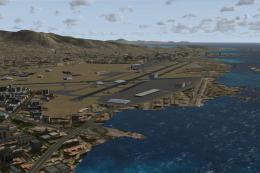
Hellinikon International Airport (LGAT) returns to life in FSX with corrected placement from satellite references, refreshed apron layout, gates, ramps, revised taxiways, and reactivated runway 3–21. Enhanced apron and parking lighting, added land and sea objects, and an included stock-aircraft traffic schedule deliver busy Athens operations; requires GRcoastlines.
Scenery Hellinikon International Airport. This is an update of the LGAT airport in Athens, Greece which has been out of operation for nearly 7 years. This update includes apron and aircraft parking lighting. Lighting objects by Jim Dhaenens. Made possible using ADE. By Angelo Tassoglou.
The stock LGAT airport (which is inactive) is placed about 500 yards to North East form the correct coordinance so I moved it with the help of satelite photos. I updated aprons with gates and ramps, remove some taxiways (between the runways) and added a few new taxiways to accomodate heavy traffic. I reactivated the short runway 3-21. I added some objects on land and sea.
INSTALLATION:
Place the 2 unziped bgl files in your Addon Scenery/Scenery folder. Set scenery complexity to dence and autogen density to normal. I have GRcoastlines installed.
TRAFFIC FILE:
I have included a traffic file for 50 Domestic and International flights using only stock FSX aircraft.
Place the unziped trafic.bgl file in your Addon Scenery/Scenery folder. Set your traffic density at least to 50% to see all the flights taking off and landing.
Also check the options Show Label, Model, Tail Number, Distance and Altitude in Traffic, to be able to see where the plains come from or going to and all other info.
For the best way to watch the traffic, I suggest you slew with a plane, in outside view, locked spot, F11, set your altitude at 3000 feet, move south beyond the runways 33L and 33R (above the city of Glyfada), pan down so you can see the whole airport and in the horizon the city of Athens and and Mount Parnitha. Set your simulation speed to 4X to speed up things. Adjust your zoom to get closer where needed. Traffic density depends on the time of the day. Some times it gets really busy. Relax and enjoy the traffic. It is a lot of fun. Trafic file created with AIFP.
This scenery is freeware and in no way should be used for commercial purposes.
Made possible by the guys of ADE and 4 months of work.
I would appreciate your input.
Angelo Tassoglou.
Free for all simmers · 360.74 KB · Scanned clean Oct 2026
Download speed: Free tier is capped at 0.5 Mbps. PRO members download at full line speed.
FSX\Addon Scenery\ containing scenery and texture sub-folders.readme.txt or README file. It tells you exactly where files go, what dependencies are needed, and any quirks specific to this add-on.Use these coordinates to fly directly to this location once the mod is installed.
37.89330000,23.72440000
Launch FSX or Prepar3D and use Flights → Load to open the downloaded .pln file. Your aircraft will be positioned at this location.
The archive lgat_2.zip has 9 files and directories contained within it.
This list displays the first 500 files in the package. If the package has more, you will need to download it to view them.
| Filename/Directory | File Date | File Size |
|---|---|---|
| LGATreadme.txt | 08.23.10 | 1.94 kB |
| LGAT_ADEX_A.BGL | 08.24.10 | 49.75 kB |
| LGAT_ADEX_A_CVX.bgl | 08.24.10 | 7.26 kB |
| Traffic_LGATstock_.bgl | 08.23.10 | 21.60 kB |
| lightobj.bgl | 11.06.08 | 643.63 kB |
| LGATLightingReadme.txt | 08.24.10 | 246 B |
| FILE_ID.DIZ | 08.24.10 | 300 B |
| flyawaysimulation.txt | 10.29.13 | 959 B |
| Go to Fly Away Simulation.url | 01.22.16 | 52 B |
Only PRO members can place votes.
More FSX & P3D add-ons hand-picked based on this download.
FSX Scenery
This scenery includes the disused Athens, Greece, capital airport in its curr…
 FSX Scenery
Princess Juliana International Airport (TNCM) in Saint Marteen, Netherlands A…
 FSX Scenery
Barbados International Airport (TBPB). Grantley Adams International Airport f…
 FSX Scenery
Dubai International Airport (OMDB), Dubai. Includes a new passenger terminal …
 FSX Scenery
Soekarno-Hatta International Airport (WIII), Jakarta, Indonesia. An update to…
 FSX Scenery
San Diego International Airport, California (CA), USA. This photoreal scenery…
 FSX Scenery
Suvarnabhumi International Airport (VTBS), Bangkok, Thailand, v1.1. Includes …
 FSX Scenery
Scenery Miami International Airport (KMIA), Florida (FL). Includes updated ta…
Read what other simmers think, or add your own.

Please make similar addons for these flight simulators: FSX, FSX:SE, FS:2004, and FS:2002 with these international airports, with the default AI air traffic of these flight simulators, and with all the aircraft that the players have in these flight simulators:
Please add these airport addons with the default AI air traffic of these flight simulators: FSX, FSX:SE, FS:2004, and FS:2002, and without affecting or taking out the default AI air traffic of these flight simulators: FSX, FSX:SE, FS:2004, and FS:2002.
Thanks. God bless you.