


 Nauru
Nauru 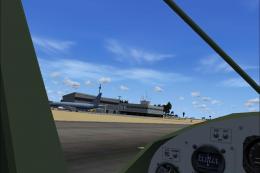 FSX Scenery
Nauru Island
Nauru Island Scenery. The package adds many buildings, cars, people, etc. on …
Nauru Island receives a livelier scenery refresh with added people, cars, and animals around Nauru International, bringing more movement and atmosphere to the ramp and nearby areas in Microsoft Flight Simulator X. This update is designed to complement the existing Nauru X package and requires NAURU_X.ZIP.
Nauru Island Scenery Update. Here is the first update for Nauru X (NAURU_X.ZIP). It adds more people, cars and animals.
Put the files, they are in the folder scenery in C:/program files/Microsoft Games/Flight Simulator X/Addon Scenery/Scenery. Start FSX. Go to Nauru/Nauru Intl. FSX will load... and you will see the scenery.
Free for all simmers · 3.03 KB · Scanned clean Oct 2026
Download speed: Free tier is capped at 0.5 Mbps. PRO members download at full line speed.
This add-on may require the following files to function properly. If this is a repaint, the dependency below is likely the base aircraft package.
FSX\Addon Scenery\ containing scenery and texture sub-folders.readme.txt or README file. It tells you exactly where files go, what dependencies are needed, and any quirks specific to this add-on.Use these coordinates to fly directly to this location once the mod is installed.
-0.54700000,166.91900000
Launch FSX or Prepar3D and use Flights → Load to open the downloaded .pln file. Your aircraft will be positioned at this location.
The archive nauruupdate1.zip has 8 files and directories contained within it.
This list displays the first 500 files in the package. If the package has more, you will need to download it to view them.
| Filename/Directory | File Date | File Size |
|---|---|---|
| Nauru-Update | 12.23.10 | 0 B |
| FILE_ID.diz | 12.22.10 | 435 B |
| installation.txt | 12.22.10 | 215 B |
| readme.txt | 12.23.10 | 88 B |
| Scenery | 12.23.10 | 0 B |
| NauruUpdate.bgl | 12.23.10 | 1.26 kB |
| flyawaysimulation.txt | 10.29.13 | 959 B |
| Go to Fly Away Simulation.url | 01.22.16 | 52 B |
Only PRO members can place votes.
More FSX & P3D add-ons hand-picked based on this download.
FSX Scenery
Nauru Island Scenery. The package adds many buildings, cars, people, etc. on …
 FSX Scenery
Comes with complete photoreal scenery and basic autogen. Also includes a new …
FSX Scenery
Nauru Update 2. The second update for Nauru X (NAURU_X.ZIP). Adds more baggag…
FSX Scenery
Montecristo Island Scenery Update. The island is mountainous with several roc…
 FSX Scenery
St Barthelemy island (TFFJ) is situated in the Caribbean Sea. It's small slop…
 FSX Scenery
Island Of Saba. Includes redesign of all coasts and land class; SABA airport;…
 FSX Scenery
(Caraibes). Saint Lucia Island scenery including the correct redefinition of …
 FSX Scenery
Saba Island (TNCS). Saba island in FSX is much improved over the flat island …
Be the first to leave a comment on this download.
Be the first to share your thoughts on this download.