


 FSX Scenery
FreeMeshX Global Terrain Mesh 2.0
For users of Flight Simulator X (and FSX: Steam Edition) and/or Prepar3D, ter…
Street and highway terrain gains added light and telephone poles to bring more depth and scale to everyday VFR flying. Built by editing the default terrain configuration with Microsoft’s ESP SDK, it refreshes the roadside look while keeping the core scenery style intact for Microsoft Flight Simulator X.
 Rate
Rate
 Global (World)
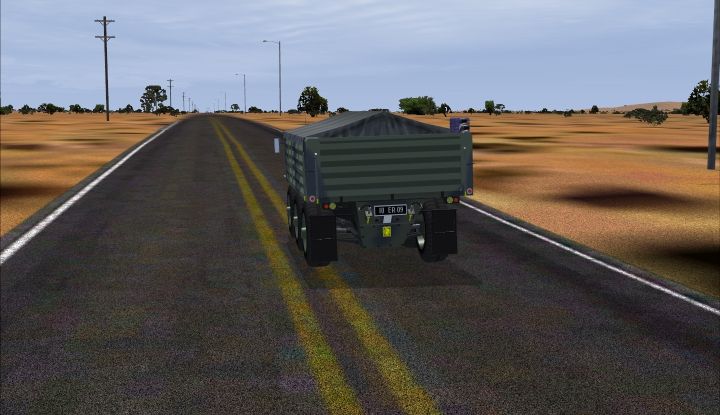
Terrain With Light And Telephone Poles. FSX streets and highways with light and telephone poles. By Rick McClung.
Screenshot of Terrain With Light And Telephone Poles.
This is my first attempt to add some telephone and light poles to FSX. This only works with FSX.
This file is the property of Microsoft I did not create this file I only edited it using Microsofts ESP sdk to edit the file to add telephone and light poles.
This has only been tested with FSX sp2, but it shoud work in default FSX. It may not work for everyone.
FIRST: Make a copy of your Terrain. config file located in your game directory. Unzip New terrain.zip Then copy terrain .config to your game directory.
This may affect your frame rate, so Make a copy of your Terrain. config in case you don't like.
This is a FSX default terrain .config file that has been modified. If you have installed any addons like Ultimate terrain or any addon scenery programs that edit this file they will not work correctly and you will need to reinstall them.
"USE AT YOUR OWN RISK" I have included an Original terrain config file just in case.
Poles may appear in the roads on the larger hiways as I had no control of this.
I used Microsofts ESP sdk to edit the file, The webb address is below.
Maybe someone else can add more scenery objects.
Free for all simmers · 260.16 KB · Scanned clean Oct 2026
Download speed: Free tier is capped at 0.5 Mbps. PRO members download at full line speed.
FSX\Addon Scenery\ containing scenery and texture sub-folders.readme.txt or README file. It tells you exactly where files go, what dependencies are needed, and any quirks specific to this add-on.The archive fsx_terrain_with_light_and_telephone_poles.zip has 7 files and directories contained within it.
This list displays the first 500 files in the package. If the package has more, you will need to download it to view them.
| Filename/Directory | File Date | File Size |
|---|---|---|
| FSX Terrain with light and telephone poles | 10.16.11 | 0 B |
| New terrain.zip | 10.16.11 | 24.19 kB |
| Original.zip | 10.16.11 | 24.27 kB |
| screenshot.jpg | 10.16.11 | 210.46 kB |
| Read this first VERY IMPORTANT!!!.txt | 10.16.11 | 1.21 kB |
| flyawaysimulation.txt | 10.29.13 | 959 B |
| Go to Fly Away Simulation.url | 01.22.16 | 52 B |
Only PRO members can place votes.
More FSX & P3D add-ons hand-picked based on this download.
FSX Scenery
For users of Flight Simulator X (and FSX: Steam Edition) and/or Prepar3D, ter…
 FSX Scenery
Flight Simulator X terrain is defined in the terrain.cfg file. During testing…
 FSX Scenery
Oceania - Asia SRTM Terrain Mesh. Covers Australia, New Zealand (including Au…
 FSX Scenery
This freeware scenery enhances the German landscape in FSX by incorporating d…
 FSX Scenery
Alaska 38 Terrain Mesh Part 1 & 2. FSX Alaska 38 Terrain Mesh Replacement ter…
 FSX Scenery
New Zealand Terrain Mesh. These files have had extensive work done on them to…
 FSX Scenery
This freeware release enriches the default environment in Flight Simulator by…
 FSX Scenery
Usa 10 M terrains Project - West Coast Version 1.1. This package includes all…
Be the first to leave a comment on this download.
Be the first to share your thoughts on this download.