

 FSX Scenery
Europe Mesh SRTM v2 (All Parts)
FSX World Wide Coverage SRTM 3, version 2, mesh of Europe. Includes the compl…
Oceania–Asia SRTM terrain mesh sharpens mountains, ridgelines, and coastal relief across Australia, New Zealand, PNG and Irian Jaya, Indonesia, Malaysia, the Philippines, Taiwan, Japan, Korea, Micronesia, and much of the Pacific for more convincing VFR navigation. Compiled from SRTM v3 and v4.1 using FSX SDK for Microsoft Flight Simulator X.
 Rate
Rate
 Global (World)
Oceania - Asia SRTM Terrain Mesh. Covers Australia, New Zealand (including Auckland Islands and Macquarie Island), PNG/Irian Jaya, Indonesia, Malaysia, Philippines, Taiwan, Japan, Korea, Micronesia, Solomon Islands, New Caledonia, Vanuatu, Fiji Islands and all other Pacific Islands (except The Hawaiian Islands). This mesh is processed from SRTM data versions 3 and 4.1 and complied using Global Mapper and FSX SDK. By Thomas Trewin.
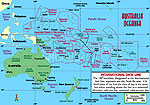
Oceania - Asia SRTM Terrain Scenery.
Covers Australia, New Zealand (including Auckland Islands & Macquarie Island), PNG/Irian Jaya, Indonesia, Malaysia, Philippines, Taiwan, Japan, Korea, Micronesia, Solomon Islands, New Caledonia, Vanuatu, Fiji Islands and all other Pacific Islands (except The Hawaiian Islands). This is a complete Update of my SRTM mesh released here at Flightsim.com in April 2007 with a combined download of over 8000.
This Mesh is PROCESSED FROM SRTM DATA VERSIONS 3 and 4.1 and Complied using Global Mapper & FSX SDK.
PLEASE NOTE: The Oceania/Pacific Regions are covered in Parts 1, 2, 3 & 4 & 5
Installation:
This is a "Self Install" Program and the default path is : C:Program FilesMicrosoft GamesMicrosoft Flight Simulator XScenery.
You can change this default path to suit your own needs but PLEASE make sure it installs into your "Microsoft Flight Simulator XScenery" Folder.
Disclaimer:
The author is not responsible for any damage, which may result from the use of this product. Use at your own risk. No warranty is offered. These Mesh Files should have no effect on any other Mesh Files you have Installed.
This scenery is released as Freeware. As an End User you can do whatever you want with these files BUT conditions apply:
1) The archive must be distributed without modification to the contents of the archive. Redistributing this archive with any files added, removed, or modified is prohibited.
2) The inclusion of any individual file from this archive in another archive without my prior permission is prohibited.
3) No charge may be made for this archive.
Regards
Thomas Trewin
Free for all simmers · 886.54 MB · Scanned clean Oct 2026
Download speed: Free tier is capped at 0.5 Mbps (this file takes approximately 4h 8m at the cap). PRO members download at full line speed.
FSX\Addon Scenery\ containing scenery and texture sub-folders.readme.txt or README file. It tells you exactly where files go, what dependencies are needed, and any quirks specific to this add-on.The archive oceania.zip has 13 files and directories contained within it.
This list displays the first 500 files in the package. If the package has more, you will need to download it to view them.
| Filename/Directory | File Date | File Size |
|---|---|---|
| oceania1.zip | 04.14.12 | 96.97 MB |
| __MACOSX | 04.14.12 | 0 B |
| oceania2.zip | 04.14.12 | 131.66 MB |
| oceania3.zip | 04.14.12 | 148.26 MB |
| oceania4.zip | 04.14.12 | 136.86 MB |
| oceania5.zip | 04.14.12 | 372.51 MB |
| flyawaysimulation.txt | 10.29.13 | 959 B |
| Go to Fly Away Simulation.url | 01.22.16 | 52 B |
Only PRO members can place votes.
More FSX & P3D add-ons hand-picked based on this download.
FSX Scenery
FSX World Wide Coverage SRTM 3, version 2, mesh of Europe. Includes the compl…
 FSX Scenery
FSX World Wide Coverage SRTM 3, version 2, mesh of Africa. Includes the compl…
 FSX Scenery
FSX SRTM 76 m South America, Central America and the Caribbean. Designed with…
 FSX Scenery
Alaska 38 Terrain Mesh Part 1 & 2. FSX Alaska 38 Terrain Mesh Replacement ter…
 FSX Scenery
Formosa X, RCTP Taiwan Taoyuan Int'l Airport 1. This project improves the def…
 FSX Scenery
This amazing all-in-one package includes all parts (1-5) of the series. All o…
 FSX Scenery
Victoria, Canada Area, including the Southern Gulf Islands and the San Juan I…
 FSX Scenery
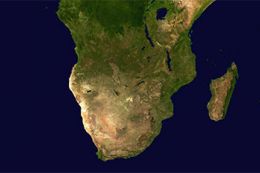
A complete package containing all parts and files of the highly detailed 76m …
Read what other simmers think, or add your own.

I get a constant DME signal and it cannot be turned off. Nothing happens when I press the DME button on the radio stack, it's stuck on "on". Any idea what's going on? Best regards Alex

Is Norfolk Island included in this mesh - halfway between Noumea / New Caledonia and New Zealand - Latitude: -29.0328 Longitude: 167.9544 - yes it has an airport Norfolk Island International Airport YSNF / NLK - good for yacht sailing as well - Philip and Nepean Islands lie just off the south coast - 5km by 8km

Hello,
I like to sail (Maltese Falcon) this scenery is great to sail in all the islands. It takes a long time to download - I can't wait until it's done, I wanna sail the whole day long to discover this scenery with my Maltese Falcon.
I hope that there is somebody who can make the Mirabella V (M5) sailing yacht for me.
Thanks for this scenery.
Kind Regards,
Gerard (Dutch)
