

 FSX Scenery
New Zealand Terrain Mesh
New Zealand Terrain Mesh. These files have had extensive work done on them to…
Te Kuiti Airport (NZTT) gets a photoreal refresh that sharpens the surrounding landscape and improves the look of the default field for more convincing local VFR flying in Microsoft Flight Simulator X. The scenery integrates cleanly with the base airport layout and requires the VLC 20 m mesh for best terrain fit.
 Rate
Rate
 New Zealand

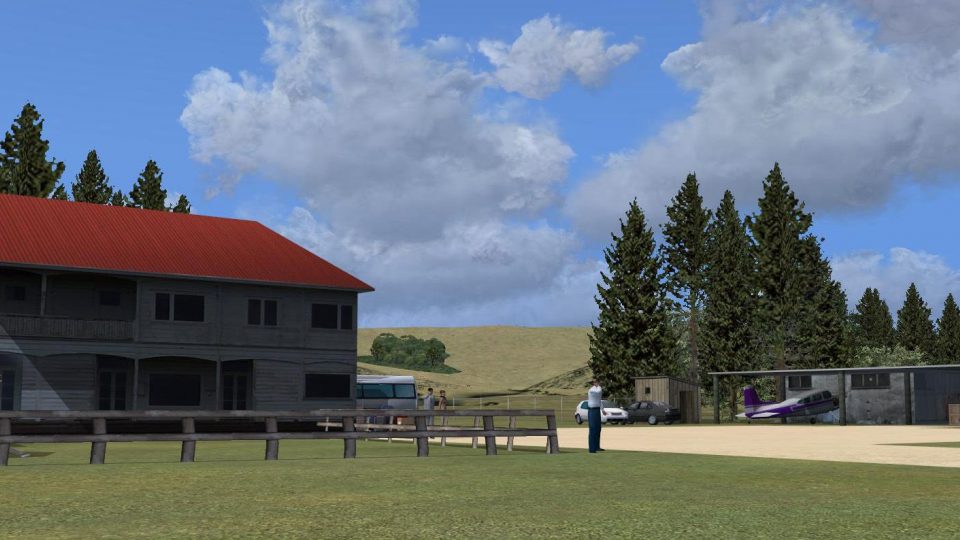
Te Kuiti New Zealand. This is a basic photoreal upgrade to default NZTT Te Kuiti airport from fs-creations.org which sits best on the VLC 20 meter mesh add-on. By Michael Allen-Andrews.
Screenshot of Te Kuiti New Zealand Scenery.
This is a basic upgrade to default NZTT Te Kuiti airport from fs-creations.org which sits best on the VLC 20meter mesh addon.
Installing guide :
For the experienced user, any other scenery folder you wish, provided it is activated within FSX.
Installing this Te_Kuiti scenery into Microsoft Flight Simulator X (FSX):
1.Once this Zip file is opened you will see one folder (Te_Kuiti) , place the Te_Kuiti folder into the Addon scenery folder of FSX found here in win7 64bit (C:\Program Files (x86)\Microsoft Games\Microsoft Flight Simulator X\Addon Scenery) or for XP (C:\Program Files \Microsoft Games\Microsoft Flight Simulator X\Addon Scenery).
2. Once you start your flight simulator (FSX) go to your addon scenery library manager and add Te_Kuiti to your addon scenery manager list .Start your flight Te_Kuiti New Zealand ,airport code is (NZTT).
Enjoy.
Free for all simmers · 695.58 KB · Scanned clean Oct 2026
Download speed: Free tier is capped at 0.5 Mbps. PRO members download at full line speed.
FSX\Addon Scenery\ containing scenery and texture sub-folders.readme.txt or README file. It tells you exactly where files go, what dependencies are needed, and any quirks specific to this add-on.Use these coordinates to fly directly to this location once the mod is installed.
-38.33330000,175.16670000
Launch FSX or Prepar3D and use Flights → Load to open the downloaded .pln file. Your aircraft will be positioned at this location.
The archive te_kuiti.zip has 13 files and directories contained within it.
This list displays the first 500 files in the package. If the package has more, you will need to download it to view them.
| Filename/Directory | File Date | File Size |
|---|---|---|
| Readme!!.txt | 09.22.11 | 1.33 kB |
| scenery | 09.22.11 | 0 B |
| NZTT_AFCAD.BGL | 09.21.11 | 2.92 kB |
| Te_kuiti_extra_default_objects.BGL | 09.21.11 | 2.09 kB |
| Te_kuiti_extra_default_objects.xml | 09.21.11 | 9.68 kB |
| Te_kuiti_library_objects.bgl | 09.21.11 | 48.16 kB |
| Te_kuiti_placement.BGL | 09.21.11 | 1.09 kB |
| Te_kuiti_trees.BGL | 09.21.11 | 3.65 kB |
| texture | 09.22.11 | 0 B |
| te_kuiti.dds | 09.22.11 | 682.79 kB |
| fsx 2011-05-22 03-43-41-57.jpg | 09.22.11 | 337.62 kB |
| flyawaysimulation.txt | 10.29.13 | 959 B |
| Go to Fly Away Simulation.url | 01.22.16 | 52 B |
Only PRO members can place votes.
More FSX & P3D add-ons hand-picked based on this download.
FSX Scenery
New Zealand Terrain Mesh. These files have had extensive work done on them to…
 FSX Scenery
Scenery Queenstown, New Zealand. Improvements to base FSX version. ILS added,…
FSX Scenery
Landclass Scenery For New Zealand. Best used in spring, summer and fall. This…
 FSX Scenery
Taupo Extras New Zealand. Includes photoreal Hukafalls / Helistar helibase / …
 FSX Scenery
Chatham Islands New Zealand. This is a basic photoreal upgrade to default NZC…
 FSX Scenery
Raglan New Zealand. This is a basic photoreal upgrade to default NZRA Raglan …
 FSX Scenery
Chateau New Zealand. Package contains custom photoreal 3D buildings for New Z…
 FSX Scenery
FSX World Wide Coverage SRTM 3 Version 2 Mesh of New Zealand and Islands. Inc…
Be the first to leave a comment on this download.
Be the first to share your thoughts on this download.