

 FSX Historic & Vintage Aircraft
Boeing 314 Clipper
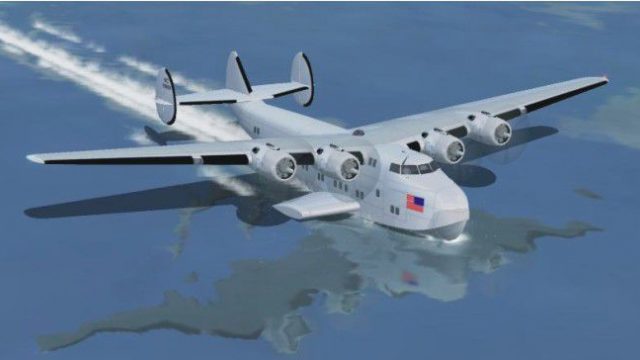
FSX Boeing 314 Clipper. Boeing's Clipper redone for FSX. This is an original …
Boeing 314 Clipper refinement for FSX Acceleration adds a simple autopilot controlled from the compass icon while preserving the classic flying-boat feel, panel layout, and effects. It updates key configuration and cockpit files for smoother operation and includes reference speeds; requires the original Mike Stone Boeing 314 package (SB314.ZIP).
 Rate
Rate

Boeing 314 Update. An update for FSX Acceleration of the Boeing 314 Clipper by Mike Stone. The author has added a basic autopilot toggled with the compass icon; otherwise it is almost the same as the FS2004 update. You need the original aircraft for this to work (SB314.ZIP). You don't need any other update. By Bob Chicilo.
Screenshot of Boeing 314 landing on water.
Unzip to a folder of your choice. After backing up your air, aircraft.cfg and panel.cfg files, replace them with the ones in this update. Copy the effect to the main FS effects folder and the picture to the aircraft folder. No need to overwrite anything already there.
If you have not already done so, copy the .cab files from the panel folders of the default aircraft that have .cab files, to the main FS gauges folder. For some of you the .cab files will be .zip files as .cab files are a type of .zip file.
See [reference speeds] section of the aircraft.cfg file for operating speeds.
The nav/GPS switch works but does not light up to show that is set for GPS.
Anyone: You have my permission to use any of my updates with the following conditions: One, you don't try to make money with them. Two, you don't try to hurt, or take something from anyone by using them.
Bob Chicilo.
Free for all simmers · 45.52 KB · Scanned clean Oct 2026
Download speed: Free tier is capped at 0.5 Mbps. PRO members download at full line speed.
FSX\SimObjects\Airplanes\. The folder must contain an aircraft.cfg file. Effects go into FSX\Effects\; gauges go into FSX\Gauges\.readme.txt or README file. It tells you exactly where files go, what dependencies are needed, and any quirks specific to this add-on.The archive b314upxa.zip has 9 files and directories contained within it.
This list displays the first 500 files in the package. If the package has more, you will need to download it to view them.
| Filename/Directory | File Date | File Size |
|---|---|---|
| b314.air | 09.23.08 | 8.33 kB |
| Boeing 314 Clipper.jpg | 09.23.08 | 34.14 kB |
| PANEL.CFG | 09.23.08 | 3.19 kB |
| read me.txt | 09.23.08 | 1.18 kB |
| file_id.diz | 09.23.08 | 321 B |
| fx_bobspray2.fx | 01.17.07 | 7.21 kB |
| Aircraft.cfg | 09.23.08 | 12.83 kB |
| flyawaysimulation.txt | 10.29.13 | 959 B |
| Go to Fly Away Simulation.url | 01.22.16 | 52 B |
Only PRO members can place votes.
More FSX & P3D add-ons hand-picked based on this download.
FSX Historic & Vintage Aircraft
FSX Boeing 314 Clipper. Boeing's Clipper redone for FSX. This is an original …
 FSX Historic & Vintage Aircraft
This aircraft is modified for FSX.. The original aircraft by Mike Stone and w…
 FSX Historic & Vintage Aircraft
Boeing P-12E Update. This update solves a problem with the VC prop texture in…
 FSX Historic & Vintage Aircraft
MAAM-Sim B-25 Mitchell Update. Allows MAAM-SIM's North American B-25J 'Briefi…
 FSX Historic & Vintage Aircraft
This is an update for FSX of Mike Stone's Consolidated PBY5A. It was only nec…
 FSX Historic & Vintage Aircraft
This is an update for FSX Acceleration of the H6K Mavis by Kazunori Ito. The …
 FSX Historic & Vintage Aircraft
Warbirdsim North American Aviation P-51 Mustang Moonbeam McSwine ''Little Fri…
 FSX Historic & Vintage Aircraft
This is an update for FSX of the default DeHavilland Comet from FS004 (aircra…
Be the first to leave a comment on this download.
Be the first to share your thoughts on this download.