

 FS2004 Civil Jet Aircraft
NWA Douglas DC-9-30
Northwest Airlines textures for the SGA DC9-30. By Daniel Halpern. Screenshot…
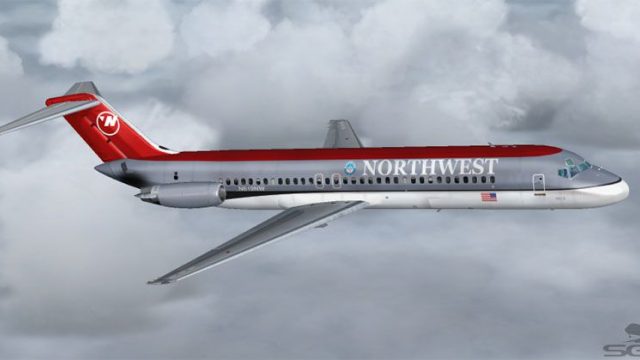
Northwest Airlines’ classic red-and-gray livery is recreated for the Douglas DC-9-32 with crisp logos, accurate window alignment, and period-correct exterior markings for vintage short-haul flying in Microsoft Flight Simulator 2004. The repaint requires the freeware SGA DC-9 base model and complements DC-9 Series 30 operations powered by JT8D turbofans.
 Rate
Rate
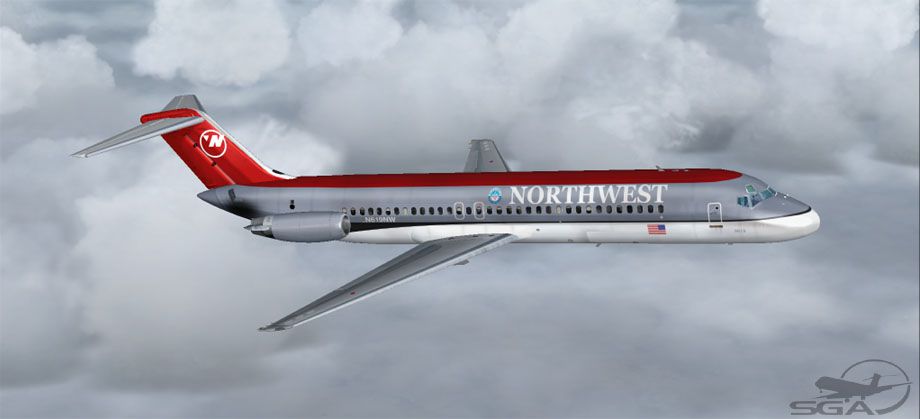
This texture package delivers an authentic Northwest Airlines livery for the Douglas DC-9-32 and is designed for use with the freeware SGA DC9 model in Microsoft Flight Simulator 2004. It showcases detailed exterior markings representing Northwest Airlines during the era they operated the DC-9 family. These textures come courtesy of developer Frank Idone and require the base Douglas DC9 series model by SGA. Visit the Fly Away Simulation library to locate and download that essential component.
The real-world DC-9 platform emerged in the 1960s from McDonnell Douglas. Its Series 30 variant stretched the fuselage by nearly 15 feet beyond the original DC-9 Series 10, accommodating up to 115 passengers. Northwest Airlines flew the DC-9 for its short-to-medium range routes, capitalizing on its reliable JT8D turbofan engines and excellent field performance. This repaint adopts the red and gray NWA scheme, reflecting the airline’s long-standing dedication to regional operations and efficient turnarounds.
Screenshot of NWA Douglas DC-9-32 in flight.
texture folder (labeled “nw”) directly into that same SGA DC9 aircraft directory.[fltsim.XX] section.Open aircraft.cfg in a text editor and add the snippet below. Replace “XX” with the appropriate number in sequential order:
[fltsim.XX] title=SGA DC-9-30 Northwest sim=SGA DC9_30 model= panel= sound= texture=nw checklists= atc_id=N619NW atc_id_color= atc_airline=Northwest Airlines atc_flight_number=478 ui_manufacturer=McDonnell Douglas ui_type=DC-9-32 ui_variation=Northwest Airlines description=DC-9 no.614 flown by Northwest Airlines.\nLivery by Frank Idone.\n\nThe DC-9 Series 30 features an extended fuselage, allowing enhanced passenger capacity and cargo volume. These aircraft often house JT8D-7 or JT8D-9 engines, delivering strong thrust while maintaining short-field performance.\n\nSpecially painted by Frank Idone. visual_damage=0 atc_heavy=0 atc_id_font=Verdana,-11,1,600,0 atc_parking_codes= atc_parking_types=GATE,RAMP
This aircraft was conceived to handle shorter runways along with flights that span short to medium distances. Northwest Airlines exploited these advantages by deploying the DC-9 on diverse routes where quick turnaround and operational efficiency mattered. Powered by Pratt & Whitney JT8D family engines, the DC-9 Series 30 perfectly balanced passenger amenities and lower operational costs across its active years.
Once you have installed these textures, you can immerse yourself in classic Northwest Airlines operations. Remember, you need the freeware DC9 base package by SGA to complete the setup. The files in this repaint were painstakingly prepared by Frank Idone for Microsoft Flight Simulator 2004 enthusiasts looking to expand their vintage commercial fleet.
Free for all simmers · 2.25 MB · Scanned clean Oct 2026
Download speed: Free tier is capped at 0.5 Mbps. PRO members download at full line speed.
FS9\Aircraft\, FS9\Addon Scenery\, FS9\Gauges\, or FS9\Effects\.readme.txt or README file. It tells you exactly where files go, what dependencies are needed, and any quirks specific to this add-on.The archive dc930nw.zip has 23 files and directories contained within it.
This list displays the first 500 files in the package. If the package has more, you will need to download it to view them.
| Filename/Directory | File Date | File Size |
|---|---|---|
| TEXTURE.nw | 10.19.04 | 0 B |
| 30FUSE_L.BMP | 10.27.04 | 1.00 MB |
| 30FUSE_T.BMP | 10.19.04 | 4.00 MB |
| CONE_L.BMP | 08.08.03 | 5.43 kB |
| CONE_T.BMP | 08.08.03 | 5.43 kB |
| DC9xINTERIOR_L.BMP | 05.19.04 | 256.07 kB |
| DC9xINTERIOR_T.BMP | 01.28.04 | 1.00 MB |
| DC9_B_L.BMP | 05.19.04 | 256.07 kB |
| DC9_B_T.BMP | 10.19.04 | 1.00 MB |
| ENGINES_L.BMP | 05.19.04 | 256.07 kB |
| ENGINES_T.BMP | 10.19.04 | 1.00 MB |
| INTAKE_L.bmp | 08.08.03 | 5.43 kB |
| INTAKE_t.BMP | 08.10.03 | 42.78 kB |
| WING_LEFT_L.BMP | 05.19.04 | 256.07 kB |
| WING_RIGHT_L.BMP | 05.19.04 | 256.07 kB |
| nw30.jpg | 10.29.04 | 51.46 kB |
| file_id.diz | 10.29.04 | 124 B |
| SGA DC-9 Readme.pdf | 09.23.04 | 153.00 kB |
| Install.txt | 10.30.04 | 2.34 kB |
| WING_LEFT_T.BMP | 10.30.04 | 1.00 MB |
| WING_RIGHT_T.BMP | 10.30.04 | 1.00 MB |
| flyawaysimulation.txt | 10.29.13 | 959 B |
| Go to Fly Away Simulation.url | 01.22.16 | 52 B |
Only PRO members can place votes.
More FS2004 add-ons hand-picked based on this download.
FS2004 Civil Jet Aircraft
Northwest Airlines textures for the SGA DC9-30. By Daniel Halpern. Screenshot…
 FS2004 Civil Jet Aircraft
This archive includes the model, and is ready to fly once unzipped. This mode…
 FS2004 Civil Jet Aircraft
Elevate your Microsoft Flight Simulator 2004 collection with an intricately r…
 FS2004 Civil Jet Aircraft
This freeware repaint offers Cebu Pacific’s distinctive Douglas DC-9-32 textu…
 FS2004 Civil Jet Aircraft
This repaint package offers a detailed Aero Trasporti Italiani livery, recrea…
 FS2004 Civil Jet Aircraft
This repaint package brings the iconic Aero Trasporti Italiani (ATI) Douglas …
 FS2004 Civil Jet Aircraft
This freeware repaint offers a specialized Playboy livery for the iconic Doug…
 FS2004 Civil Jet Aircraft
This freeware repaint showcases Air Canada's 1967 Douglas DC-9-32 livery, met…
Be the first to leave a comment on this download.
Be the first to share your thoughts on this download.