

 FSX Panels & Gauges
McDonnell Douglas MD-80 / MD-83 Panel
McDonnell Douglas MD-80 / MD-83 Panel. Reworked by adding new gauges and free…
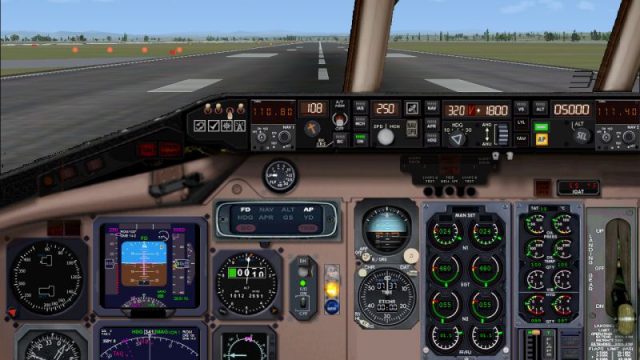
McDonnell-Douglas MD-80 instrument panel brings a convincing mix of digital and analog gauges to the virtual cockpit, with clear readouts for airspeed, altitude, pitch, and core systems for real-time flying. Built for Microsoft Flight Simulator X, it captures the look and workflow of the classic twin‑engine airliner.
 Rate
Rate
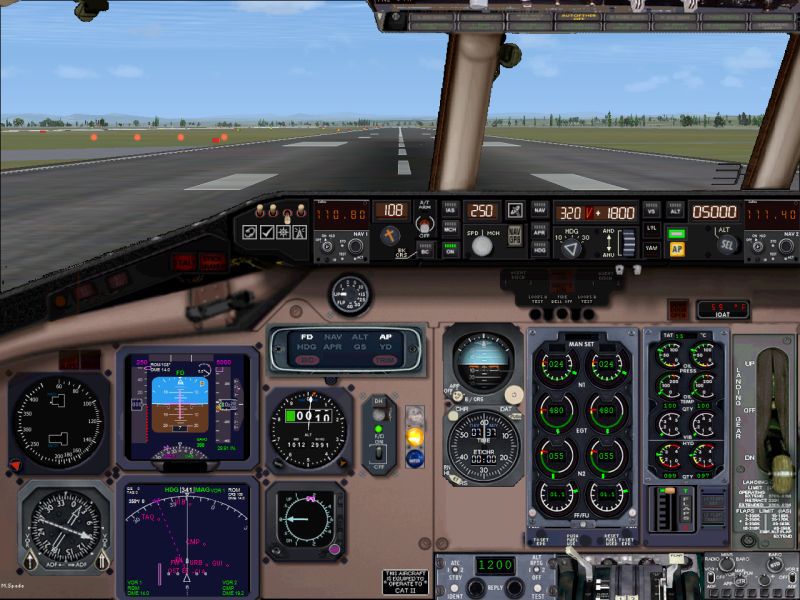
This is a free download for the McDonnell-Douglas MD-80 Instrument Panel bringing real life accuracy to your screen. It is compatible with Microsoft Flight Simulator X (FSX).
With a combination of digital and analog gages the cockpit feel is great. Monitor airspeed, altitude, pitch along with all of the other key functions in real time. You will feel immersed in a real world environment that is as accurate to what you would experience as if you were really flying the McDonnell-Douglas MD-80.
The twin engine mid-size, medium range jet airliner is designed to accommodate up to 172 passengers in a single isle configuration. The McDonnell-Douglas MD-80 was introduced on October 10, 1980 by Swissair. The McDonnell-Douglas MD-80 made use of the newly available Pratt & Whitney JT8D jet engine.
The plane continued in production with 5 other variants before being replaced by the McDonnell-Douglas MD-90 in 1995. The McDonnell-Douglas MD-80 was produced inline with the DC-9 in Long Beach, California. At the peak of production the McDonnell-Douglas MD-80 was being produced at a rate of 12 per month.
The McDonnell-Douglas MD-80 has been used by multiple major airlines throughout the world. Due to newer, more fuel efficient airplane designs, airlines have retired most of the McDonnell-Douglas MD-80. They are being replaced by Boeing 737-800’s and other more fuel efficient planes. There was 886 MD-80’s in service as of July 2009.
Free for all simmers · 1.4 MB · Scanned clean Oct 2026
Download speed: Free tier is capped at 0.5 Mbps. PRO members download at full line speed.
FSX\SimObjects\Airplanes\{aircraft}\panel\. Back up the existing panel folder first.readme.txt or README file. It tells you exactly where files go, what dependencies are needed, and any quirks specific to this add-on.The archive md80pnlx.zip has 13 files and directories contained within it.
This list displays the first 500 files in the package. If the package has more, you will need to download it to view them.
| Filename/Directory | File Date | File Size |
|---|---|---|
| Panel | 01.04.07 | 0 B |
| md80pnlx.bak | 01.04.07 | 449 B |
| md80pnlx.jpg | 01.04.07 | 98.29 kB |
| md80pnlx.txt | 01.04.07 | 484 B |
| md80xap.CAB | 01.04.07 | 89.44 kB |
| md80xmain.CAB | 01.04.07 | 504.09 kB |
| Panel.cfg | 01.04.07 | 5.37 kB |
| super80.bmp | 01.04.07 | 2.25 MB |
| super80ped.bmp | 02.07.03 | 534.43 kB |
| upper_640.bmp | 04.18.01 | 18.99 kB |
| md80pnlx | 01.04.07 | 0 B |
| flyawaysimulation.txt | 10.29.13 | 959 B |
| Go to Fly Away Simulation.url | 01.22.16 | 52 B |
Only PRO members can place votes.
More FSX & P3D add-ons hand-picked based on this download.
FSX Panels & Gauges
McDonnell Douglas MD-80 / MD-83 Panel. Reworked by adding new gauges and free…
 FSX Panels & Gauges
Four panels for the MD-80-87 (SGA MD-80 and MD-87 Series, or similar). Sub-pa…
 FSX Panels & Gauges
FSX sample Aircraft.cfg linking FSX DC-10 Panel Project (FSX_DC-10_PANEL_PROJ…
 FSX Panels & Gauges
Updated photorealistic panel for the Douglas DC6 from Jens B. Kristensen (DC6…
 FSX Panels & Gauges
Douglas DC-3 Widescreen 2D Panel. Original DC3 2D panel extended for use with…
 FSX Panels & Gauges
Douglas R4D Panel. Modified default panel for the Manfred Jahn C-47. This pan…
 FSX Panels & Gauges
Panel--Douglas Boston. This alternative 2D and 3D panel is for Alphasim's fre…
 FSX Panels & Gauges
For use with wing views in FSX. As we all know, FSX doesn't provide this func…
Read what other simmers think, or add your own.

Can someone please tell me how to install this panel on a aircraft in flight simulator x please I can not figure it out

Its great if u like mismatched streched peices of other panels and the hdg on autopilot does not work. but it does tell u the essentials.

It looks good, but the HDG (heading) on the auto pilot doesn't work and one cannot change direction with the auto pilot. It also doesn't turn on approach so it doesn't stablish a direction for an ILS appoach. But for those of you who likes to fly yoke and pedal, it is ok.

Really good!!!!!!!! Works really well with md-80 flyable upgrade in the fsx aircraft section.

I think that this download is well worth-it despite what other people might think. I had no problems whatsoever.