

 FS2004 Propeller Aircraft
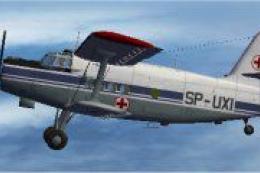
Polish Air Ambulance An2T
This specialized repaint introduces the distinctive Polish Air Ambulance live…
Polish Air Force green textures bring Tim Conrad’s Antonov AN-2T to life with 1975-era markings, camouflage tones, and crisp structural detail that suits cargo runs, parachute drops, and short-field flying. Designed for Microsoft Flight Simulator 2004, this repaint set requires the AN2TPPP.ZIP base aircraft and adds an authentic classic biplane presence.
 Rate
Rate
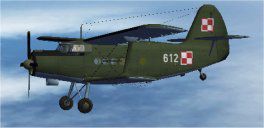
This specialized repaint set for Microsoft Flight Simulator 2004 introduces a Polish Air Force green livery that highlights the unique biplane form of Tim Conrad’s Antonov AN-2T. Developed by Steve Baldwin, these textures accurately capture the classic look from 1975, reflecting the broad versatility of an aircraft that once operated in roles spanning cargo transport, parachute drops, and short-field flights. Below, you will find detailed instructions to integrate these textures seamlessly into your flight simulator installation, along with insights on this historically significant aircraft.
The Polish Air Force employed various adaptations of the Antonov AN-2T, advocating its robustness and service flexibility. The green camouflage replicated here was often seen in the mid-1970s, where it helped the biplane blend into diverse operational environments. This repaint preserves the distinctive fuselage markings and structural accents that typify the era.
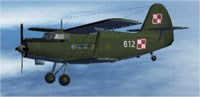
Enhanced textures of the Polish Green An2T showcased in flight.
To make use of these textures, you must have Tim Conrad’s AN-2T base package installed. The relevant file is named AN2TPPP.ZIP and can be found in the Fly Away Simulation mod library. Without the base aircraft, these repaint files will not work as intended.
texture.pol75 folder into your existing An2T directory, located in your main Aircraft folder.[fltsim.X] index (represented by XX) is updated to the next unused number:
[fltsim.XX]
title=AN-2T_Polish_AF_1975
sim=AN-2T
model=
panel=
sound=
texture=pol75
panel_alias=
sound_alias=
kb_checklists=
kb_reference=
atc_id=
atc_id_color=0xffffffff
atc_airline=
atc_flight_number=1
ui_manufacturer=Antonov
ui_type=AN-2T
ui_variation=Polish AF 1975
description=First introduced in the late 1940s, the AN-2 was initially viewed as outdated due to its biplane layout. However, its reliability and functionality quickly made it an aviation workhorse, especially under Polish production rights. This repaint depicts a 1975 Polish Air Force scheme for Tim Conrad’s exceptional AN-2T model. Textures by Steve Baldwin.
Once added, the updated repaint will appear among your aircraft options in the simulator’s aircraft selection menu.
This repaint was conceptualized and crafted by Steve Baldwin. The underlying Antonov AN-2T model is a freeware effort by Tim Conrad. Both developers have contributed to the enhancement of biplane simulation experiences by combining visual authenticity with reliable flight characteristics.
Free for all simmers · 1.53 MB · Scanned clean Oct 2026
Download speed: Free tier is capped at 0.5 Mbps. PRO members download at full line speed.
FS9\Aircraft\, FS9\Addon Scenery\, FS9\Gauges\, or FS9\Effects\.readme.txt or README file. It tells you exactly where files go, what dependencies are needed, and any quirks specific to this add-on.The archive an2polg.zip has 14 files and directories contained within it.
This list displays the first 500 files in the package. If the package has more, you will need to download it to view them.
| Filename/Directory | File Date | File Size |
|---|---|---|
| Readme.txt | 11.15.06 | 1.39 kB |
| texture.pol75 | 11.15.06 | 0 B |
| an2t_00.bmp | 12.13.03 | 256.07 kB |
| an2t_01.bmp | 11.15.06 | 1.00 MB |
| an2t_02.bmp | 12.11.03 | 4.00 MB |
| an2t_03.bmp | 11.12.06 | 512.07 kB |
| an2t_fan.bmp | 12.10.03 | 16.07 kB |
| an2t_glass.bmp | 12.11.03 | 256.07 kB |
| thumbnail.jpg | 11.07.06 | 7.97 kB |
| Thumbs.db | 11.15.06 | 16.50 kB |
| thumbnail.jpg | 11.07.06 | 7.97 kB |
| An2T Polish Green | 11.15.06 | 0 B |
| flyawaysimulation.txt | 10.29.13 | 959 B |
| Go to Fly Away Simulation.url | 01.22.16 | 52 B |
Only PRO members can place votes.
More FS2004 add-ons hand-picked based on this download.
FS2004 Propeller Aircraft
This specialized repaint introduces the distinctive Polish Air Ambulance live…
 FS2004 Propeller Aircraft
This freeware repaint showcases a specialized Polish Air Ambulance scheme for…
 FS2004 Propeller Aircraft
Enthusiasts of Microsoft Flight Simulator 2004 can enhance their virtual hang…
 FS2004 Propeller Aircraft
This fully freeware repaint showcases a striking “Big Panda” scheme for the A…
 FS2004 Propeller Aircraft
This freeware repaint enriches your copy of Microsoft Flight Simulator 2004 b…
 FS2004 Propeller Aircraft
This repaint package features a Russian civil aviation theme for the Antonov …
 FS2004 Propeller Aircraft
This freeware repaint immerses you in the unique livery of the Nicaraguan Air…
 FS2004 Propeller Aircraft
Experience a nuanced rendering of a classic Soviet-era biplane in Microsoft F…
Be the first to leave a comment on this download.
Be the first to share your thoughts on this download.