

 FSX Other Aircraft & Vehicles
Battlestar Galactica Viper II Rev. 2
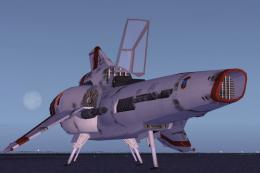
This freeware add-on recreates the iconic Colonial Viper II from the Battlest…
The Battlestar Galactica Shuttle brings a sci-fi aerospace vibe to Microsoft Flight Simulator X with a detailed exterior and futuristic virtual cockpit lighting. An advanced aerodynamic model, vectored thrust, SuperSpoilers, and deflection flaps support near-hover handling, stable high-G maneuvering, and blistering speeds up to 2667 knots while staying smooth and controllable.
 Rate
Rate
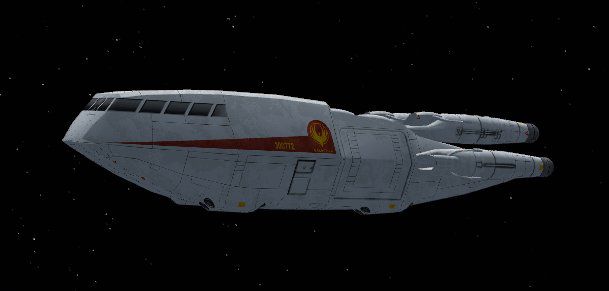
Experience a highly detailed Battlestar Galactica Shuttle add-on, optimized for Microsoft Flight Simulator X. Designed by the creators of this freeware package, it delivers a swift and robust flight experience that can handle unprecedented speeds while remaining smooth during rigorous maneuvers. In addition, it leverages advanced aerodynamic methods to ensure reliability under extreme conditions.
This fictional craft takes its cues from the classic Battlestar Galactica universe, known for futuristic aerospace engineering. Although not based on a real-world aerospace program, it borrows structural concepts found in modern experimental aircraft. The developers, who have dedicated extensive research to reimagining the shuttle’s shape and performance characteristics, have replicated its sci-fi origins in a believable manner.
To accomplish these advanced capabilities, the authors integrated a unique aerodynamic model with support for high dynamic pressures. This approach ensures the shuttle remains controlled during transitions from subsonic travel to supersonic bursts. Additionally, thrust vectors are aligned to keep the craft balanced during non-traditional flight profiles, such as vertical descents and agile turns.
Included at no cost, the freeware base model supplies every necessary component to fly the shuttle directly after installation. The exterior detailing captures the distinctive mid-fuselage structure and forward cockpit layout, reflecting its on-screen counterpart. Internally, the developers have implemented cockpit elements that align with the shuttle’s futuristic theme, illuminated by well-placed internal lighting.
Once installed, this add-on will appear in your aircraft selection menu, ready for immediate use within Microsoft Flight Simulator X. Feel free to take off from orbital runways, explore atmospheric flight at transonic or hypersonic speeds, or conduct short-range hops around virtual planetary surfaces. Its flexible design caters to a variety of pilot preferences, from experimental test flights to cinematic demonstrations.
Free for all simmers · 1.33 MB · Scanned clean Oct 2026
Download speed: Free tier is capped at 0.5 Mbps. PRO members download at full line speed.
SimObjects\Airplanes\, Addon Scenery\, Effects\, or Gauges\.readme.txt or README file. It tells you exactly where files go, what dependencies are needed, and any quirks specific to this add-on.The archive bsg_shtl.zip has 43 files and directories contained within it.
This list displays the first 500 files in the package. If the package has more, you will need to download it to view them.
| Filename/Directory | File Date | File Size |
|---|---|---|
| aircraft.cfg | 03.09.07 | 8.66 kB |
| BSG_Shuttle.jpg | 03.03.07 | 16.07 kB |
| effects | 03.08.07 | 0 B |
| fx_cylonflame.fx | 03.04.07 | 16.34 kB |
| fx_landing.fx | 05.12.06 | 3.37 kB |
| fx_landinglightf1.fx | 12.29.03 | 3.71 kB |
| maxPERF.air | 03.09.07 | 12.84 kB |
| Model | 03.08.07 | 0 B |
| BSG_Shuttle.mdl | 03.08.07 | 100.35 kB |
| Model.cfg | 03.03.07 | 30 B |
| panel | 03.09.07 | 0 B |
| burnab.CAB | 03.04.07 | 11.36 kB |
| dfa18_fx.cab | 03.29.04 | 1.33 kB |
| forward_1024.bmp | 03.23.04 | 769.05 kB |
| panel.cfg | 03.04.07 | 3.16 kB |
| panel_decal.bmp | 02.28.04 | 3.00 MB |
| panel_decal_2.bmp | 02.28.04 | 768.05 kB |
| panel_decal_3.bmp | 01.28.04 | 1.00 MB |
| panel_decal_4.bmp | 01.28.04 | 1.00 MB |
| radarpanels1 | 03.09.07 | 0 B |
| credits.txt | 12.04.06 | 573 B |
| hja_panel_org | 03.09.07 | 0 B |
| panel.cfg | 12.04.06 | 7.38 kB |
| panel_ver1 | 03.09.07 | 0 B |
| Panel.cfg | 12.04.06 | 8.36 kB |
| panel_ver2 | 03.09.07 | 0 B |
| Panel.cfg | 12.04.06 | 8.36 kB |
| panel_ver3 | 03.09.07 | 0 B |
| Panel.cfg | 12.04.06 | 8.36 kB |
| picradarscreen.jpg | 12.04.06 | 16.43 kB |
| readme_radarpanels.txt | 12.04.06 | 3.51 kB |
| radio.bmp | 03.22.04 | 769.05 kB |
| right_mfd.bmp | 03.22.04 | 769.05 kB |
| superh.cab | 03.29.04 | 226.02 kB |
| Thumbs.db | 11.17.06 | 7.00 kB |
| readme.txt | 03.09.07 | 1.69 kB |
| sound | 03.02.07 | 0 B |
| Sound.cfg | 02.11.07 | 32 B |
| Texture | 03.03.07 | 0 B |
| colshtl1cox.bmp | 03.01.07 | 1.00 MB |
| thumbnail.jpg | 03.03.07 | 16.07 kB |
| flyawaysimulation.txt | 10.29.13 | 959 B |
| Go to Fly Away Simulation.url | 01.22.16 | 52 B |
Only PRO members can place votes.
More FSX & P3D add-ons hand-picked based on this download.
FSX Other Aircraft & Vehicles
This freeware add-on recreates the iconic Colonial Viper II from the Battlest…
 FSX Other Aircraft & Vehicles
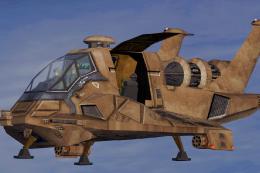
This reworked Raptor add-on brings the iconic Colonial vessel from Battlestar…
 FSX Other Aircraft & Vehicles
Introducing the Battlestar Galactica (BSG) Space Ship Pack, an essential addi…
 FSX Other Aircraft & Vehicles
Enter the Battlestar Galactica realm with this freeware Viper VII for Microso…
 FSX Other Aircraft & Vehicles
FSX Galactica TOS Package. Features pilotable Battlestar Galactica from the o…
 FSX Other Aircraft & Vehicles
Immerse yourself in a sci-fi inspired flight experience with the Battlestar G…
 FSX Other Aircraft & Vehicles
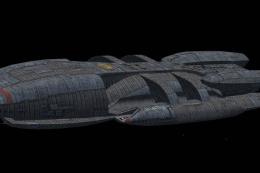
This exclusive freeware package brings the legendary Battlestar Galactica int…
 FSX Other Aircraft & Vehicles
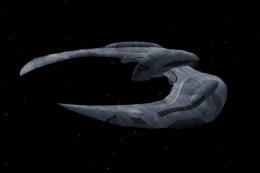
This completely free Battlestar Galactica Raider for Microsoft Flight Simulat…
Read what other simmers think, or add your own.
