

 FS2004 AFCAD Files
EDDF, AFCAD2 File
Frankfurt/Main Airport, Germany, for use with AMEDDF11.ZIP. Should solve most…
Dallas Love Field (KDAL) gets a detailed AFCAD2 layout with real-world gate assignments, refined terminal parking, dedicated cargo stands, and sensible general aviation spots to improve AI traffic and ground flow. Designed for Microsoft Flight Simulator 2004, it also sharpens taxi routing and hold-short points for more believable day-to-day operations.
 Rate
Rate

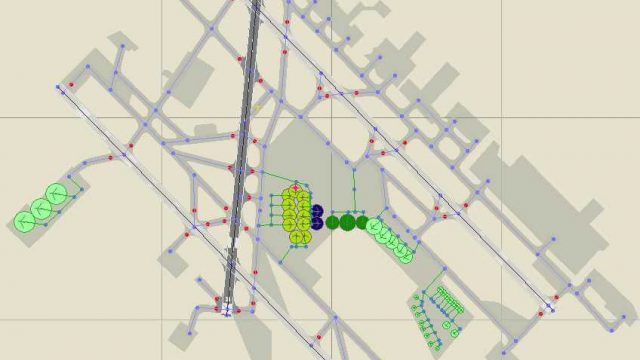
This fully customized freeware file adapts gate layouts, independent parking positions, and cargo ramps at Dallas Love Field (KDAL) for Microsoft Flight Simulator 2004. By seamlessly pinpointing real-world gate assignments, this AFCAD2 configuration adds a realistic feel for flight sim enthusiasts looking to enhance their operational flow and traffic management at this iconic airport in Dallas, Texas.
Developed by Joey Collura, with contributions from AFCAD World, this file tailors each airline parking location to match authentic real-world usage. Operators that frequent Dallas Love Field will find gates labeled for specific carriers, and there are also designated spots for general aviation traffic. The portrayal of commercial parking ensures that arrivals and departures align with actual schedules for an added sense of immersion.
Overview of Dallas Love Field.
Cargo carriers are allocated specific stands that can accommodate larger aircraft, ensuring uninterrupted logistics operations. In addition, ample general aviation parking is tailored to those wishing to simulate private flights or corporate operations. Each ramp has been logically arranged to reflect typical real-world spacing, reducing overlap and incompatible size restrictions.
Originally the main airport for Dallas before larger facilities took over, Love Field remains a bustling hub, particularly known for its strong connections to regional carriers. The airport features a simple yet efficient design, where terminal ramps and service roads handle significant daily traffic volumes. With this AFCAD2 upgrade, pilots gain smoother taxi routes and accurate hold-short placements that align with actual ground patterns.
Installation requires placing the included AFCAD file directly into the Flight Simulator 9\Addon Scenery\Scenery directory. By doing so, customized parking logic will replace the default setup. For simmers who manage add-on libraries, ensure the scenery priority remains properly ordered so traffic flows smoothly without conflicts. After installation, you can restart your simulator to see the updated ground layout in effect.
This AFCAD add-on is created by AFCAD World and Joey Collura to enhance your experience within Microsoft Flight Simulator 2004. You may re-upload these files elsewhere; however, please acknowledge the designers and refrain from claiming credit for their work. AFCAD World disclaims any liability for potential complications arising on specific systems, so always maintain backups and follow standard installation procedures to avoid issues.
Free for all simmers · 41.4 KB · Scanned clean Oct 2026
Download speed: Free tier is capped at 0.5 Mbps. PRO members download at full line speed.
FS9\Aircraft\, FS9\Addon Scenery\, FS9\Gauges\, or FS9\Effects\.readme.txt or README file. It tells you exactly where files go, what dependencies are needed, and any quirks specific to this add-on.The archive af2_kdal.zip has 5 files and directories contained within it.
This list displays the first 500 files in the package. If the package has more, you will need to download it to view them.
| Filename/Directory | File Date | File Size |
|---|---|---|
| AF2_KDAL.bgl | 12.31.03 | 18.74 kB |
| Readme.txt | 12.26.03 | 639 B |
| KDAL AFCAD.jpg | 01.24.04 | 36.97 kB |
| flyawaysimulation.txt | 10.29.13 | 959 B |
| Go to Fly Away Simulation.url | 01.22.16 | 52 B |
Only PRO members can place votes.
More FS2004 add-ons hand-picked based on this download.
FS2004 AFCAD Files
Frankfurt/Main Airport, Germany, for use with AMEDDF11.ZIP. Should solve most…
 FS2004 AFCAD Files
FS2004 AFCAD2 File For RCKH and RCSS, Taipei Sungshan Airport and Kaohsiung A…
 FS2004 AFCAD Files
Tokyo Narita Airport (RJAA), Japan (not for the default FS2004 airport; detai…
 FS2004 AFCAD Files
Updated gates and taxiways for Amsterdam Schiphol Int'l Airport, The Netherla…
 FS2004 AFCAD Files
WSSS for Samsoft's Singapore Changi scenery (not for the default FS2004 airpo…
 FS2004 AFCAD Files
An AFCAD2 file for Soekarno-Hatta Airport, Jakarta, Indonesia (WIII) for use …
 FS2004 AFCAD Files
An AFCAD2 file for Ngurah Rai Int'l Airport, Denpasar Bali, Indonesia (WRRR),…
FS2004 AFCAD Files
Dubai Int'l Airport, United Arab Emirates. Upgrades the stock airport to prov…
Be the first to leave a comment on this download.
Be the first to share your thoughts on this download.