

 FS2004 AFCAD Files
AFCAD2 File For Midway Island
Midway Island (PMDY). Two different AFCAD2 files for Midway Island in the Pac…
Sand Island Airport HI99 brings a more usable outpost west of Midway with a slightly extended, lit runway, improved parking for aircraft up to Dash 8 size, and added tower and ATIS frequencies for clearer operations in FS2004. The package also includes EditVoicepack updates for accurate airport phraseology using default scenery.
 Rate
Rate
Sand Island (HI99) in the Pacific. This airport is situated in the Pacific Ocean to the west of Midway Island. The runway has been slightly extended and now has lighting. Parking for aircraft up to Dash8 size has been added as well as a tower and ATIS frequency. This airport is only a short hop by Dash8 from Midway Island. This package includes voicepack updates for the airport. This is for the default FS2004 scenery. Also recommended is Midway Island AI package (LB_PMDY.ZIP) as it contains GA traffic flying between Sand Island and Midway Island. By Lee Brompton.
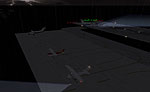
Screenshot of Sand Island scenery.
Installation:
Installation of Voicepack updates:
Free for all simmers · 355.93 KB · Scanned clean Oct 2026
Download speed: Free tier is capped at 0.5 Mbps. PRO members download at full line speed.
This add-on may require the following files to function properly. If this is a repaint, the dependency below is likely the base aircraft package.
FS9\Aircraft\, FS9\Addon Scenery\, FS9\Gauges\, or FS9\Effects\.readme.txt or README file. It tells you exactly where files go, what dependencies are needed, and any quirks specific to this add-on.The archive lb_hi99.zip has 11 files and directories contained within it.
This list displays the first 500 files in the package. If the package has more, you will need to download it to view them.
| Filename/Directory | File Date | File Size |
|---|---|---|
| About and Install.txt | 12.08.04 | 1.03 kB |
| parking | 12.08.04 | 0 B |
| AF2_HI99.bgl | 12.08.04 | 1.37 kB |
| TRAFFIC - NOTE.txt | 12.08.04 | 252 B |
| voice | 12.08.04 | 0 B |
| Sand Island ACIO.vcpmod | 12.08.04 | 3.79 kB |
| Sand Island AGENT.vcpmod | 12.08.04 | 3.80 kB |
| Sand Island.bmp | 12.08.04 | 1.09 MB |
| File_id.diz | 12.08.04 | 651 B |
| flyawaysimulation.txt | 10.29.13 | 959 B |
| Go to Fly Away Simulation.url | 01.22.16 | 52 B |
Only PRO members can place votes.
More FS2004 add-ons hand-picked based on this download.
FS2004 AFCAD Files
Midway Island (PMDY). Two different AFCAD2 files for Midway Island in the Pac…
 FS2004 AFCAD Files
San Andres Island / Pinilla Airport (SKSP). Adds tower view, parking spots an…
FS2004 AFCAD Files
Wake Island (PWAK). This airport is situated in the Pacific Ocean. The runway…
 FS2004 AFCAD Files
An AFCAD2 file for Lord Howe Island (YLHI), NSW, Australia. The runway has be…
 FS2004 AFCAD Files
Frankfurt/Main Airport, Germany, for use with AMEDDF11.ZIP. Should solve most…
FS2004 AFCAD Files
FS2004 AFCAD2 File For RCKH and RCSS, Taipei Sungshan Airport and Kaohsiung A…
 FS2004 AFCAD Files
Tokyo Narita Airport (RJAA), Japan (not for the default FS2004 airport; detai…
 FS2004 AFCAD Files
Updated gates and taxiways for Amsterdam Schiphol Int'l Airport, The Netherla…
Be the first to leave a comment on this download.
Be the first to share your thoughts on this download.