

 FSX Civil Aircraft
Aeromexico Boeing 767-3Q8ER/WL
Complete package of the Skyspirit2010 B767-300ER in Aeromexico livery, regist…
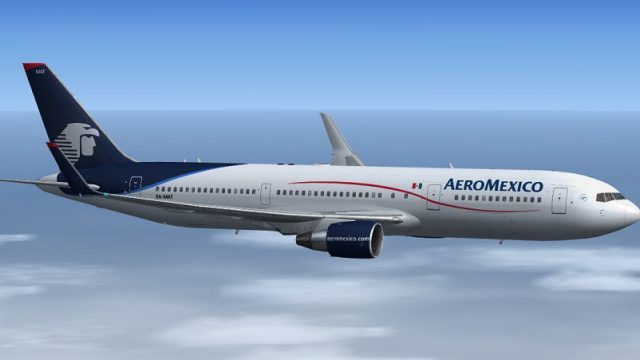
Aeromexico Boeing 767-3Y0ER/WL XA-MAT brings a Skyspirit2010 767-300ER model to Microsoft Flight Simulator X with a crisp exterior, wingflex, and animated control surfaces. It includes a 2D panel plus a default 737-800-based virtual cockpit and integrates the Posky Utility panel to manage doors and ground service animations.
 Rate
Rate
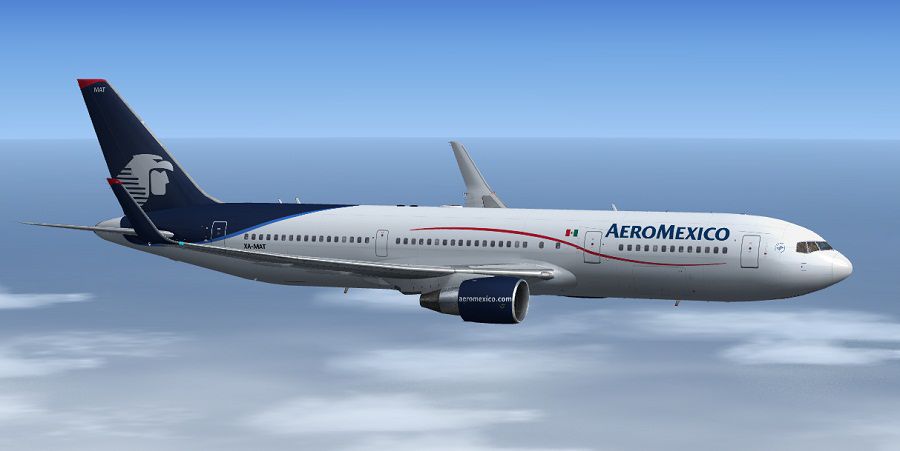
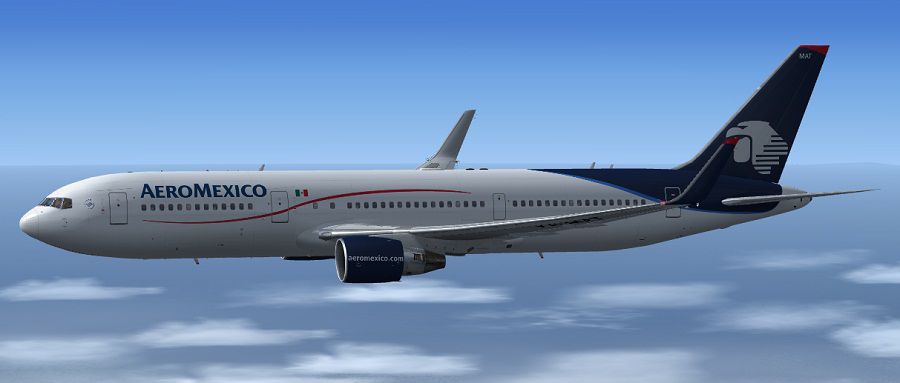
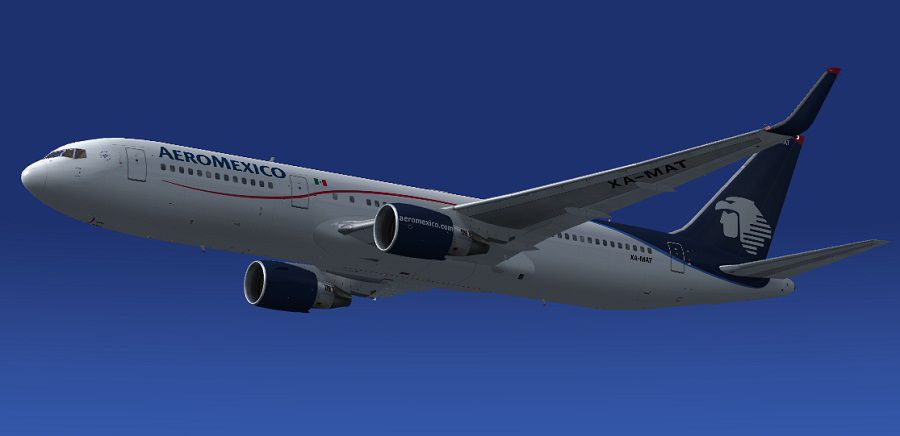
This complete freeware package brings an Aeromexico Boeing 767-3Y0ER/WL registered XA-MAT (c/n 24947/351) into Microsoft Flight Simulator X with a detailed visual model and an enhanced cockpit layout. Skyspirit2010 developed the B767-300ER airframe, and the repaint was created by Paul Craig. It integrates the default 737-800 virtual cockpit (VC) along with a 2D panel and the Posky utility panel for expanded ground service animations.
Boeing’s 767-300ER is recognized for its twin-engine, wide-body layout designed to handle mid- to long-range routes. The real-world Aeromexico version, represented here by registration XA-MAT, frequently performs transcontinental services, combining fuel efficiency with comfortable passenger capacity. Skyspirit2010’s model offers an accurate exterior design, delivering realistic wingflex and detailed surfaces across the fuselage.
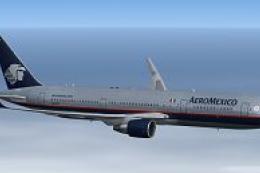
Screenshot of Aeromexico Boeing 767-3Y0ER/WL in flight.
Although the cockpit is based on the default Boeing 737-800 panel in FSX, this package incorporates essential elements from the Posky utilities. Animations such as tow truck operations, catering vehicles, and cargo loading are managed through an added icon on the panel, which opens the Posky Utility interface. In addition, the model brings enhanced aileron animations including wingflex dynamics, ensuring a more immersive in-flight experience.
These operations can also be managed seamlessly via the Posky Utility panel for users who prefer a graphical menu approach.
On the FSX-specific variant of Skyspirit2010’s 767, the Satcom dome on top of the fuselage cannot be hidden by controlling the alpha channel in the “Antenna” texture. This issue does not occur with the FS9 models, but the FSX edition is mandatory to ensure compatibility with the virtual cockpit elements.
Once added, the repaint by Paul Craig and the Skyspirit2010 Boeing 767-300ER become selectable as an Aeromexico livery directly within your aircraft list. The included Posky Utility icon on the panel ensures swift access to door controls, ground vehicles, and other animations.
Free for all simmers · 14.56 MB · Scanned clean Oct 2026
Download speed: Free tier is capped at 0.5 Mbps (this file takes approximately 4 mins at the cap). PRO members download at full line speed.
FSX\SimObjects\Airplanes\. The folder must contain an aircraft.cfg file. Effects go into FSX\Effects\; gauges go into FSX\Gauges\.readme.txt or README file. It tells you exactly where files go, what dependencies are needed, and any quirks specific to this add-on.The archive ssp2010_aeromexico_b767-3y0er__wl_.zip has 140 files and directories contained within it.
This list displays the first 500 files in the package. If the package has more, you will need to download it to view them.
| Filename/Directory | File Date | File Size |
|---|---|---|
| Aeroméxico B767-3Y0ER Screenshot (1).jpg | 01.16.13 | 68.99 kB |
| Aeroméxico B767-3Y0ER Screenshot (2).jpg | 01.16.13 | 62.03 kB |
| Aeroméxico B767-3Y0ER Screenshot (3).jpg | 01.16.13 | 49.13 kB |
| Effects | 01.16.13 | 0 B |
| Opensky_747_vclight.fx | 10.02.02 | 1.31 kB |
| Opensky_767_Nose_Gear.fx | 12.12.10 | 1.31 kB |
| Opensky_beacon.fx | 02.12.02 | 3.04 kB |
| Opensky_conden.fx | 10.04.02 | 3.15 kB |
| Opensky_condens.fx | 09.08.02 | 2.71 kB |
| Opensky_logo_light.fx | 10.04.02 | 1.31 kB |
| Opensky_nacelle_refl.fx | 09.29.02 | 1.29 kB |
| Opensky_nav_yellow.fx | 03.24.04 | 3.07 kB |
| Opensky_sparks.fx | 09.08.02 | 7.05 kB |
| Opensky_vortex.fx | 10.08.03 | 1.23 kB |
| Opensky_wing_light.fx | 09.29.02 | 1.31 kB |
| FILE_ID.DIZ | 01.16.13 | 321 B |
| Installation Readme.txt | 01.16.13 | 2.18 kB |
| SSP2010 Boeing 767-300ER PW | 01.16.13 | 0 B |
| 767-300ER-PW4060.air | 02.06.05 | 8.81 kB |
| Aircraft.cfg | 01.16.13 | 14.82 kB |
| model.BWL | 01.16.13 | 0 B |
| Model.cfg | 01.14.13 | 92 B |
| OSX763ERV5_PW4000--BWL.MDL | 11.19.12 | 2.52 MB |
| panel | 01.16.13 | 0 B |
| 737_compass.BMP | 05.12.06 | 95.51 kB |
| 737_Panel_Decals_2.bmp | 05.12.06 | 257.05 kB |
| 737-800_panel_background.bmp | 05.12.06 | 769.05 kB |
| 737-800_panel_background_night.bmp | 05.12.06 | 769.05 kB |
| B737_800.cab | 05.11.07 | 2.01 MB |
| panel.cfg | 01.16.13 | 7.29 kB |
| Pky_util | 01.16.13 | 0 B |
| install.txt | 03.25.08 | 143 B |
| Pky_Init.xml | 04.26.08 | 621 B |
| Pky_Timer.xml | 10.30.09 | 1.92 kB |
| Pky_Util.xml | 11.09.10 | 7.30 kB |
| posky_sw_close.bmp | 03.25.08 | 2.30 kB |
| posky_sw_off.bmp | 03.25.08 | 2.30 kB |
| posky_sw_on.bmp | 03.25.08 | 2.30 kB |
| posky_sw_open.bmp | 03.25.08 | 2.30 kB |
| posky_tow_0.bmp | 11.05.10 | 3.05 kB |
| posky_tow_100.bmp | 11.05.10 | 3.05 kB |
| posky_utilbase.bmp | 11.09.10 | 60.05 kB |
| Thumbs.db | 11.09.10 | 19.50 kB |
| Posky763 | 01.16.13 | 0 B |
| $~poskydebug2.xml | 09.23.10 | 499 B |
| Pky_AdvInit.xml | 01.11.11 | 1.09 kB |
| Pky_PB_Towhead.xml | 10.22.08 | 809 B |
| Pky6WINGFLEX.xml | 12.19.11 | 2.05 kB |
| PkyAileronL.xml | 01.11.11 | 805 B |
| PkyAileronR.xml | 01.11.11 | 820 B |
| PkyAPUDoor.xml | 01.11.11 | 434 B |
| PkyCALC.xml | 01.11.11 | 2.10 kB |
| Pkycondassign.xml | 12.10.10 | 433 B |
| PkyEngRev.xml | 05.18.08 | 699 B |
| PkyFlasher.xml | 06.09.10 | 2.51 kB |
| Pkygearcalc.xml | 10.30.10 | 1.91 kB |
| PkyLSAileron.xml | 01.11.11 | 845 B |
| PkyNosegearsteerling.xml | 09.23.10 | 1.21 kB |
| PkySEA.xml | 11.09.09 | 1.41 kB |
| PkySpoiler.xml | 01.11.11 | 4.13 kB |
| poskydebug.xml | 04.26.11 | 349 B |
| poskydebug2.xml | 09.23.10 | 498 B |
| poskydebug3.xml | 01.11.11 | 437 B |
| PU_ICON | 01.16.13 | 0 B |
| PU_Icon.bmp | 04.09.12 | 3.05 kB |
| PU_Icon.xml | 04.09.12 | 297 B |
| upper_640.bmp | 05.12.06 | 18.99 kB |
| Sound | 01.16.13 | 0 B |
| sound.cfg | 03.18.09 | 32 B |
| texture.Aeroméxico | 01.16.13 | 0 B |
| DECAL_OS763V5TAILLOGO.bmp | 01.13.13 | 4.00 MB |
| OS763V5_LFUSE_Front_L.BMP | 01.10.13 | 4.00 MB |
| OS763V5_LFUSE_Front_T.bmp | 01.15.13 | 4.00 MB |
| OS763V5_LFUSE_Mid_L.BMP | 01.16.13 | 4.00 MB |
| OS763V5_LFUSE_Mid_T.bmp | 01.15.13 | 4.00 MB |
| OS763V5_LFUSE_Rear_L.bmp | 01.16.13 | 4.00 MB |
| OS763V5_LFUSE_Rear_T.bmp | 01.15.13 | 4.00 MB |
| OS763V5_RFUSE_Front_L.BMP | 01.10.13 | 4.00 MB |
| OS763V5_RFUSE_Front_T.bmp | 01.15.13 | 4.00 MB |
| OS763V5_RFUSE_Mid_L.BMP | 01.16.13 | 4.00 MB |
| OS763V5_RFUSE_Mid_T.bmp | 01.15.13 | 4.00 MB |
| OS763V5_RFUSE_Rear_L.bmp | 01.16.13 | 4.00 MB |
| OS763V5_RFUSE_Rear_T.bmp | 01.15.13 | 4.00 MB |
| OS767Antenna.bmp | 01.15.13 | 256.07 kB |
| Os767PW4000_fan.bmp | 01.13.13 | 1.00 MB |
| Os767PW4000_T.bmp | 01.13.13 | 4.00 MB |
| OS767Wing_L_T.BMP | 01.15.13 | 4.00 MB |
| OS767Wing_R_T.BMP | 01.15.13 | 4.00 MB |
| OS767Wing2_L_T.bmp | 01.07.13 | 1.00 MB |
| OS767Wing2_R_T.bmp | 01.07.13 | 1.00 MB |
| texture.cfg | 01.10.13 | 153 B |
| thumbnail.jpg | 01.16.13 | 9.64 kB |
| Thumbs.db | 11.09.10 | 229.00 kB |
| texture.Shared Textures | 01.16.13 | 0 B |
| 737_Refection.dds | 09.04.06 | 170.79 kB |
| B737_800_1_C.dds | 09.04.06 | 682.79 kB |
| B737_800_1_night_C.dds | 02.03.12 | 512.12 kB |
| B737_800_2_C.dds | 09.04.06 | 682.79 kB |
| B737_800_2_night_C.dds | 02.03.12 | 512.12 kB |
| B737_800_3_C.dds | 09.04.06 | 682.79 kB |
| B737_800_3_night_C.dds | 02.03.12 | 512.12 kB |
| B737_800_4_C.dds | 09.04.06 | 682.79 kB |
| B737_800_4_night_C.dds | 02.03.12 | 512.12 kB |
| B737_800_5_C.dds | 09.04.06 | 170.79 kB |
| B737_800_5_night_C.dds | 09.04.06 | 170.79 kB |
| B737_800_C.bmp | 05.12.06 | 682.74 kB |
| B737_800_Interior.dds | 09.04.06 | 170.79 kB |
| DECAL_OS763V5.bmp | 12.05.10 | 4.00 MB |
| Os_wt500e_l.bmp | 10.22.08 | 1.00 MB |
| Os_wt500e_t.bmp | 10.21.08 | 1.00 MB |
| Os763V5_FLCARGOBAY_T.BMP | 11.26.09 | 1.00 MB |
| OS763V5_FSCARGOBAY_T.BMP | 09.16.09 | 1.00 MB |
| Os763V5_RSCARGOBAY_T.BMP | 09.16.09 | 1.00 MB |
| Os767_chock.bmp | 11.05.10 | 256.07 kB |
| Os767_Container_T.BMP | 09.16.09 | 4.00 MB |
| Os767_Interior_T.BMP | 09.07.09 | 4.00 MB |
| OS767_SPRING_T.BMP | 10.13.10 | 16.07 kB |
| OS767_Wheel1_T.bmp | 03.21.09 | 1.00 MB |
| OS767_Wheel2_T.bmp | 03.21.09 | 1.00 MB |
| OS767Antenna.bmp | 11.29.10 | 256.07 kB |
| OS767GSU1_T.BMP | 09.07.09 | 4.00 MB |
| OS767GSU2_T.BMP | 09.06.09 | 4.00 MB |
| OS767Option.bmp | 11.23.10 | 64.07 kB |
| Os767PW4000_fan.bmp | 10.22.10 | 1.00 MB |
| Os767PW4000_L.bmp | 12.05.10 | 4.00 MB |
| OS767V5_Parts_L.bmp | 03.25.07 | 1.07 kB |
| OS767V5_Parts_T.BMP | 11.20.10 | 4.00 MB |
| OS767V5_Parts2_L.bmp | 12.06.10 | 4.00 MB |
| OS767V5_Parts2_T.bmp | 12.02.10 | 4.00 MB |
| OS767V5_Parts3_T.bmp | 10.24.10 | 4.00 MB |
| Os767v5_wheeltire_t.bmp | 05.15.12 | 4.00 MB |
| OS767Wing_L_L.BMP | 12.01.10 | 4.00 MB |
| OS767Wing_R_L.BMP | 12.01.10 | 4.00 MB |
| OS767Wing2_L_L.bmp | 12.01.10 | 1.00 MB |
| OS767Wing2_R_L.bmp | 12.01.10 | 1.00 MB |
| texture.cfg | 01.10.13 | 153 B |
| SSP2010 Readme.txt | 01.16.13 | 5.92 kB |
| thumbnail.png | 01.16.13 | 40.40 kB |
| flyawaysimulation.txt | 10.29.13 | 959 B |
| Go to Fly Away Simulation.url | 01.22.16 | 52 B |
Only PRO members can place votes.
More FSX & P3D add-ons hand-picked based on this download.
FSX Civil Aircraft
Complete package of the Skyspirit2010 B767-300ER in Aeromexico livery, regist…
 FSX Civil Aircraft
Replacement textures for the Skyspirit2010 B767-300ER Aeromexico package (SSP…
 FSX Civil Aircraft
Complete package of the Project Open Sky B737-700 WE model in Aeromexico live…
 FSX Civil Aircraft
Immerse yourself in a fully realized Boeing 767-283/ER customized with Aerome…
 FSX Civil Aircraft
FS2004/FSX/P3D Aeromexico Boeing 787-9, registration XA-ADL. 32 bit Aeromexic…
 FSX Civil Aircraft
Aeromexico Boeing 757-200. Has a virtual cabin and panel of CRJ 700. By fsx-m…
 FSX Civil Aircraft
AeroMexico Boeing 737-800NGX, registration N861AM and XA-AMO. Repaint of two …
 FSX Civil Aircraft
Aeromexico’s Boeing 777-200ER airplane, bearing tail number N746AM, is offere…
Be the first to leave a comment on this download.
Be the first to share your thoughts on this download.