

 FSX General Aviation Aircraft
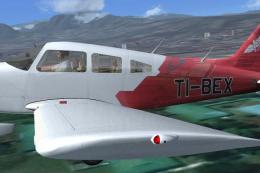
Aerotica Piper Archer II TI-BEX
A repaint of the payware Carenado Piper Archer. Aerotica is an flight school …
Aerotica Flight School’s TI-BEP repaint brings the Piper Archer II training look to life with crisp markings, realistic shading, and polished surface detail that suits everyday instructional flying. Built for Microsoft Flight Simulator X, it requires the payware Carenado PA28-181 Archer II and integrates cleanly for an authentic school-aircraft finish.
 Rate
Rate

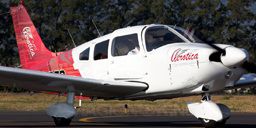
This freeware repaint offers a faithful depiction of the Aerotica Flight School Piper Archer II, carrying the TI-BEP registration, designed by developer Luis Jimenez Trejos specifically for the payware Carenado Piper PA28-181 Archer II. It introduces a subtle exterior scheme that highlights the aircraft’s use as a trainer and general aviation platform, ready to enhance your experience in Microsoft Flight Simulator X.
The livery showcases the colors of Aerotica Flight School, which is renowned for training budding pilots. The Archer II, often considered a direct competitor to the Cessna 172, is part of Piper’s PA-28 Cherokee series. Its 180 HP single piston engine provides robust performance for instructional flights, and its low-wing configuration offers good stability for newcomers to general aviation. This unique repaint mirrors the real-world registration TI-BEP, reflecting the school’s distinctive identity.
Developed with high-resolution layering, each curve and marking is carefully placed to capture authentic shading and realistic wear that aligns with real PA28-181 Archers in active flight training. The repaint merges seamlessly with the acclaimed Carenado model, ensuring lifelike reflections, dynamic surface rendering, and crisp color definition across the aircraft’s fuselage and control surfaces.
This repaint applies exclusively to the Carenado Piper PA28-181 Archer II payware package. Please note that the payware aircraft itself is not included with this repaint—you will need to purchase the original aircraft from your favorite add-on store, such as SimShack. Once installed, the textures integrate directly into your aircraft folder, delivering this realistic Aerotica Flight School appearance when you load up the simulation.
aircraft.cfg file by adding the [fltsim.xx] entry found below, incrementing “xx” to the next sequential number.
[fltsim.xx]
title=PA-28 Archer TI-BEP
sim=Archer_Carenado
model=
panel=
sound=
texture=BEP
kb_checklists=Check_List_Archer
kb_reference=Reference_Archer
atc_id=TI-BEP
ui_manufacturer="Carenado"
ui_type=Archer II
ui_typerole="Single Engine Prop"
ui_createdby="Carenado"
ui_variation=Aerotica TI-BEP
description="The Archer belongs to the PA-28 family (or Cherokee family) of aircraft model. It was born in 1974 when the Challenger was renamed to Archer (PA-28-181). Four seat, single piston engine (180 HP), unpressurized, low wing and tricycle landing gear. It is a direct competitor to the C172."
atc_heavy=0
atc_airline=
atc_flight_number=
atc_id_color=0000000000
visual_damage=1
ui_thumbnailfile=thumbnail.jpg
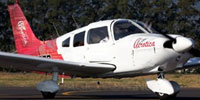
Image of Aerotica Flight School Piper Archer II TI-BEP on runway.
The Piper Archer II was introduced in the mid-1970s and features improved aerodynamics over its predecessors in the Cherokee family. Sporting a tricycle landing gear and four-seat cabin, it excels in both training and personal flight. Its 180 HP engine and simple handling profile allow learners to focus on fundamental maneuvers without becoming overwhelmed. In real training environments, its cockpit layout provides straightforward instrumentation, making it a prized asset for flight schools worldwide.
This repaint is brought to you by Luis Jimenez Trejos to complement the original Carenado model. Each detail has been refined to echo the real TI-BEP registration. Pilots seeking an immersive and accurate training atmosphere will find this texture set a splendid addition to their simulated hangar.
Free for all simmers · 11.27 MB · Scanned clean Oct 2026
Download speed: Free tier is capped at 0.5 Mbps (this file takes approximately 3 mins at the cap). PRO members download at full line speed.
texture.{airline}) inside FSX\SimObjects\Airplanes\{base-aircraft}\.aircraft.cfg in Notepad. Add a new [fltsim.X] section per the readme.readme.txt or README file. It tells you exactly where files go, what dependencies are needed, and any quirks specific to this add-on.The archive tico_sim_carenado_archer_ii_ti-bep.zip has 46 files and directories contained within it.
This list displays the first 500 files in the package. If the package has more, you will need to download it to view them.
| Filename/Directory | File Date | File Size |
|---|---|---|
| Carenado PA28 Archer II | 12.22.13 | 0 B |
| Facebook.jpg | 09.11.13 | 766.14 kB |
| Leame.txt | 12.22.13 | 1.06 kB |
| lr.JPG | 02.28.12 | 9.49 kB |
| texture.BEP | 12.22.13 | 0 B |
| ARCHERLIGHT.bmp | 07.28.09 | 256.05 kB |
| ARCHERLIGHT_night.bmp | 07.28.09 | 256.05 kB |
| Archer_night1.bmp | 08.12.09 | 128.07 kB |
| Archer_night2.bmp | 08.12.09 | 128.07 kB |
| Archer_night3.bmp | 08.12.09 | 32.07 kB |
| CARARCHERa.bmp | 12.20.13 | 1.00 MB |
| CARARCHERa_bump.bmp | 08.11.09 | 4.00 MB |
| CARARCHERa_spec.bmp | 07.21.09 | 1.00 MB |
| CARARCHERa_Tnight.bmp | 07.05.09 | 1.00 MB |
| CARARCHERb.bmp | 12.20.13 | 1.00 MB |
| CARARCHERb_bump.bmp | 07.21.09 | 4.00 MB |
| CARARCHERb_spec.bmp | 07.21.09 | 1.00 MB |
| CARARCHERc.bmp | 12.20.13 | 1.00 MB |
| CARARCHERc1.bmp | 12.20.13 | 1.00 MB |
| CARARCHERc_bump.bmp | 07.21.09 | 4.00 MB |
| CARARCHERc_spec.bmp | 07.21.09 | 1.00 MB |
| CARARCHERd.bmp | 12.20.13 | 1.00 MB |
| CARARCHERd2.bmp | 12.20.13 | 1.00 MB |
| CARARCHERd2_bump.bmp | 08.13.09 | 4.00 MB |
| CARARCHERd2_spec.bmp | 07.21.09 | 1.00 MB |
| CARARCHERd_bump.bmp | 08.13.09 | 4.00 MB |
| CARARCHERd_spec.bmp | 07.21.09 | 1.00 MB |
| CARARCHERe.bmp | 12.20.13 | 1.00 MB |
| CARARCHERe_bump.bmp | 07.21.09 | 4.00 MB |
| CARARCHERe_spec.bmp | 07.21.09 | 1.00 MB |
| CARARCHERSeats.bmp | 12.20.13 | 1.00 MB |
| CARARCHER_WindowsA.bmp | 08.04.09 | 85.40 kB |
| CARARCHER_WindowsA_spec.bmp | 07.05.09 | 64.07 kB |
| CarenadoARCHERprop.bmp | 12.20.13 | 1.00 MB |
| fusintARCHERa1.bmp | 12.20.13 | 1.00 MB |
| fusintARCHERa2.bmp | 12.20.13 | 1.00 MB |
| fusintARCHERb1.bmp | 12.20.13 | 1.00 MB |
| fusintARCHERb2.bmp | 12.20.13 | 1.00 MB |
| interiorARCHER_a.bmp | 12.20.13 | 1.00 MB |
| panelfrontARCHER.bmp | 12.20.13 | 1.00 MB |
| Pilot.bmp | 08.18.13 | 1.00 MB |
| thumbnail.JPG | 12.20.13 | 42.62 kB |
| thumbnail.JPG | 12.20.13 | 42.62 kB |
| Tico Sim logo.jpg | 06.01.13 | 35.11 kB |
| flyawaysimulation.txt | 10.29.13 | 959 B |
| Go to Fly Away Simulation.url | 01.22.16 | 52 B |
Only PRO members can place votes.
More FSX & P3D add-ons hand-picked based on this download.
FSX General Aviation Aircraft
A repaint of the payware Carenado Piper Archer. Aerotica is an flight school …
 FSX General Aviation Aircraft
This repaint package adds realistic Costa Rican flight school markings for th…
 FSX General Aviation Aircraft
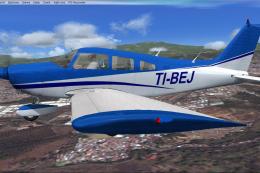
This repaint brings the distinctive CPEA Flight School registration, TI-BEJ, …
 FSX General Aviation Aircraft
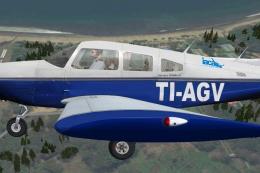
The payware Carenado Archer II painted as TI-AGV from IACA Flight School. By …
 FSX General Aviation Aircraft
This repaint showcases a distinctive livery for the Carenado PA28-181 Archer …
 FSX General Aviation Aircraft
This repaint provides a specialized livery for the Carenado PA28-181 Archer I…
 FSX General Aviation Aircraft
Piper Archer II TI-BEW, CPEA Flight School. Textures for the payware Carenado…
 FSX General Aviation Aircraft
This repaint offers a custom livery of the Piper Archer II registered as TI-A…
Be the first to leave a comment on this download.
Be the first to share your thoughts on this download.