


 FSX Civil Aircraft
Jetstar Airbus A330-200 Silver Livery
Experience a refined Jetstar Airbus A330-200 repaint in a metallic silver mot…
Jetstar Airbus A330-200 “white” repaint brings a clean, transitional livery to Microsoft Flight Simulator X, with carefully aligned titles, registrations, window outlines, and tail art on Thomas Ruth’s GE A330-200 model. Subtle shading and reflective tuning help the minimalist scheme read convincingly across changing light, and it requires TOM330.ZIP.
 Rate
Rate
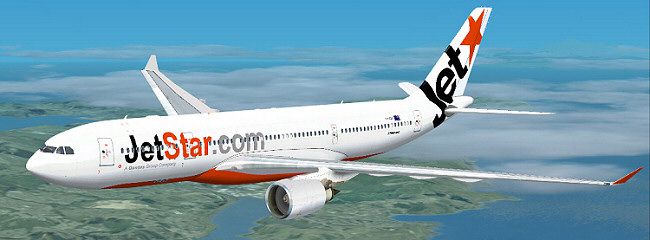
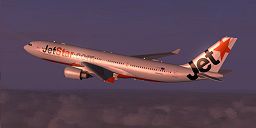
Enhance your Microsoft Flight Simulator X experience with this meticulously crafted Jetstar Airbus A330-200 “white” repaint. Developed by Thomas Ruth (base model) and refined by Jon Murchison (texture design), this add-on showcases an accurate rendition of the aircraft’s understated color scheme. The base package referenced (TOM330.ZIP) is required, and it can usually be located in the Fly Away Simulation library.
Jetstar’s A330-200 fleet delivers reliable medium-to-long-haul service across the Asia-Pacific region, and this repaint reflects the minimalist look introduced in certain transitions between full paint schemes. This layout emphasizes the fuselage lines and engine cowlings while accurately capturing the airline’s branding elements. You will notice the realistic placement of registration markings, window outlines, and tail graphics, which all match the real-world model’s configuration.
Follow these instructions to integrate the repaint safely into your simulator:
...SimObjects\Airplanes\Tom_A330-200[fltsim.X] with the next sequential number. For example, if your previous repaint ends with [fltsim.9], increment by one.[fltsim.X] title=Jetstar 'White' A330-200 sim=TomA332 model=GE panel= sound= texture=JETSTAR_W kb_checklists= kb_reference= atc_id= atc_airline=Jetstar atc_flight_number=1124 atc_heavy=1 ui_manufacturer=Airbus ui_type="A330-200" ui_variation="White" description=
Once completed, save the changes to aircraft.cfg. You should then be able to select this Jetstar repaint from your aircraft menu in Microsoft Flight Simulator X.
The Airbus A330-200, a twin-engine jetliner, has proven its versatility by operating over both regional and intercontinental distances. Jetstar employed this series for a range of routes, benefiting from the A330’s cost-efficient fuel burn and spacious cabin layout. That capacity often supported an all-economy format or a split-class arrangement with premium options, highlighting the aircraft’s adaptability for diverse passenger demands.

The download package contains only textures. The freeware base model by Thomas Ruth (TOM330.ZIP) must be obtained separately. You can find that in the Fly Away Simulation mod archive. After installing the required original aircraft, adding this Jetstar repaint completes the setup, showcasing a clean livery that stays true to the carrier’s transitional designs.
Free for all simmers · 2.02 MB · Scanned clean Oct 2026
Download speed: Free tier is capped at 0.5 Mbps. PRO members download at full line speed.
This file is a repaint — the package below is the base model it paints onto. Install it first, or the textures will have nothing to load onto.
texture.{airline}) inside FSX\SimObjects\Airplanes\{base-aircraft}\.aircraft.cfg in Notepad. Add a new [fltsim.X] section per the readme.readme.txt or README file. It tells you exactly where files go, what dependencies are needed, and any quirks specific to this add-on.The archive jetstarw.zip has 26 files and directories contained within it.
This list displays the first 500 files in the package. If the package has more, you will need to download it to view them.
| Filename/Directory | File Date | File Size |
|---|---|---|
| JETSTAR_W.jpg | 03.17.09 | 51.82 kB |
| README _INSTALL.txt | 03.17.09 | 1.34 kB |
| A321_1_L.dds | 03.12.09 | 1.00 MB |
| A321_2_L.dds | 03.12.09 | 256.12 kB |
| A330_VC01.dds | 03.12.09 | 1.00 MB |
| A330_VC01L.dds | 03.12.09 | 1.00 MB |
| Airbus_A321_1_L.dds | 03.12.09 | 1.00 MB |
| Airbus_A321_2_L.dds | 03.12.09 | 1.00 MB |
| Airbus_A321_3_L.dds | 03.12.09 | 4.12 kB |
| Airbus_A321_4_L.dds | 03.12.09 | 1.00 MB |
| glass.dds | 03.12.09 | 64.12 kB |
| glass_spec.dds | 03.12.09 | 4.12 kB |
| main.dds | 03.14.09 | 4.00 MB |
| main_bump.dds | 03.12.09 | 4.00 MB |
| main_light.dds | 03.12.09 | 1.00 MB |
| main_spec.dds | 03.12.09 | 64.12 kB |
| texture.cfg | 03.12.09 | 165 B |
| thumbnail.jpg | 03.14.09 | 8.56 kB |
| Thumbs.db | 03.12.09 | 7.00 kB |
| VCblend.dds | 03.12.09 | 1.12 kB |
| wing_bump.dds | 03.12.09 | 1.00 MB |
| wing_l.dds | 03.14.09 | 1.00 MB |
| wing_r.dds | 03.14.09 | 1.00 MB |
| wing_spec.dds | 03.12.09 | 64.12 kB |
| flyawaysimulation.txt | 10.29.13 | 959 B |
| Go to Fly Away Simulation.url | 01.22.16 | 52 B |
Only PRO members can place votes.
More FSX & P3D add-ons hand-picked based on this download.
FSX Civil Aircraft
Experience a refined Jetstar Airbus A330-200 repaint in a metallic silver mot…
 FSX Civil Aircraft
Jetstar Airways Airbus A320 with sharklets, registration VH-VFN, 'Celebrating…
 FSX Civil Aircraft
A repaint of the default Airbus A321 in JetStar livery. Textures include diff…
 FSX Civil Aircraft
This refined repaint package offers a faithful Jetstar Airways Boeing 787-8 V…
 FSX Civil Aircraft
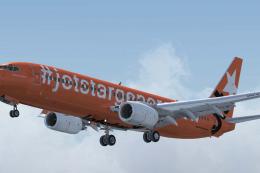
Jetstar Pacific Boeing 737-800, registration VN-A191. Jetstar Pacific offers …
 FSX Civil Aircraft
Jetstar Australia Boeing 737 in 10th anniversary livery. Jetstar Australia, a…
 FSX Civil Aircraft
Airbus NEO livery for the payware Blackbox Simulations A330 Prologue. This is…
 FSX Civil Aircraft
This freeware Airbus A330-200 package offers an all-in-one solution for Micro…
Read what other simmers think, or add your own.

Hi,
I want to add this to my FSX but i don't have A330-200 airbus in my FSX and the folder it says to save this to doesn't exist in my FSX?