

 FSX Panels & Gauges
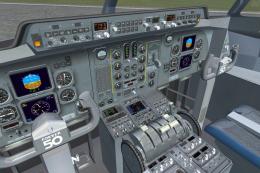
Fokker 50 Flight Deck And Passenger Compartment
Enhance your Fokker 50 cockpit and passenger area with comprehensive texture …
Passenger Sign Display Gauge brings realistic seat belt and no smoking indicators to the cabin, with a crisp multi-colored display, a classic warm-color option, and an alternative screen layout for flexible panel setups in FSX. It integrates as a dedicated window and requires working passenger and no smoking sign switches for proper operation.
 Rate
Rate
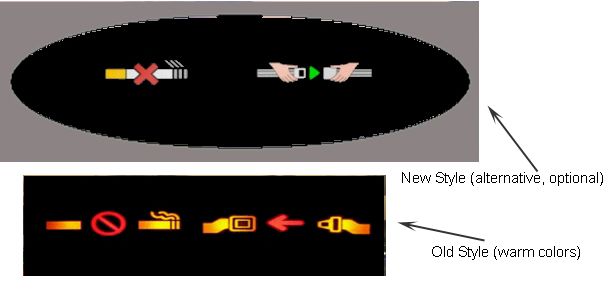
Passenger Sign Display Gauge. A display gauge showing passenger signs in the cabin (seat belt and no smoking signs). Comes with new multi-colored display and with classic warm colors display. Alternative screen display included. You must have, however, a passenger and no smoking sign switch in order for this to work properly. By Diego Roxas.
Passenger Sign Display Gauge.
1. Follow steps 1-4 in the manual.
2. Copy the display_screen.bmp file (in this folder) and paste it in the panel folder to where you pasted the Pass signs folder.
3. Open aircraft.cfg and add the following.
(Replace XX with a number after the last gauge)
Windowxx=Passenger Signs
//Windows category (change the xx into the numers the SAME as the passenger signs's window no.)
[Windowxx]

	file_1024=display_screen.bmp

	Position=0

	Visible=0

	Size_mm=600,200
gauge00=Pass Signs!Passenger Signs, 82,46,437,109
Free for all simmers · 108.19 KB · Scanned clean Oct 2026
Download speed: Free tier is capped at 0.5 Mbps. PRO members download at full line speed.
FSX\SimObjects\Airplanes\{aircraft}\panel\. Back up the existing panel folder first.readme.txt or README file. It tells you exactly where files go, what dependencies are needed, and any quirks specific to this add-on.The archive pass_sign_fsx.zip has 25 files and directories contained within it.
This list displays the first 500 files in the package. If the package has more, you will need to download it to view them.
| Filename/Directory | File Date | File Size |
|---|---|---|
| pass_sign_fsx | 04.13.11 | 0 B |
| Alternative screen | 04.13.11 | 0 B |
| display_screen.BMP | 04.13.11 | 351.62 kB |
| Install.txt | 04.13.11 | 524 B |
| Thumbs.db | 04.13.11 | 4.00 kB |
| Gauge | 04.13.11 | 0 B |
| Pass signs | 04.13.11 | 0 B |
| blank.BMP | 04.13.11 | 165.09 kB |
| Passenger signs.xml | 04.13.11 | 776 B |
| Thumbs.db | 04.13.11 | 3.00 kB |
| Manual.txt | 04.13.11 | 1.43 kB |
| New design | 04.13.11 | 0 B |
| screen.BMP | 04.13.11 | 165.09 kB |
| seatbelt_on.BMP | 04.13.11 | 165.09 kB |
| smoking_on.BMP | 04.13.11 | 165.09 kB |
| Thumbs.db | 04.13.11 | 5.50 kB |
| Old design | 04.13.11 | 0 B |
| screen.BMP | 04.13.11 | 165.09 kB |
| seatbelt_on.BMP | 04.13.11 | 165.09 kB |
| smoking_on.BMP | 04.13.11 | 165.09 kB |
| Thumbs.db | 04.13.11 | 5.50 kB |
| pass_sign_fsx.JPG | 04.13.11 | 63.59 kB |
| Thumbs.db | 04.13.11 | 5.00 kB |
| flyawaysimulation.txt | 10.29.13 | 959 B |
| Go to Fly Away Simulation.url | 01.22.16 | 52 B |
Only PRO members can place votes.
More FSX & P3D add-ons hand-picked based on this download.
FSX Panels & Gauges
Enhance your Fokker 50 cockpit and passenger area with comprehensive texture …
 FSX Panels & Gauges
This freeware package refines both the Fokker 60 flight deck and passenger se…
 FSX Panels & Gauges
FSXPrimary Flight Display (PFD) Updates. A good flight has to end with a grea…
 FSX Panels & Gauges
A concept Primary Flight Display with unique integrated radar altimeter, vert…
 FSX Panels & Gauges
This updated freeware panel for the Fokker 50 integrates a wide, three-monito…
 FSX Panels & Gauges
This advanced dual-display panel configuration for the Fokker 50 aircraft in …
 FSX Panels & Gauges
Experience a seamless multi-monitor flight deck arrangement with this special…
 FSX Panels & Gauges
This dual-display freeware package integrates an updated Fokker 60 flight dec…
Be the first to leave a comment on this download.
Be the first to share your thoughts on this download.