


 Panama
  FSX Scenery
Princess Juliana International Airport
Princess Juliana International Airport (TNCM) in Saint Marteen, Netherlands A…
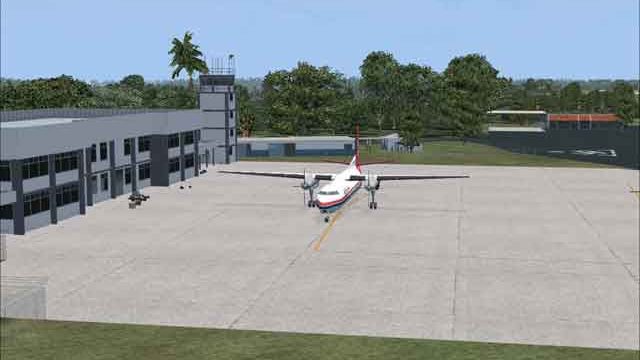
Enrique Malek International Airport (MPDA) brings David, Panama to life in FSX with fully GMAX-modeled buildings placed accurately, plus PAPI and night lighting that matches the real field. It adds a realistic taxi and parking layout with in-hangar spots, updated roads and airport background, local vegetation, a helipad, fuel area tweaks, and refined landclass, waterclass, seasons, and tower view.
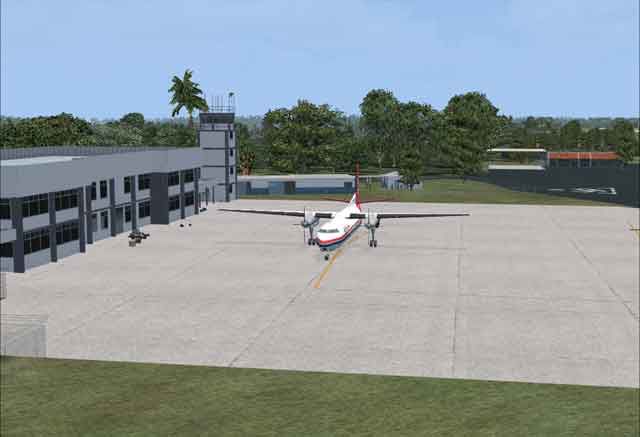
Enrique Malek International Airport (MPDA), Panama. Gmax scenery of one of Panama's larger airport, located in the city of David. By Rhett Browning.
Enrique Malek International Scenery.
This is a GMAX scenery of one of Panama's larger airports, Enrique Malek Intl in the city of David (pronounced Dah-veed). It is part of a larger project I have done some work on. At present the only other part of that project that has been uploaded anywhere, is MPTO (Tocumen Intl).
David is presently undergoing some construction, more specifically an airport fire station (estacion de bomberos) but I do not have any good pictures of what the newly-constructed building looks like. Also there is some work being done to the automobile parking area in the front of the terminal.
FEATURES
-- all structures fully GMAX'ed
-- added PAPI and night lighting to match the real MPDA
-- all structures at their exact, precise locations (default MPDA is not accurate at all)
-- realistic parking and taxi network, based on the best real-world information available to me
-- much more parking (max size: 14.1m = F27 size aircraft)
-- in-hangar parking (if your crash detection is turned off!)
-- reworked cvx scenery (roads, airport background) around MPDA
-- adjusted seasons BGL to avoid browns and fall and winter colors in Panama
-- more accurate VOR shack
-- adjusted landclass and waterclass around the airport
-- adjusted Tower View
-- put in some vegetation to better match the real world
-- added a helipad as in the real airport
-- adjusted the fuel station
INSTALLATION
1) I recommend creating a separate folder for all Panama scenery, such as E:\SCENERY\PANAMA.
2) Then create E:\SCENERY\PANAMA\SCENERY and E:\SCENERY\PANAMA\TEXTURE
2) Install the .bgl files into a \scenery folder.
3) Install the .bmp files into a \texture folder.
4) activate in scenery library.
This scenery was tested with FSX Deluxe SP1, FSX Deluxe SP2/Acceleration, FEX, FSGenesis terrain, and ASG. I cannot guarantee compatibility with any other add-ons, such as UTX, which I do not have.
RECOMMENDED FSX SETTINGS
Autogen: at least NORMAL, preferably EXTREMELY DENSE (At a rural place like David, even on mid-level computers like mine you can run Dense or Extremely Dense Autogen. The airport blends best this way.)
Scenery Complexity Slider: EXTREMELY DENSE. (Setting it to "Sparse" or "Very Sparse" will result in a poor experience for you. In rural areas, frame rate is little affected by the Scenery Complexity Slider, so I recommend you turn it up.)
If you want to park your aircraft inside the various hangars I made, you should disable "Crash Detection" in your FSX settings. I could have implemented this differently but for now, this is how I have handled this.
NOTAM
TWY C INOP UFN (Translation: Taxiway C is inoperable until further notice). You can be a rebel, and taxi on Taxiway C if you want, but ATC will not vector you on it and AI will not travel on it, either. I am sure the Panamanian aviation authorities will arrest you if you do taxi on Taxiway C at David.
Rhett Browning
Free for all simmers · 802.69 KB · Scanned clean Oct 2026
Download speed: Free tier is capped at 0.5 Mbps. PRO members download at full line speed.
FSX\Addon Scenery\ containing scenery and texture sub-folders.readme.txt or README file. It tells you exactly where files go, what dependencies are needed, and any quirks specific to this add-on.Use these coordinates to fly directly to this location once the mod is installed.
8.39100000,-82.43400000
Launch FSX or Prepar3D and use Flights → Load to open the downloaded .pln file. Your aircraft will be positioned at this location.
The archive mpdav1rb.zip has 16 files and directories contained within it.
This list displays the first 500 files in the package. If the package has more, you will need to download it to view them.
| Filename/Directory | File Date | File Size |
|---|---|---|
| MPDA_apx_rb.BGL | 10.28.07 | 12.45 kB |
| MPDA_cvx_RB.BGL | 10.02.07 | 2.24 kB |
| MPDA_lc_rb.bgl | 10.17.07 | 314 B |
| MPDA_wc_rb.bgl | 10.28.07 | 683 B |
| MPDA1.jpg | 10.28.07 | 14.37 kB |
| MPDA_obx_rb.BGL | 10.28.07 | 655.26 kB |
| MPDA_south.bmp | 10.28.07 | 341.40 kB |
| MPDA_south_lm.bmp | 10.28.07 | 341.40 kB |
| MPDA_terminal.bmp | 10.19.07 | 1.33 MB |
| MPDA_terminal_lm.bmp | 10.19.07 | 1.33 MB |
| Pan_Season.bgl | 11.02.07 | 1.75 kB |
| MPDA_readme.txt | 11.08.07 | 3.28 kB |
| MPDA2.gif | 11.08.07 | 11.05 kB |
| FILE_ID.DIZ | 11.18.07 | 167 B |
| flyawaysimulation.txt | 10.29.13 | 959 B |
| Go to Fly Away Simulation.url | 01.22.16 | 52 B |
Only PRO members can place votes.
More FSX & P3D add-ons hand-picked based on this download.
FSX Scenery
Princess Juliana International Airport (TNCM) in Saint Marteen, Netherlands A…
 FSX Scenery
Barbados International Airport (TBPB). Grantley Adams International Airport f…
 FSX Scenery
Dubai International Airport (OMDB), Dubai. Includes a new passenger terminal …
 FSX Scenery
Soekarno-Hatta International Airport (WIII), Jakarta, Indonesia. An update to…
 FSX Scenery
San Diego International Airport, California (CA), USA. This photoreal scenery…
 FSX Scenery
Suvarnabhumi International Airport (VTBS), Bangkok, Thailand, v1.1. Includes …
 FSX Scenery
Scenery Miami International Airport (KMIA), Florida (FL). Includes updated ta…
 FSX Scenery
Dallas-Fort Worth International Airport (KDFW), Texas (TX), with Terminal D. …
Be the first to leave a comment on this download.
Be the first to share your thoughts on this download.