

 FSX Scenery
Orlando Seaplane Base
This scenery mod will add Orlando Seaplane base to the scenery of FSX, P3D, a…
Jack Brown’s Seaplane Base (F57) in Winter Haven, Florida comes to life with detailed hangar and FBO buildings, plus static boats and a lineup of parked floatplanes including Piper J-3 Cubs and a C185 for added ramp character. Designed specifically for FSX, it recreates the lakeside training hub with convincing atmosphere.
 Rate
Rate
 United States of America
Jack Brown's Seaplane Base (F57), Winter Haven, Florida (FL). Includes hangar, FBO, static boats and airplanes. By Daniel Kemmer.
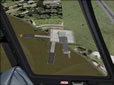
Jack Brown's Seaplane Base Scenery.
This scenery is of Jack Brown's Seaplane Base (F57) in Winter Haven, FL. This scenery only works in FSX. This includes several Piper J-3 Cubs, a C185 and a few other seaplanes, as well as a hanger, FBO, and 2 boats. By Daniel Kemmer.
To install plane the .bgl file into your Hard Drive:\Program Files\Microsoft Games\Microsoft Flight Simulator X\Addon Scenery\scenery folder. Then start FSX. THIS WILL NOT WORK IN FS2004 (FS9)!
This file is freeware and should not be sold for profit.
Free for all simmers · 1.24 MB · Scanned clean Oct 2026
Download speed: Free tier is capped at 0.5 Mbps. PRO members download at full line speed.
FSX\Addon Scenery\ containing scenery and texture sub-folders.readme.txt or README file. It tells you exactly where files go, what dependencies are needed, and any quirks specific to this add-on.Use these coordinates to fly directly to this location once the mod is installed.
28.02140000,-81.73390000
Launch FSX or Prepar3D and use Flights → Load to open the downloaded .pln file. Your aircraft will be positioned at this location.
The archive jbrownsp.zip has 8 files and directories contained within it.
This list displays the first 500 files in the package. If the package has more, you will need to download it to view them.
| Filename/Directory | File Date | File Size |
|---|---|---|
| FSX Scenery Jack Browns Seaplane Base | 07.29.08 | 0 B |
| 2008-7-29_9-14-43-843.BMP | 07.29.08 | 3.00 MB |
| Jack Browns seaplane base.bgl | 07.29.08 | 1.64 kB |
| README.txt | 07.29.08 | 555 B |
| thumbnail.jpg | 07.29.08 | 5.56 kB |
| FILE_ID.DIZ | 07.30.08 | 147 B |
| flyawaysimulation.txt | 10.29.13 | 959 B |
| Go to Fly Away Simulation.url | 01.22.16 | 52 B |
Only PRO members can place votes.
More FSX & P3D add-ons hand-picked based on this download.
FSX Scenery
This scenery mod will add Orlando Seaplane base to the scenery of FSX, P3D, a…
 FSX Scenery
King Seaaero Seaplane Base, FL. King Seaaero Seaplane Base is located two mil…
 FSX Scenery
Fulton Seaplane Base 0FD6. Fulton Seaplane Base is located 2 miles north of S…
 FSX Scenery
Gary Gale Seaplane Base Florida. Gary Gale Seaplane Base (0FL8) is a real pri…
 FSX Scenery
Lake Weir Seaplane Base. The Lake Weir facility (24FA), in Oklawaha, Florida …
 FSX Scenery
Goddard Seadrome Seaplane Base, Florida. Goddard Seadrome Seaplane Base (FD46…
 FSX Scenery
Jack Garland Airport, North Bay (CYYB), Canada. Enhancements include maintena…
 FSX Scenery
Caribbean Seaplane Tours, Florida (FL) operations. Caribbean Seaplane Tours i…
Read what other simmers think, or add your own.

There are some problems such as building and bushes in the water. The ramp is impossible to go up.