

 FSX Scenery
New Orleans International Airport
New Orleans International Airport, Louisiana (LA). This photoreal scenery is …
New Tempe Airport (FATP) scenery brings a detailed general aviation field in South Africa to FSX, built with fully custom hangars and airport buildings for authentic ramp and circuit work. A high-resolution photoreal ground base with seasonal variations sharpens local immersion and makes the airfield ideal for short regional hops.
 Rate
Rate
 South Africa

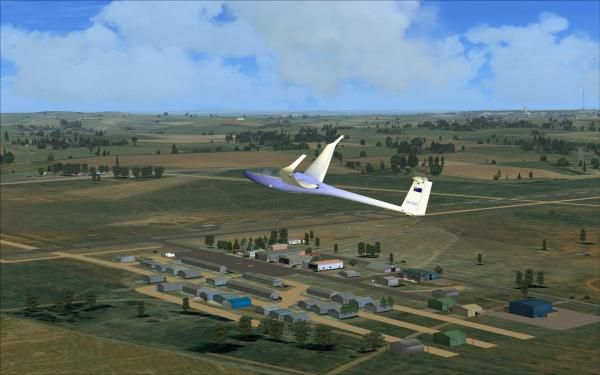
Scenery New Tempe Airport (FATP), South Africa. The airport is used by general aviation. Made from custom designed objects and buildings. Nice for short hops. Every hangar and building is custom built. It has a high resolution photoreal base that changes with the seasons. By Frits Beyer and Jacques Botha.
New Tempe Airport Scenery.
Instructions :
1.Unzip "New Tempe.zip" to a temp folder.
2.Copy the "New Tempe (FATP)" folder to your "FSX/scenery" folder.
3.Copy the "AFX_FATP_ALT.bgl" file to your "FSX/scenery/world/scenery" folder.
4.Copy the contents of "effects"folder to your FSX/effects folder.
5.Run FSX and on the main page go to "settings".
6.Now click on "scenery library".
7.Now click on "Add area" and search for the scenery folder.
8.Double click on the scenery folder and look for the"New Tempe (FATP)" folder.
9.NB !!!!!! click on this folder only once ! and then click on "OK".
10.The scenery will now load !
11.Go to free flight and choose "FATP" to start your flight !
Enjoy !
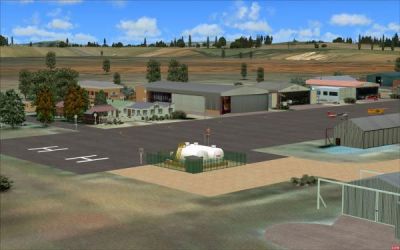
New Tempe Airport Scenery.
Free for all simmers · 17.95 MB · Scanned clean Oct 2026
Download speed: Free tier is capped at 0.5 Mbps (this file takes approximately 5 mins at the cap). PRO members download at full line speed.
FSX\Addon Scenery\ containing scenery and texture sub-folders.readme.txt or README file. It tells you exactly where files go, what dependencies are needed, and any quirks specific to this add-on.Use these coordinates to fly directly to this location once the mod is installed.
-29.09270000,26.30290000
Launch FSX or Prepar3D and use Flights → Load to open the downloaded .pln file. Your aircraft will be positioned at this location.
The archive newtempe.zip has 92 files and directories contained within it.
This list displays the first 500 files in the package. If the package has more, you will need to download it to view them.
| Filename/Directory | File Date | File Size |
|---|---|---|
| New Tempe | 04.23.10 | 0 B |
| AFX_FATP_ALT.bgl | 04.23.10 | 513 B |
| Effects | 04.23.10 | 0 B |
| fx_Lichtkegel.fx | 11.18.08 | 1.38 kB |
| texture | 04.23.10 | 0 B |
| TR2.bmp | 11.18.08 | 85.40 kB |
| FATP_1.jpg | 04.21.10 | 31.35 kB |
| FATP_2.jpg | 04.23.10 | 35.59 kB |
| FATP_Readme.txt | 04.23.10 | 1.56 kB |
| New Tempe(FATP) | 04.23.10 | 0 B |
| Scenery | 04.23.10 | 0 B |
| 001_AFX_ FATP.BGL | 04.21.10 | 13.82 kB |
| FATP Libary.bgl | 04.19.10 | 2.66 MB |
| FATP Location.bgl | 04.21.10 | 4.64 kB |
| FATP Objects.bgl | 04.21.10 | 11.39 kB |
| FATP Photo.bgl | 04.21.10 | 8.66 MB |
| Windsock Location.bgl | 04.21.10 | 236 B |
| Windsock.bgl | 04.21.10 | 119.59 kB |
| Texture | 04.23.10 | 0 B |
| AMS Hanger.bmp | 03.30.10 | 682.75 kB |
| AMS Hanger_LM.bmp | 03.30.10 | 682.75 kB |
| Cedar Hanger.bmp | 03.15.10 | 682.75 kB |
| Cedar Hanger_LM.bmp | 03.16.10 | 682.75 kB |
| Extra.bmp | 04.02.10 | 682.75 kB |
| Extra_LM.bmp | 04.02.10 | 682.75 kB |
| FA Aviation.bmp | 01.13.10 | 682.75 kB |
| FA Aviation_LM.bmp | 01.13.10 | 682.75 kB |
| FATP Coke.bmp | 09.27.09 | 170.75 kB |
| FATP Coke_LM.bmp | 09.27.09 | 170.75 kB |
| FATP Fuel.bmp | 02.08.10 | 682.75 kB |
| FATP Fuel_LM.bmp | 02.08.10 | 682.75 kB |
| FATP Hanger 2.bmp | 01.06.10 | 682.75 kB |
| FATP Hanger 2_LM.bmp | 01.06.10 | 682.75 kB |
| FATP Lights.bmp | 04.18.10 | 170.75 kB |
| FATP Lights_LM.bmp | 04.18.10 | 170.75 kB |
| FATP Office.bmp | 01.23.10 | 682.75 kB |
| FATP Office_LM.bmp | 01.23.10 | 682.75 kB |
| FATP Radio.bmp | 10.25.09 | 170.75 kB |
| FATP Radio_LM.bmp | 10.25.09 | 170.75 kB |
| FATP Sign 1.bmp | 12.09.09 | 341.43 kB |
| FATP Sign 1_LM.bmp | 12.09.09 | 341.43 kB |
| FATP Sign.bmp | 08.18.09 | 170.75 kB |
| FATP Sign_LM.bmp | 08.18.09 | 170.75 kB |
| FATP Toilet.bmp | 01.29.10 | 682.75 kB |
| FATP Toilet_LM.bmp | 01.29.10 | 682.75 kB |
| Ferraviation.bmp | 01.13.10 | 682.75 kB |
| Ferraviation_LM.bmp | 01.13.10 | 682.75 kB |
| Gliding Clubhuis.bmp | 03.31.10 | 682.75 kB |
| Gliding Clubhuis_LM.bmp | 03.31.10 | 682.75 kB |
| Gliding Extras.bmp | 04.04.10 | 170.75 kB |
| Gliding Extras_LM.bmp | 04.04.10 | 170.75 kB |
| Gliding Hanger.bmp | 03.31.10 | 682.75 kB |
| Gliding Hanger_LM.bmp | 03.31.10 | 682.75 kB |
| Glidingtower.bmp | 12.05.09 | 170.75 kB |
| Glidingtower_LM.bmp | 12.05.09 | 170.75 kB |
| Grasdak.bmp | 01.23.10 | 170.75 kB |
| Grasdak_LM.bmp | 01.23.10 | 170.75 kB |
| Green Hanger.bmp | 12.20.09 | 682.75 kB |
| Green Hanger_LM.bmp | 12.20.09 | 682.75 kB |
| Hanger Onder_1.bmp | 04.14.10 | 682.75 kB |
| Hanger Onder_1_LM.bmp | 04.14.10 | 682.75 kB |
| Hanger Onder_2.bmp | 04.18.10 | 682.75 kB |
| Hanger Onder_2_LM.bmp | 04.18.10 | 682.75 kB |
| Kragkas.bmp | 01.26.10 | 170.75 kB |
| Kragkas_LM.bmp | 01.26.10 | 170.75 kB |
| Langhangers.bmp | 04.17.10 | 682.75 kB |
| Langhangers_LM.bmp | 04.17.10 | 682.75 kB |
| Midwest Aviation.bmp | 12.11.09 | 682.75 kB |
| Midwest Aviation_LM.bmp | 01.05.10 | 682.75 kB |
| Motorcross Tower.bmp | 04.02.10 | 682.75 kB |
| Motorcross Tower_LM.bmp | 04.02.10 | 682.75 kB |
| Office Signs.bmp | 01.23.10 | 682.75 kB |
| Office Signs_LM.bmp | 01.23.10 | 682.75 kB |
| SAPS Hanger.bmp | 12.21.09 | 682.75 kB |
| SAPS Hanger_LM.bmp | 12.21.09 | 682.75 kB |
| Skadunet.bmp | 01.30.10 | 341.43 kB |
| Skadunet_LM.bmp | 01.30.10 | 341.43 kB |
| Sweef Skadunet.bmp | 03.02.10 | 341.43 kB |
| Sweef Skadunet_LM.bmp | 03.02.10 | 341.43 kB |
| Tempe_Hangar_1.bmp | 12.19.09 | 682.75 kB |
| Tempe_Hangar_1_LM.bmp | 12.19.09 | 682.75 kB |
| Valskerm Sentrum.bmp | 02.01.10 | 682.75 kB |
| Valskerm Sentrum_LM.bmp | 02.01.10 | 682.75 kB |
| Valskermsign.bmp | 02.01.10 | 170.75 kB |
| Valskermsign_LM.bmp | 02.01.10 | 170.75 kB |
| Westline Accommodation.bmp | 12.22.09 | 682.75 kB |
| Westline Accommodation_LM.bmp | 12.22.09 | 682.75 kB |
| Window.bmp | 04.19.09 | 170.78 kB |
| windsock.bmp | 10.12.06 | 42.75 kB |
| windsock_LM.bmp | 10.20.06 | 42.75 kB |
| flyawaysimulation.txt | 10.29.13 | 959 B |
| Go to Fly Away Simulation.url | 01.22.16 | 52 B |
Only PRO members can place votes.
More FSX & P3D add-ons hand-picked based on this download.
FSX Scenery
New Orleans International Airport, Louisiana (LA). This photoreal scenery is …
 FSX Scenery
Scenery New Springfield-Branson Airport (KSGF), Missouri (MO). This project a…
 FSX Scenery
New Zealand (NZNP). Welcome to New Plymouth Regional Airport, a medium sized …
 FSX Scenery
Groton New London Airport (KGON), Connecticut (CT). Updates the default airpr…
 FSX Scenery
Erie International Airport / Tom Ridge Field (KERI), Erie, Pennsylvania (PA).…
 FSX Scenery
New Castle Municipal Airport (ICAO: KUCP, FAA LID: UCP) is a small municipal …
 FSX Scenery
New Castle-Henry County Municipal Airport (KUWL), New Castle, Indiana (IN). S…
 FSX Scenery
(N57) In Toughkenamon, Chester County, Pennsylvania (PA), USA. By Christopher…
Be the first to leave a comment on this download.
Be the first to share your thoughts on this download.