

 FSX Scenery
Red Bull Air Race Abu Dhabi (W/O Corniche)
This freeware enhancement recreates the Red Bull Air Race environment held in…
Red Bull Air Race Abu Dhabi 2010 scenery recreates the Corniche circuit with accurately placed pylons, race gates, and checkpoints, backed by nearby city details and a convincing coastal backdrop for high-speed aerobatics. Built for Microsoft Flight Simulator X, it supports immersive practice runs and clean spectator flyovers with solid performance.
 Rate
Rate
 United Arab Emirates
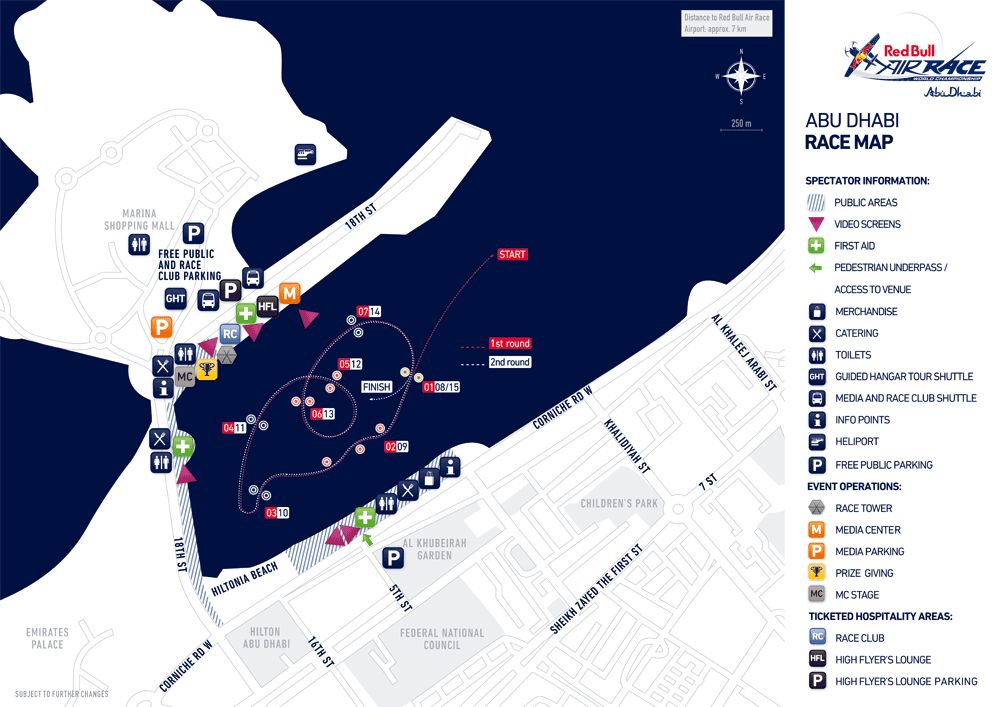
Experience the thrill of a fully realized Red Bull Air Race setup along Abu Dhabi’s famous Corniche in this add-on, created by Siscot Yves and Carlos Santos. It is meticulously fashioned for use in Microsoft Flight Simulator X, offering an immersive environment that showcases the iconic 2010 racing circuit.
The renowned Abu Dhabi Corniche hosts the Red Bull Air Race challenges with a distinctive layout. This add-on reconstructs the pylons and racetrack, integrating the precise checkpoints to mirror the real-world spectacle. Nearby urban elements are also included to improve the sense of immersion, consistently maintaining moderate impact on performance. All race gates have been positioned according to the 2010 setup.
The mashup of detailed three-dimensional objects and the unique coastal setting of the United Arab Emirates ensures pilots can practice razor-sharp aerobatics in a realistic environment. Abu Dhabi’s skyline has been accurately depicted here, giving you the ideal vantage points to fly around or watch the race from aerial views.
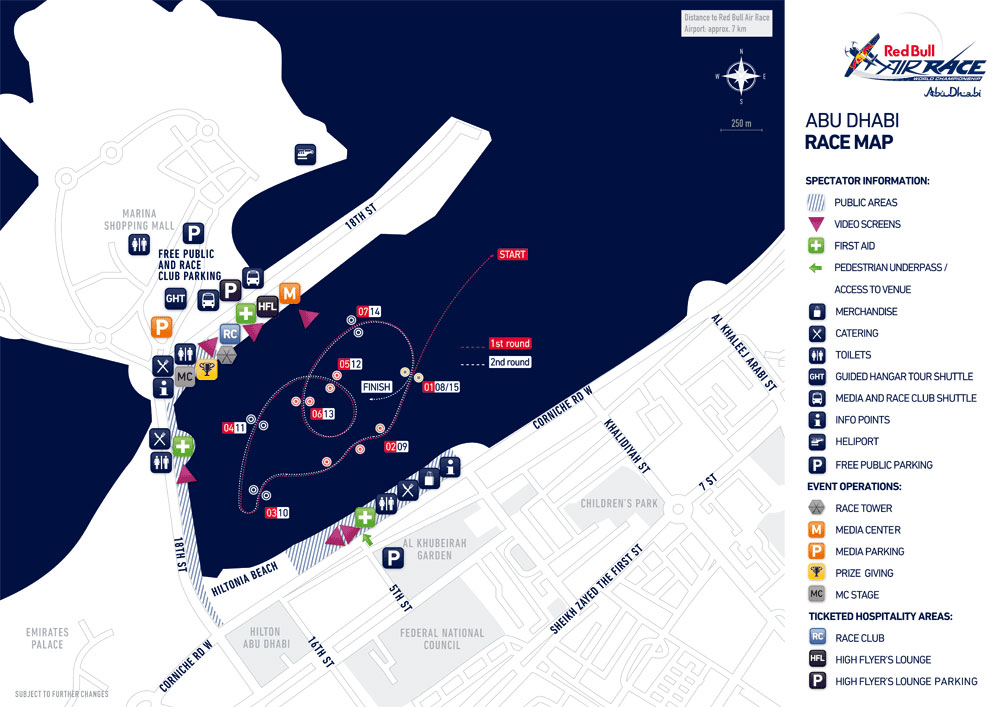
In-game view of the racetrack setup along the Abu Dhabi Corniche.
.exe installer and target the directory: C:\Program Files (x86)\Microsoft Games\Microsoft Flight Simulator X\Addon Scenery. After the installation completes, restart Microsoft Flight Simulator X.Once the software is open, go into “Settings” > “Scenery Library” and add the newly placed folder named Abu Dhabi 2010. Ensure the following layering sequence to avoid potential visual conflicts:
After these steps, the racetrack objects and the associated scenery should be visible upon launching your chosen flight in this region.
To discover the circuit, consider departing from OMAD airport and flying on a heading of 284° for about 19.6 nautical miles. The race pylons should become visible as you approach the Corniche shoreline. This location is ideal for practicing tight turns and high-speed maneuvers.
This software package is entirely freeware. If you choose to redistribute it or repack it, ensure this text accompanies the scenery files. By installing and using this product, the user accepts full responsibility for any possible issues or risks that arise. Neither the authors nor any other party can be held liable for potential technical difficulties encountered.
Proudly developed by Siscot Yves and Carlos Santos. Fly through these iconic pylons and experience the thrill of the Red Bull Air Race atmosphere within Microsoft Flight Simulator X. Safe flying and swift turns!
Free for all simmers · 645.43 KB · Scanned clean Oct 2026
Download speed: Free tier is capped at 0.5 Mbps. PRO members download at full line speed.
FSX\Addon Scenery\ containing scenery and texture sub-folders.readme.txt or README file. It tells you exactly where files go, what dependencies are needed, and any quirks specific to this add-on.Use these coordinates to fly directly to this location once the mod is installed.
24.46670000,54.36670000
Launch FSX or Prepar3D and use Flights → Load to open the downloaded .pln file. Your aircraft will be positioned at this location.
The archive sy-red_bull_air_race_abu_dhabi_2010__witch_corniche__fsx.zip has 6 files and directories contained within it.
This list displays the first 500 files in the package. If the package has more, you will need to download it to view them.
| Filename/Directory | File Date | File Size |
|---|---|---|
| AD_10_AREAMAP.GIF | 05.08.10 | 108.99 kB |
| Readme sy.Red Bull Air Race Abu Dhabi 2010 FSX Release.txt | 03.27.10 | 3.31 kB |
| Readme thanks.txt | 03.27.10 | 1.54 kB |
| Sy-Red Bull Air Race Abu Dhabi 2010 with corniche FSX.exe | 05.14.10 | 542.54 kB |
| flyawaysimulation.txt | 10.29.13 | 959 B |
| Go to Fly Away Simulation.url | 01.22.16 | 52 B |
Only PRO members can place votes.
More FSX & P3D add-ons hand-picked based on this download.
FSX Scenery
This freeware enhancement recreates the Red Bull Air Race environment held in…
 FSX Scenery
Scenery Abu Dhabi International Airport (OMAA), Abu Dhabi, United Arab Emirat…
 FSX Scenery
Scenery of Abu Dhabi International Airport (OMAA). Includes night textures an…
 FSX Scenery
This add-on showcases the 2010 Red Bull Air Race course set against the iconi…
 FSX Scenery
Red Bull Air Race Course, Monument Valley, Utah (UT), v0.5. Includes the pylo…
 FSX Scenery
Experience the vibrant atmosphere of an authentic Red Bull Air Race setup in …
 FSX Scenery
Immerse yourself in a custom-built Red Bull Air Race environment set along th…
FSX Scenery
Red Bull Air Race Circuits. Includes Rio de Janeiro, Monument Valley, Istanbu…
Be the first to leave a comment on this download.
Be the first to share your thoughts on this download.