


 Canada
  FSX Scenery
Red Bull Air Race Rio De Janeiro
This add-on showcases the 2010 Red Bull Air Race course set against the iconi…
Red Bull Air Race Windsor scenery recreates the Detroit River course with accurately placed pylons, tuned terrain, and recognizable Windsor–Detroit landmarks for demanding low-level, high-speed aerobatic runs. Built for Microsoft Flight Simulator X, it also refreshes the nearby airport environment to match the real-world setting and sharpen precision turns and gate-to-gate navigation.
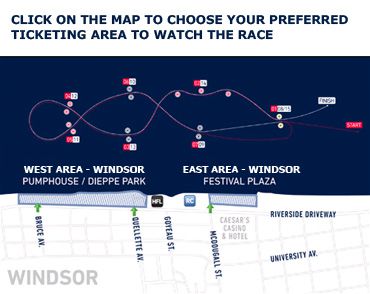
Experience the vibrant atmosphere of an authentic Red Bull Air Race setup in Windsor, Ontario, with this freeware add-on created by Siscot Yves. Designed for Microsoft Flight Simulator X, it recreates the iconic pylons and precise terrain modifications that reflect the dynamic nature of these high-speed aerobatic competitions.
This package incorporates carefully arranged course markers and an updated airport environment that parallels real-world surroundings near Windsor. The layout mirrors the famed Red Bull Air Race track, which famously straddles the Canadian-American border along the Detroit River, delivering pilots an engaging challenge perfect for testing low-altitude flight precision.
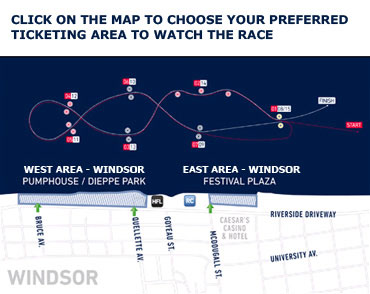
Red Bull Air Race Windsor Scenery.
The visual design focuses on realistic pylon placement and recognizable landmarks. By blending satellite references with handcrafted modeling, the developer ensures consistent geographical accuracy. This approach yields physically correct positioning for each checkpoint, helping pilots refine their navigation abilities when flying at intense speeds and tight turning radii.
C:\Program Files (x86)\Microsoft Games\Microsoft Flight Simulator X\Addon Scenery.C:\Program Files\Microsoft Games\Microsoft Flight Simulator X\Addon Scenery.Once these steps are complete, the newly registered Red Bull Air Race track will appear in your simulator’s scenery database. Regular updates in your Scenery Library ensure smooth transitions between default and custom environments.
For a straightforward entry to the aerial circuit, pilots can load directly out of CYQG (Windsor International Airport) and fly toward the Detroit River. The short approach from the runway to the city offers ample time to set up for a low-level pass through the pylons, creating an adrenaline-filled race experience. Seasoned sim pilots can also incorporate real weather to simulate cross-border wind patterns affecting flight stability.
This freeware scenery, provided by Siscot Yves, retains permissive distribution rights. You may repackage and share it, but always include the original documentation. The author disclaims responsibility for any potential impacts associated with using this add-on. Use at your own risk and enjoy the immersive flight conditions it creates.
Fly safely, and have an exciting low-level flight around the custom Red Bull Air Race pylons on the scenic Detroit-Windsor corridor.
Free for all simmers · 437.08 KB · Scanned clean Oct 2026
Download speed: Free tier is capped at 0.5 Mbps. PRO members download at full line speed.
FSX\Addon Scenery\ containing scenery and texture sub-folders.readme.txt or README file. It tells you exactly where files go, what dependencies are needed, and any quirks specific to this add-on.Use these coordinates to fly directly to this location once the mod is installed.
42.31490000,-83.03640000
Launch FSX or Prepar3D and use Flights → Load to open the downloaded .pln file. Your aircraft will be positioned at this location.
The archive sy-red_bull_air_race_windsor_2010_fsx.zip has 5 files and directories contained within it.
This list displays the first 500 files in the package. If the package has more, you will need to download it to view them.
| Filename/Directory | File Date | File Size |
|---|---|---|
| Windsor%20GA%20Seatmap%202010.jpg | 05.11.10 | 69.91 kB |
| Readme sy.Red Bull Air Race Windsor Ontario 2010.txt.txt | 05.14.10 | 2.95 kB |
| Sy-Red Bull Air Race Windsor-Ontario 2010 FSX.exe | 05.14.10 | 387.63 kB |
| flyawaysimulation.txt | 10.29.13 | 959 B |
| Go to Fly Away Simulation.url | 01.22.16 | 52 B |
Only PRO members can place votes.
More FSX & P3D add-ons hand-picked based on this download.
FSX Scenery
This add-on showcases the 2010 Red Bull Air Race course set against the iconi…
 FSX Scenery
Red Bull Air Race Course, Monument Valley, Utah (UT), v0.5. Includes the pylo…
 FSX Scenery
This freeware enhancement recreates the Red Bull Air Race environment held in…
 FSX Scenery
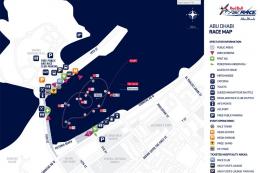
Experience the thrill of a fully realized Red Bull Air Race setup along Abu D…
 FSX Scenery
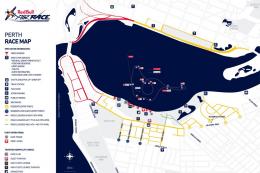
Immerse yourself in a custom-built Red Bull Air Race environment set along th…
FSX Scenery
Red Bull Air Race Circuits. Includes Rio de Janeiro, Monument Valley, Istanbu…
 FSX Scenery
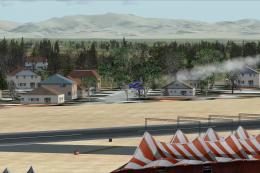
Red Bull Scenery For Christchurch Airport, New Zealand. Red Bull pylons and o…
 FSX Scenery
Sailboat Race. Race with eight sailboats located at Chester, Nova Scotia, Can…
Be the first to leave a comment on this download.
Be the first to share your thoughts on this download.